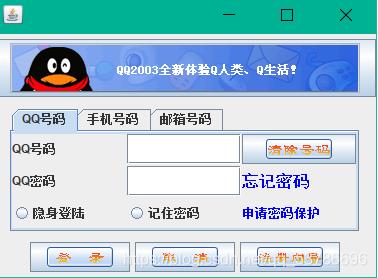
代码如下:
|
1 2 3 4 5 6 7 8 9 10 11 12 13 14 15 16 17 18 19 20 21 22 23 24 25 26 27 28 29 30 31 32 33 34 35 36 37 38 39 40 41 42 43 44 45 46 47 48 49 50 51 52 53 54 55 56 57 58 59 60 61 62 63 64 65 66 67 68 69 70 71 72 73 74 75 76 77 78 79 80 81 |
import java.awt.*; import javax.swing.*; public class Demo121 extends JFrame{ public Demo121() { JPanel jp1=new JPanel(); JPanel jp2=new JPanel(); JPanel jp3=new JPanel();
Icon icon1=new ImageIcon(getClass().getResource("/com/res/tou.gif")); Icon icon2=new ImageIcon(getClass().getResource("/com/res/clear.gif")); Icon icon3=new ImageIcon(getClass().getResource("/com/res/denglu.gif")); Icon icon4=new ImageIcon(getClass().getResource("/com/res/quxiao.gif")); Icon icon5=new ImageIcon(getClass().getResource("/com/res/xiangdao.gif"));
JButton jb1=new JButton(); JButton jb2=new JButton(); JButton jb3=new JButton(); JButton jb4=new JButton(); JButton jb5=new JButton(); jb1.setIcon(icon1); jb2.setIcon(icon2); jb3.setIcon(icon3); jb4.setIcon(icon4); jb5.setIcon(icon5);
JTabbedPane jta=new JTabbedPane(JTabbedPane.TOP); JPanel jp4=new JPanel(); JPanel jp5=new JPanel(); JPanel jp6=new JPanel(); jta.addTab("QQ号码", jp4); jta.addTab("手机号码", jp5); jta.addTab("邮箱号码", jp6);
JLabel jla1=new JLabel("QQ号码"); JLabel jla2=new JLabel("QQ密码"); JLabel jla3=new JLabel("忘记密码"); jla3.setFont(new Font("宋体",Font.BOLD,16)); jla3.setForeground(Color.BLUE);
JLabel jla4=new JLabel("申请密码保护"); jla4.setForeground(Color.BLUE);
JRadioButton jra1=new JRadioButton("隐身登陆"); JRadioButton jra2=new JRadioButton("记住密码"); JTextField jte=new JTextField(10); JPasswordField jpa=new JPasswordField(10); jp4.setLayout(new GridLayout(3,3,1,2)); jp4.add(jla1); jp4.add(jte); jp4.add(jb2); jp4.add(jla2); jp4.add(jpa); jp4.add(jla3); jp4.add(jra1); jp4.add(jra2); jp4.add(jla4);
jp1.add(jb1); jp2.add(jta); jp3.add(jb3); jp3.add(jb4); jp3.add(jb5);
this.add(jp1,BorderLayout.NORTH); this.add(jp2,BorderLayout.CENTER); this.add(jp3,BorderLayout.SOUTH);
this.setSize(400, 290); this.setVisible(true); this.setDefaultCloseOperation(JFrame.EXIT_ON_CLOSE); this.setLocation(450, 120);
}
public static void main(String[] args) { Demo121 de=new Demo121(); } } |
运行结果: