一、修改 sonar 配置 conf/sonar.properties
修改 sonar 配置文件 conf/sonar.properties:
|
1 2 3 4 5 6 7 8 9 10 11 12 13 14 15 16 17 18 19 20 21 22 23 24 |
sonar.security.realm = cas sonar.authenticator.createUsers = true #sonar.cas.forceCasLogin = true sonar.cas.protocol = cas3 sonar.cas.casServerUrlPrefix = http://192.168.1.58:8080/cas sonar.cas.casServerLoginUrl = http://192.168.1.58:8080/cas/login sonar.cas.casServerLogoutUrl = http://192.168.1.58:8080/cas/logout sonar.cas.sonarServerUrl = http://192.168.1.35:9200 sonar.cas.urlAfterCasRedirectCookieMaxAgeSeconds = 300 sonar.cas.sessionStorePath = /opt/sonarqube/data/sonarcas/sessionstore sonar.cas.sessionStore.cleanUpIntervalInSeconds = 1800
# Specifies whether gateway=true should be sent to the CAS server. Default is false. # sonar.cas.sendGateway
# Specifies how SonarQube groups should be replicated. A value of "CAS" always overwrites the user's local groups with # the group provided by CAS upon UI log-in. The user's local groups will be untouched, f. i. with the value "sonarqube". # Defaults to "CAS". sonar.cas.groupReplication = CAS sonar.cas.rolesAttributes = groups sonar.cas.fullNameAttribute = displayName sonar.cas.eMailAttribute = mail sonar.cas.saml11.toleranceMilliseconds = 1000 sonar.cas.disableCertValidation = true |
二、下载插件 sonar-cas-plugin
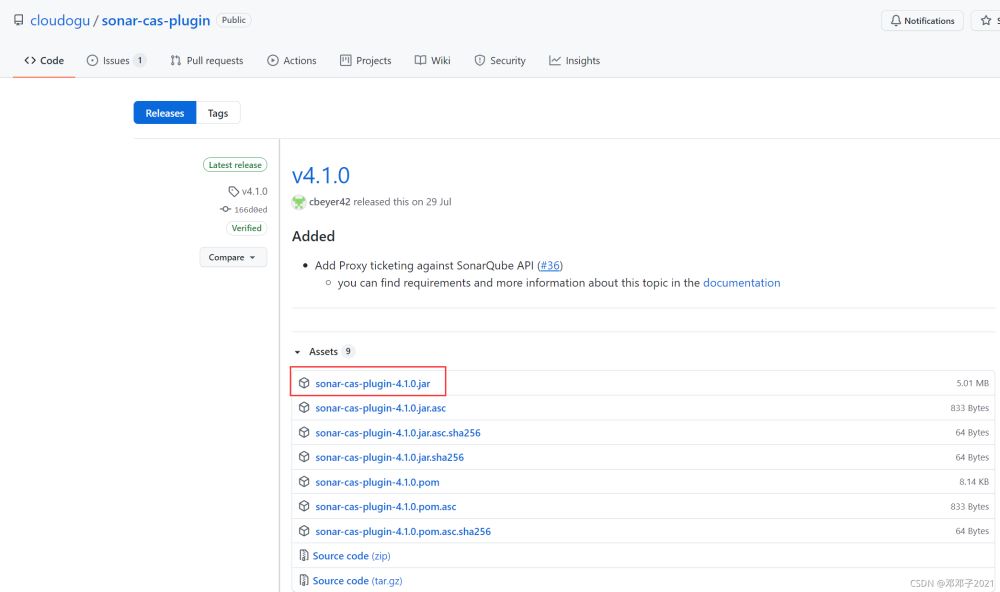
下载插件 sonar-cas-plugin,将插件拷贝至 sonar 的 extentions/plugins 目录下,并重启 sonar 服务。
下载链接:https://github.com/cloudogu/sonar-cas-plugin/releases
三、修改 cas 配置文件 application.yml
修改 cas 配置文件 application.yml,修改内容如下:
|
1 2 3 4 5 6 7 8 9 10 11 12 13 14 15 16 17 |
# Application properties that need to be # embedded within the web application can be included here cas: authn: jdbc: query: - dialect: org.hibernate.dialect.MySQLDialect driverClass: com.mysql.jdbc.Driver fieldPassword: password password: 'xxxxxx' sql: select * from user where user_name=? url: jdbc:mysql://192.168.1.32:3306/cas?useUnicode=true&characterEncoding=utf-8&useSSL=false user: root serviceRegistry: initFromJson: true tgc: secure: false |
四、修改 cas 配置文件 HTTPSandIMAPS-10000001.json
新增 cas/WEB-INF/classes/services/HTTPSandIMAPS-10000001.json 文件,添加 http 支持:
|
1 2 3 4 5 6 7 8 9 10 11 12 13 14 15 16 17 18 |
{ "@class" : "org.apereo.cas.services.RegexRegisteredService", "serviceId" : "^(https?|http?|imaps?)://.*", "name" : "All", "id" : 10000000, "description" : "This service definition authorizes all application urls that support HTTPS and IMAPS protocols.", "evaluationOrder" : 10000, "proxyPolicy" : { "@class" : "org.apereo.cas.services.RegexMatchingRegisteredServiceProxyPolicy", "pattern" : "^(https?|http?|imaps?)://.*" }, "usernameAttributeProvider" : { "@class" : "org.apereo.cas.services.DefaultRegisteredServiceUsernameProvider" }, "attributeReleasePolicy" : { "@class" : "org.apereo.cas.services.ReturnAllAttributeReleasePolicy" } } |