一、技术栈
uniapp+vue3+javascript
二、实现的效果
全部代码可见:https://github.com/zzm319/study-summarize.git(分支为code-login)。
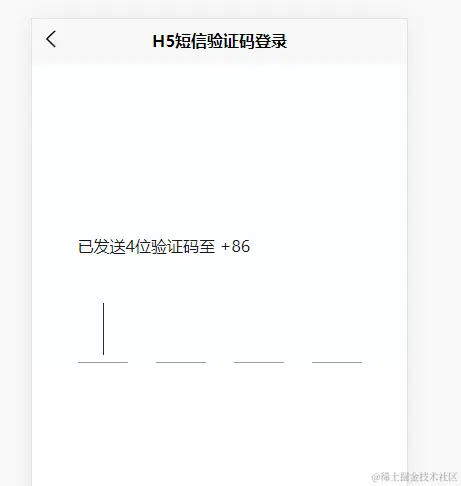
1、进入页面第一个输入框自动聚焦
2、输入后下一个输入框自动聚焦
3、点击输入区域自动聚焦到无值的第一个输入框(当前一个输入框无值时后一个输入框无法聚焦 )
4、可以复制粘贴填充也可以短信验证码一键登录
5、监听键盘的删除键(Backspace)删除输入的验证码
三、实现逻辑及代码
1、HTML部分:
利用循环渲染4个输入框,第一个输入框可输入最大长度无值时为4(为了复制和验证码填充赋值),有值时最大可输入长度为1。
|
1 2 3 4 5 6 7 8 9 10 11 |
<template> <view class="content"> <view class="code-area"> <view class="propmt">已发送4位验证码至 +86 {{ phoneNum }}</view> <view class="code-input" @click="handleFocus"> <input v-for="(item, index) in inputbox" type="number" :key="index" v-model="item.labelValue" class="input-code" :maxlength="index === 0 && isMaxLength ? 4 : 1" @input="onInput($event, index)" /> </view> </view> </view> </template> |
2、javascript部分:
1)进入页面第一个输入框自动聚焦:
|
1 2 3 4 5 6 |
onMounted(() => { // #ifdef H5 // 处理聚焦第一个输入框 document.querySelectorAll('.uni-input-input')[0].focus(); // #endif }) |
2. 输入后下一个输入框自动聚焦,主要是给输入框监听输入事件,判断是否有值,有值就自动聚焦下一个输入框:
|
1 2 3 4 5 6 7 8 9 |
// 监听输入输入框 自动聚焦到下一个输入框 const onInput = (e, index) => { // index < 3 ,如果是第4格,不触发光标移动至下一个输入框。 if (inputbox[index].labelValue && index < 3) { nextTick(() => { document.querySelectorAll('.uni-input-input')[index + 1].focus() }) } } |
3)点击输入区域自动聚焦到无值的第一个输入框(当前一个输入框无值时后一个输入框无法聚焦 ),主要是给输入框区域判定一个点击事件,判断当前哪个输入框无值则聚焦:
|
1 2 3 4 5 6 7 8 |
// 点击输入区域 自动聚焦到空的输入框 const handleFocus = () => { if (focusIndex.value === 4) { document.querySelectorAll('.uni-input-input')[3].focus(); return; } document.querySelectorAll('.uni-input-input')[focusIndex.value].focus(); } |
4)监听粘贴事件赋值给每个输入框,主要是利用给第一个输入框赋值后,然后给剩下的三个输入框重新赋值(短信验证码填充同理):
|
1 2 3 4 5 6 7 8 9 10 11 12 13 14 15 16 17 18 19 20 21 22 23 24 25 26 27 28 |
// 监听输入区域的粘贴事件 document.querySelector('.code-input').addEventListener('paste', (event) => { const pasteText = (event.clipboardData || window.clipboardData).getData("text"); const arr = pasteText.split('').filter(item => /\d/.test(Number(item))); const newArr = arr.slice(0, 4).map(item => Number(item)); if (newArr.length) { inputbox[0].labelValue = newArr.join(''); } }) // 监听第一个输入框的值:为了处理粘贴和短信自动填充时赋值和聚焦 watch(() => inputbox[0].labelValue, (val) => { if (val) { // 处理输入的时候限制输入长度 isMaxLength.value = false; } nextTick(() => { if (val && val.length >= 2) { val.split('').forEach((element, index) => { inputbox[index].labelValue = element; }); } ? setTimeout(() => { // 加个定时器 避免粘贴两次 handleFocus(); }) }) }) |
注意的是,二次粘贴时需要先重置第一个输入框的最大可输入长度:
|
1 2 3 4 5 6 7 8 9 10 11 |
watch(() => inputCodeValue.value, async (val) => { if (!val) { // 处理四位输入框为空时再次复制粘贴 isMaxLength.value = true; } ? if (val.length === 4) { // 四位输入框的值已填满 做登录等逻辑操作 console.log('to login') } }) |
5)监听键盘的删除键(Backspace)删除输入的验证码:
|
1 2 3 4 5 6 7 8 9 10 11 |
// 监听键盘上的删除按键(Backspace) const handleListenDelete = (e) => { if (e.keyCode === 8 && focusIndex.value > 0) { inputbox[focusIndex.value - 1].labelValue = ''; document.querySelectorAll('.uni-input-input')[focusIndex.value].focus(); } } ? onMounted(() => { document.addEventListener('keydown', handleListenDelete) }) |
3、完整javascript代码:
|
1 2 3 4 5 6 7 8 9 10 11 12 13 14 15 16 17 18 19 20 21 22 23 24 25 26 27 28 29 30 31 32 33 34 35 36 37 38 39 40 41 42 43 44 45 46 47 48 49 50 51 52 53 54 55 56 57 58 59 60 61 62 63 64 65 66 67 68 69 70 71 72 73 74 75 76 77 78 79 80 81 82 83 84 85 86 87 88 89 90 91 92 93 94 95 96 97 98 |
<script setup> import { ref, reactive, watch, onBeforeUnmount, nextTick, onMounted, computed } from 'vue'; ? let inputbox = reactive(new Array(4).fill().map((item, index) => ({ id: index, labelValue: '' }))); let phoneNum = ref(''); let isMaxLength = ref(true); ? // 四位短信验证码 const inputCodeValue = computed(() => inputbox.reduce((pre, item) => pre + item.labelValue, '')) ? // 验证码的长度 const focusIndex = computed(() => inputCodeValue.value.length) ? // 监听键盘上的删除按键(Backspace) const handleListenDelete = (e) => { if (e.keyCode === 8 && focusIndex.value > 0) { inputbox[focusIndex.value - 1].labelValue = ''; document.querySelectorAll('.uni-input-input')[focusIndex.value].focus(); } } ? ? onMounted(() => { // #ifdef H5 // 处理聚焦第一个输入框 document.querySelectorAll('.uni-input-input')[0].focus() ? document.addEventListener('keydown', handleListenDelete) ? // 监听输入区域的粘贴事件 document.querySelector('.code-input').addEventListener('paste', (event) => { const pasteText = (event.clipboardData || window.clipboardData).getData("text"); const arr = pasteText.split('').filter(item => /\d/.test(Number(item))); const newArr = arr.slice(0, 4).map(item => Number(item)); if (newArr.length) { inputbox[0].labelValue = newArr.join(''); } }) // #endif }) ? // 监听第一个输入框的值:为了处理粘贴和短信自动填充时赋值和聚焦 watch(() => inputbox[0].labelValue, (val) => { if (val) { // 处理输入的时候限制输入长度 isMaxLength.value = false; } nextTick(() => { if (val && val.length >= 2) { val.split('').forEach((element, index) => { inputbox[index].labelValue = element; }); } ? setTimeout(() => { // 加个定时器 避免粘贴两次 handleFocus(); }) }) }) ? watch(() => inputCodeValue.value, async (val) => { if (!val) { // 处理四位输入框为空时再次复制粘贴 isMaxLength.value = true; } ? if (val.length === 4) { // 四位输入框的值已填满 做登录等逻辑操作 console.log('to login') } }) ? // 点击输入区域 自动聚焦到空的输入框 const handleFocus = () => { if (focusIndex.value === 4) { document.querySelectorAll('.uni-input-input')[3].focus(); return; } document.querySelectorAll('.uni-input-input')[focusIndex.value].focus(); } ? // 监听输入输入框 自动聚焦到下一个输入框 const onInput = (e, index) => { // index < 3 ,如果是第4格,不触发光标移动至下一个输入框。 if (inputbox[index].labelValue && index < 3) { nextTick(() => { document.querySelectorAll('.uni-input-input')[index + 1].focus() }) } } ? ? onBeforeUnmount(() => { document.removeEventListener('keydown', handleListenDelete); }) ? </script> |
四、遇到的问题
1、聚焦实现
由于uniapp使用input是通过封装原生input标签实现的,使用ref获取input dom节点的方式,不能调用focus方法实现聚焦,所以采用原生的获取dom方法实现:
|
1 |
document.querySelectorAll('.uni-input-input')[focusIndex.value].focus(); |
2、循环渲染input的方法,当某个输入框的值改变其它输入框也跟着改变 原因是我fill()了一个对象,这种方式相当于四个输入框的值都是同一个对象。
|
1 |
let inputbox = reactive(new Array(4).fill({ id: index, labelValue: '' }); |
3、在做点击输入区域,让焦点自动聚焦到无值的第一个输入框时,发现点击输入框不能实现,点击输入框之间的间隔可以实现。 原因:我给每个输入框设置了diabled属性,让其在上一个输入框有值时才能使用。
|
1 |
:disabled="item.labelValue || (index >= 1 && !inputbox[index - 1].labelValue)" |
4、ios的safari浏览器中,验证码填充背景颜色会为黄色: (ps:网上有很多种方法:改变背景色,改变阴影填充等,本人试了都不能实现,下面的方法在iphone14 ios版本为16.1.1中亲测有效)
|
1 2 3 4 5 |
// 处理去掉safari浏览器填充短信验证码背景色 /deep/ .uni-input-input { -webkit-text-fill-color: #262C33; transition: background-color 5000s ease-out 0.5s; } |