一、常用的Nginx 正则表达式
- ^ :匹配输入字符串的起始位置
- $ :匹配输入字符串的结束位置
- * :匹配前面的字符零次或多次。如“ol*”能匹配“o”及“ol”、“oll”
- + :匹配前面的字符一次或多次。如“ol+”能匹配“ol”及“oll”、“olll”,但不能匹配“o”
- ? :匹配前面的字符零次或一次,例如“do(es)?”能匹配“do”或者“does”,”?”等效于”{0,1}”
- . :匹配除“\n”之外的任何单个字符,若要匹配包括“\n”在内的任意字符,请使用诸如“[.\n]”之类的模式
- \ :将后面接着的字符标记为一个特殊字符或一个原义字符或一个向后引用。如“\n”匹配一个换行符,而“\$”则匹配“$”
- \d :匹配纯数字
- {n} :重复 n 次
- {n,} :重复 n 次或更多次
- {n,m} :重复 n 到 m 次
- [] :定义匹配的字符范围
- [c] :匹配单个字符 c
- [a-z] :匹配 a-z 小写字母的任意一个
- [a-zA-Z0-9] :匹配所有大小写字母或数字
- () :表达式的开始和结束位置
- | :或运算符
二、location
1、location 大致可以分为三类
- 精准匹配:location = / {...}
- 一般匹配:location / {...}
- 正则匹配:location ~ / {...}
2、location 常用的匹配规则
- = :进行普通字符精确匹配,也就是完全匹配。
- ^~ :表示普通字符匹配。使用前缀匹配。如果匹配成功,则不再匹配其它 location。
- ~ :区分大小写的匹配。
- ~* :不区分大小写的匹配。
- !~ :区分大小写的匹配取非。
- !~* :不区分大小写的匹配取非。
3、location的优先级
- 首先精确匹配 =
- 其次前缀匹配 ^~
- 其次是按文件中顺序的正则匹配 ~或~*
- 然后匹配不带任何修饰的前缀匹配
- 最后是交给 / 通用匹配
4、location 示例说明
(1)location = / {}
- =为精确匹配 / ,主机名后面不能带任何字符串,比如访问 / 和 /data,则 / 匹配,/data 不匹配
- 再比如 location = /abc,则只匹配/abc ,/abc/或 /abcd不匹配。若 location /abc,则即匹配/abc 、/abcd/ 同时也匹配 /abc/。
(2)location / {}
- 因为所有的地址都以 / 开头,所以这条规则将匹配到所有请求 比如访问 / 和 /data, 则 / 匹配, /data 也匹配,
- 但若后面是正则表达式会和最长字符串优先匹配(最长匹配)
(3)location /documents/ {}
- 匹配任何以 /documents/ 开头的地址,匹配符合以后,还要继续往下搜索其它 location
- 只有其它 location后面的正则表达式没有匹配到时,才会采用这一条
(4)location /documents/abc {}
- 匹配任何以 /documents/abc 开头的地址,匹配符合以后,还要继续往下搜索其它 location
- 只有其它 location后面的正则表达式没有匹配到时,才会采用这一条
(5)location ^~ /images/ {}
- 匹配任何以 /images/ 开头的地址,匹配符合以后,停止往下搜索正则,采用这一条
(6)location ~* .(gif|jpg|jpeg)$ {}
- 匹配所有以 gif、jpg或jpeg 结尾的请求
- 然而,所有请求 /images/ 下的图片会被 location ^~ /images/ 处理,因为 ^~ 的优先级更高,所以到达不了这一条正则
(7)location /images/abc {}
- 最长字符匹配到 /images/abc,优先级最低,继续往下搜索其它 location,会发现 ^~ 和 ~ 存在
(8)location ~ /images/abc {}
- 匹配以/images/abc 开头的,优先级次之,只有去掉 location ^~ /images/ 才会采用这一条
(9)location /images/abc/1.html {}
- 匹配/images/abc/1.html 文件,如果和正则 ~ /images/abc/1.html 相比,正则优先级更高
优先级总结:
(location =) > (location 完整路径) > (location ^~ 路径) > (location ,* 正则顺序) > (location 部分起始路径) > (location /)
5、实际网站使用中,至少有三个匹配规则定义
第一个必选规则直接匹配网站根,通过域名访问网站首页比较频繁,使用这个会加速处理,比如说官网。
这里是直接转发给后端应用服务器了,也可以是一个静态首页
|
1 2 3 4 |
location = / { root html; index index.html index.html; } |
第二个必选规则是处理静态文件请求,这是nginx作为http服务器的强项
有两种配置模式,目录匹配或后缀匹配,任选其一或搭配使用
|
1 2 3 4 5 6 7 |
location ^~ /static/ { root /webroot/static/; }
location ~* .(html|gif|jpg|jpeg|png|css|js|ico)$ { root /webroot/res/; } |
第三个规则就是通用规则,比如用来转发带.php、.jsp后缀的动态请求到后端应用服务器
非静态文件请求就默认是动态请求
|
1 2 3 4 |
location / { proxy_pass http://tomcat_server;
} |
三、rewrite
rewrite功能就是,使用nginx提供的全局变量或自己设置的变量,结合正则表达式和标志位实现url重写以及重定向。
rewrite只能放在server{},location{},if{}中,并且默认只能对域名后边的除去传递的参数外的字符串起作用,
例如 http://www.kgc.com/a/we/index.php?id=1&u=str 只对/a/we/index.php重写
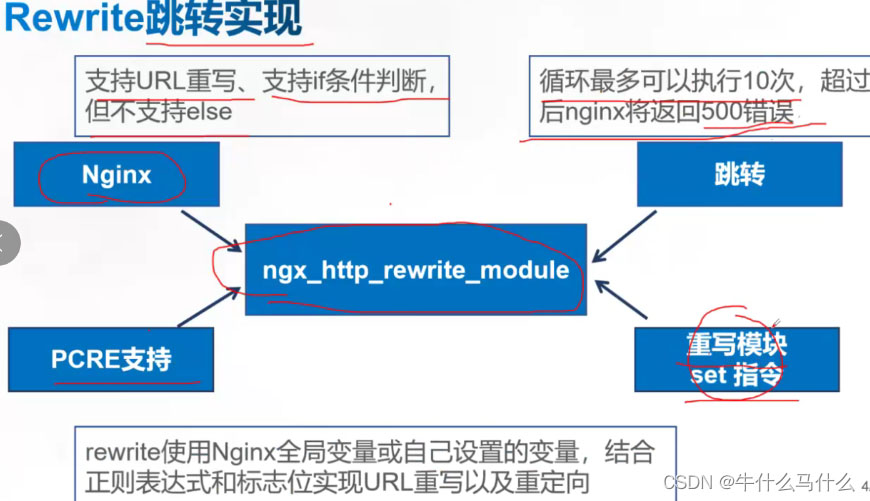
rewrite 执行顺序如下:
- (1) 执行 server 块里面的 rewrite 指令。
- (2) 执行 location 匹配。
- (3) 执行选定的 location 中的 rewrite 指令。
语法
语法rewrite <regex> <replacement> [flag];
- regex :表示正则匹配规则。
- replacement :表示跳转后的内容。
- flag :表示 rewrite 支持的 flag 标记。
flag标记说明
- last :本条规则匹配完成后,继续向下匹配新的location URI规则,一般用在 server 和 if 中。
- break :本条规则匹配完成即终止,不再匹配后面的任何规则,一般使用在 location 中。
- redirect :返回302临时重定向,浏览器地址会显示跳转后的URL地址。
- permanent :返回301永久重定向,浏览器地址栏会显示跳转后的URL地址。
四、rewrite 示例: 准备工作
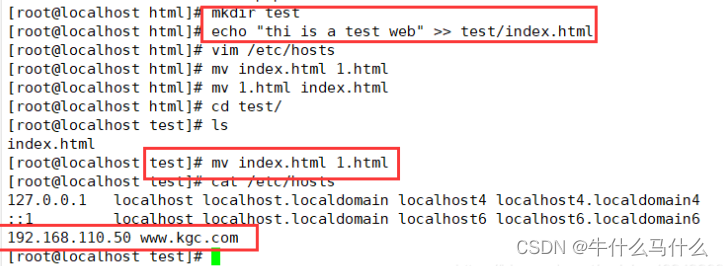
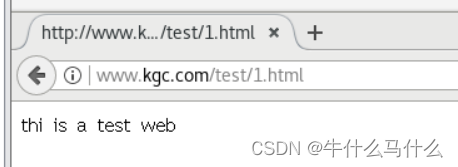
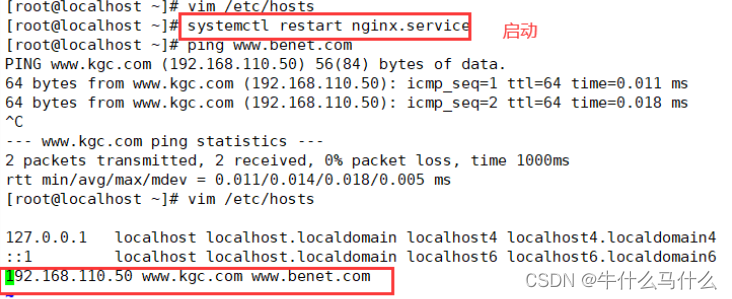
(1)基于域名的跳转
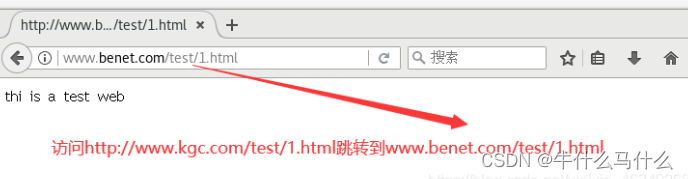
旧域名www.kgc.com有业务需求变更,需要使用新域名www.benet.com代替,但是旧域名不能废除,需要跳转到新域名上,而且后面的参数保持不变。
|
1 2 3 4 5 6 7 8 9 10 11 12 13 14 15 16 17 18 19 20 |
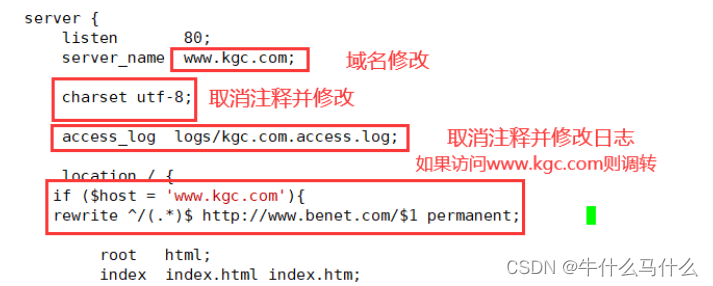
vim /usr/local/nginx/conf/nginx.conf server { listen 80; server_name www.kgc.com; #域名修改 charset utf-8; access_log /var/log/nginx/www.kgc.com-access.log; #日志修改 location / { #添加域名重定向 if ($host = 'www.kgc.com'){ #$host为rewrite全局变量,代表请求主机头字段或主机名 rewrite ^/(.*)$ http://www.benet.com/$1 permanent; #$1为正则匹配的内容,即域名后边的字符串 } root html; index index.html index.htm; } }
echo "192.168.110.50 www.kgc.com www.benet.com" >> /etc/hosts systemctl restart nginx 浏览器输入模拟访问 http://www.kgc.com/test/1.html(虽然这个请求内容是不存在的) 会跳转到www.benet.com/test/1.html,查看元素可以看到返回301,实现了永久重定向跳转,而且域名后的参数也正常跳转。 |
(2)基于客户端 IP 访问跳转
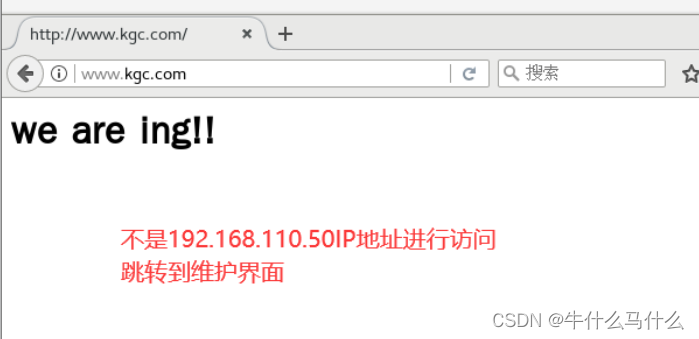
业务新版本上线,要求所有 IP 访问任何内容都显示一个固定维护页面,只有公司 IP :192.168.110.50访问正常。
|
1 2 3 4 5 6 7 8 9 10 11 12 13 14 15 16 17 18 19 20 21 22 23 24 25 26 27 28 29 30 31 32 |
vim /usr/local/nginx/conf/nginx.conf server { listen 80; server_name www.kgc.com; #域名修改 charset utf-8; access_log /var/log/nginx/www.kgc.com-access.log; #日志修改
#设置是否合法的IP标记 set $rewrite true; #设置变量$rewrite,变量值为boole值true #判断是否为合法IP if ($remote_addr = "192.168.110.50"){ #当客户端IP为192.168.110.50时,将变量值设为false,不进行重写 set $rewrite false; } #除了合法IP,其它都是非法IP,进行重写跳转维护页面 if ($rewrite = true){ #当变量值为true时,进行重写 rewrite (.+) /weihu.html; #重写在访问IP后边插入/weihu.html,例如192.168.110.11/weihu.html } location = /weihu.html { root /var/www/html; #网页返回/var/www/html/weihu.html的内容 }
location / { root html; index index.html index.htm; } }
mkdir -p /var/www/html/ echo "<h1>We are maintaining now!</h1>" > /var/www/html/weihu.html systemctl restart nginx 只有 IP 为 192.168.110.50能正常访问,其它地址都是维护页面 |




(3)基于旧域名跳转到新域名后面加目录
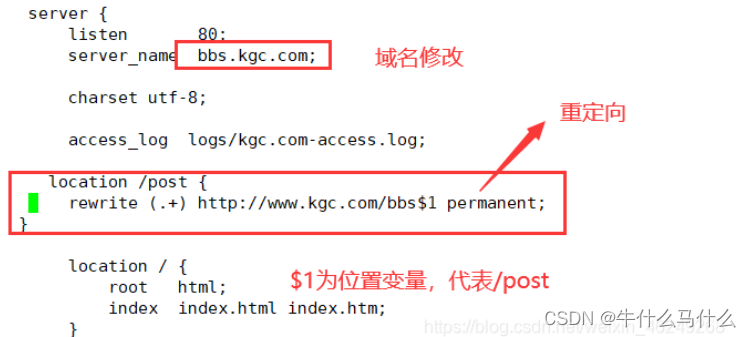
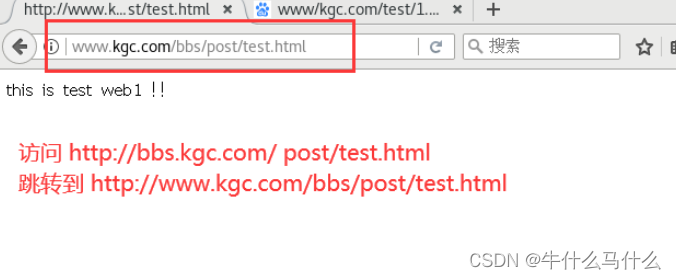
现在访问的是 http://bbs.kgc.com,现在需要将这个域名下面的访问都跳转到http://www.kgc.com/bbs
|
1 2 3 4 5 6 7 8 9 10 11 12 13 14 15 16 17 18 19 20 21 22 23 |
vim /usr/local/nginx/conf/nginx.conf server { listen 80; server_name bbs.kgc.com; #域名修改 charset utf-8; access_log /var/log/nginx/www.kgc.com-access.log; #添加 location /post { rewrite (.+) http://www.kgc.com/bbs$1 permanent; #这里的$1为位置变量,代表/post }
location / { root html; index index.html index.htm; } }
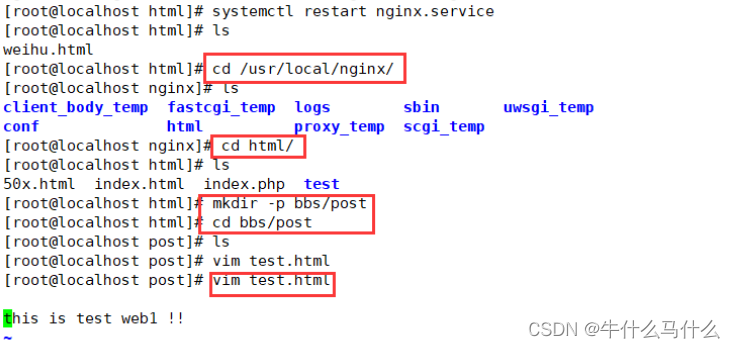
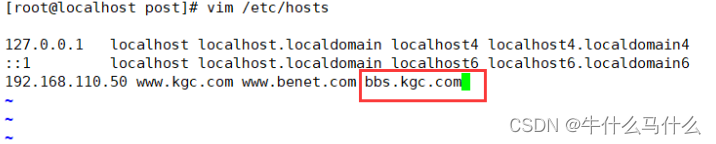
mkdir -p /usr/local/nginx/html/bbs/post echo "this is test web1 !!" >> /usr/local/nginx/html/bbs/test.html echo "192.168.110.50 bbs.kgc.com" >> /etc/hosts systemctl restart nginx 使用浏览器访问 http://bbs.kgc.com/ post/test.html 跳转到 http://www.kgc.com/bbs/post/test.html |
(4)基于参数匹配的跳转
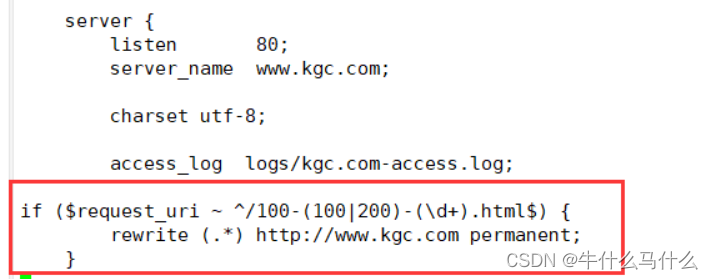
现在访问http://www.kgc.com/100-(100|200)-100.html 跳转到http://www.kgc.com页面
|
1 2 3 4 5 6 7 8 9 10 11 12 13 14 15 16 17 18 19 20 |
vim /usr/local/nginx/conf/nginx.conf server { listen 80; server_name www.kgc.com; #域名修改 charset utf-8; access_log /var/log/nginx/www.kgc.com-access.log main;
if ($request_uri ~ ^/100-(100|200)-(\d+).html$) { rewrite (.*) http://www.kgc.com permanent; }
location / { root html; index index.html index.htm; } }
systemctl restart nginx 使用浏览器访问 http://www.kgc.com/100-200-100.html 或 http://www.kgc.com/100-100-100.html 跳转到http://www.kgc.com页面。 |

- $request_ uri: 包含请求参数的原始URI,不包含主机名,如: http://www.kgc.com/ abc/bbs/index.html?au16b2中的/abc/bbs/index.php?a=1&b=2
- Suri:这个变量指当前的请求URI,不包括任何参数,如:/abc/bbs/ index.html
- Sdocument_ uri:与$uri相同, 这个变量指当前的请求URI,不包括任何传递参数,如: /abc/bbs/ index.html
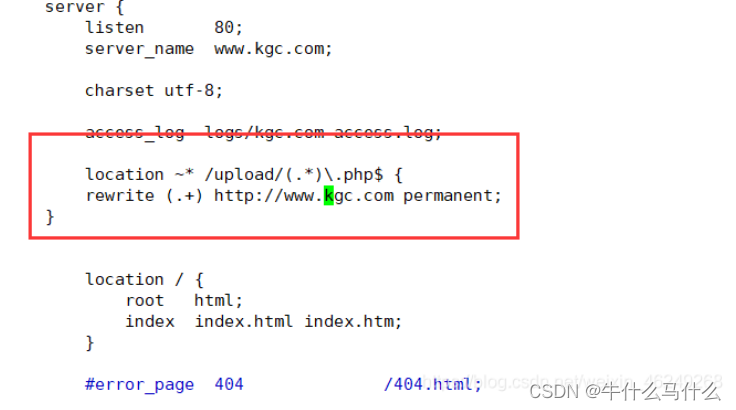
(5)基于目录下所有 php 结尾的文件跳转
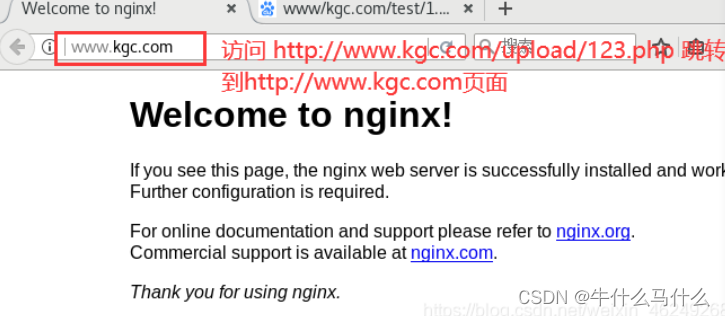
要求访问 http://www.kgc.com/upload/123.php 跳转到首页。
|
1 2 3 4 5 6 7 8 9 10 11 12 13 14 15 16 17 18 19 20 |
vim /usr/local/nginx/conf/nginx.conf server { listen 80; server_name www.kgc.com; #域名修改 charset utf-8; access_log /var/log/nginx/www.kgc.com-access.log main;
location ~* /upload/(.*)\.php$ { rewrite (.+) http://www.kgc.com permanent; }
location / { root html; index index.html index.htm; } }
systemctl restart nginx 浏览器访问 http://www.kgc.com/upload/123.php 跳转到http://www.kgc.com页面。 |
(6)基于最普通一条 url 请求的跳转
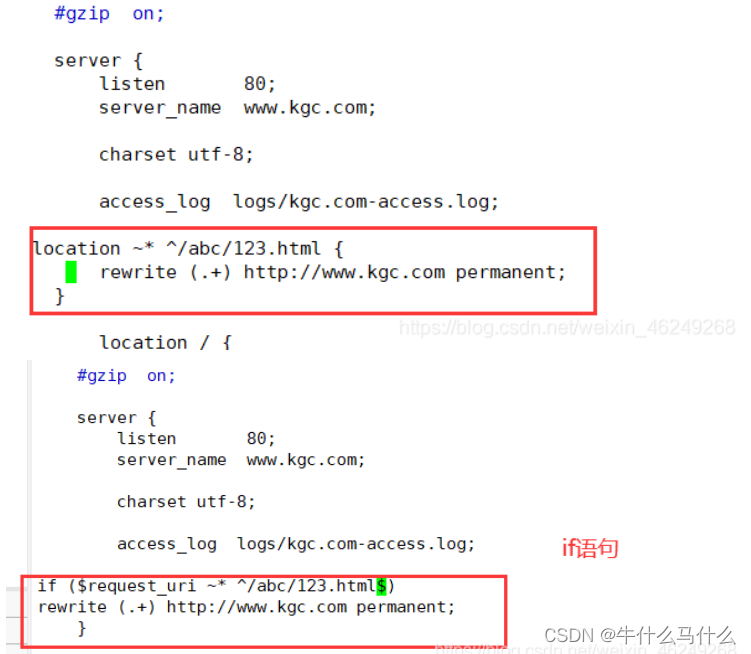
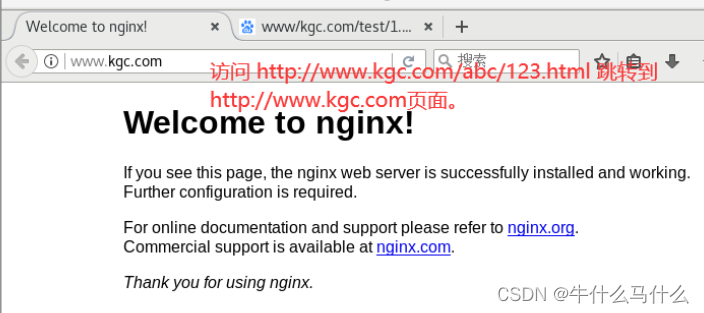
要求访问一个具体的页面如 http://www.kgc.com/abc/123.html 跳转到首页
|
1 2 3 4 5 6 7 8 9 10 11 12 13 14 15 16 17 18 19 20 |
vim /usr/local/nginx/conf/nginx.conf server { listen 80; server_name www.kgc.com; #域名修改 charset utf-8; access_log /var/log/nginx/www.kgc.com-access.log main;
location ~* ^/abc/123.html { rewrite (.+) http://www.kgc.com permanent; }
location / { root html; index index.html index.htm; } }
systemctl restart nginx 浏览器访问 http://www.kgc.com/abc/123.html 跳转到http://www.kgc.com页面。 |