Nginx的使用(windows环境) linux也和此类似
- 去官网下载nginx后解压
- 在当前目录打开cmd窗口输入nginx.exe 即可启动服务
- 若想停止当前服务 输入命令nginx.exe -s stop 快速关闭nginx服务。 (注意使用Ctrl+C或者直接关闭黑窗口是不能停止服务的 )
使用Nginx来完成请求的转发 负责分配请求的转发到的服务其他命令:
- nginx -s quit 优雅的关闭,优雅是指当一个请求被处理完成之后才被关闭。
- 配置语法检查:nginx -c ./conf/jason.conf -t 可进行配置文件的语法检测。
- nginx -v查看nginx的版本
- nginx -s reload 重新加载配置文件,nginx是支持热部署的,意思就是可以在不停止服务的情况下进行更新部署。
- nginx -s reopen 重新打开日志文件。
Nginx的概念
- 例如 一个项目有多个服务 1.基本业务的服务 2.文件上传服务(阿里云OSS)
- 前端的请求都统一请求nginx后再由nginx来判断请求转发到哪个服务
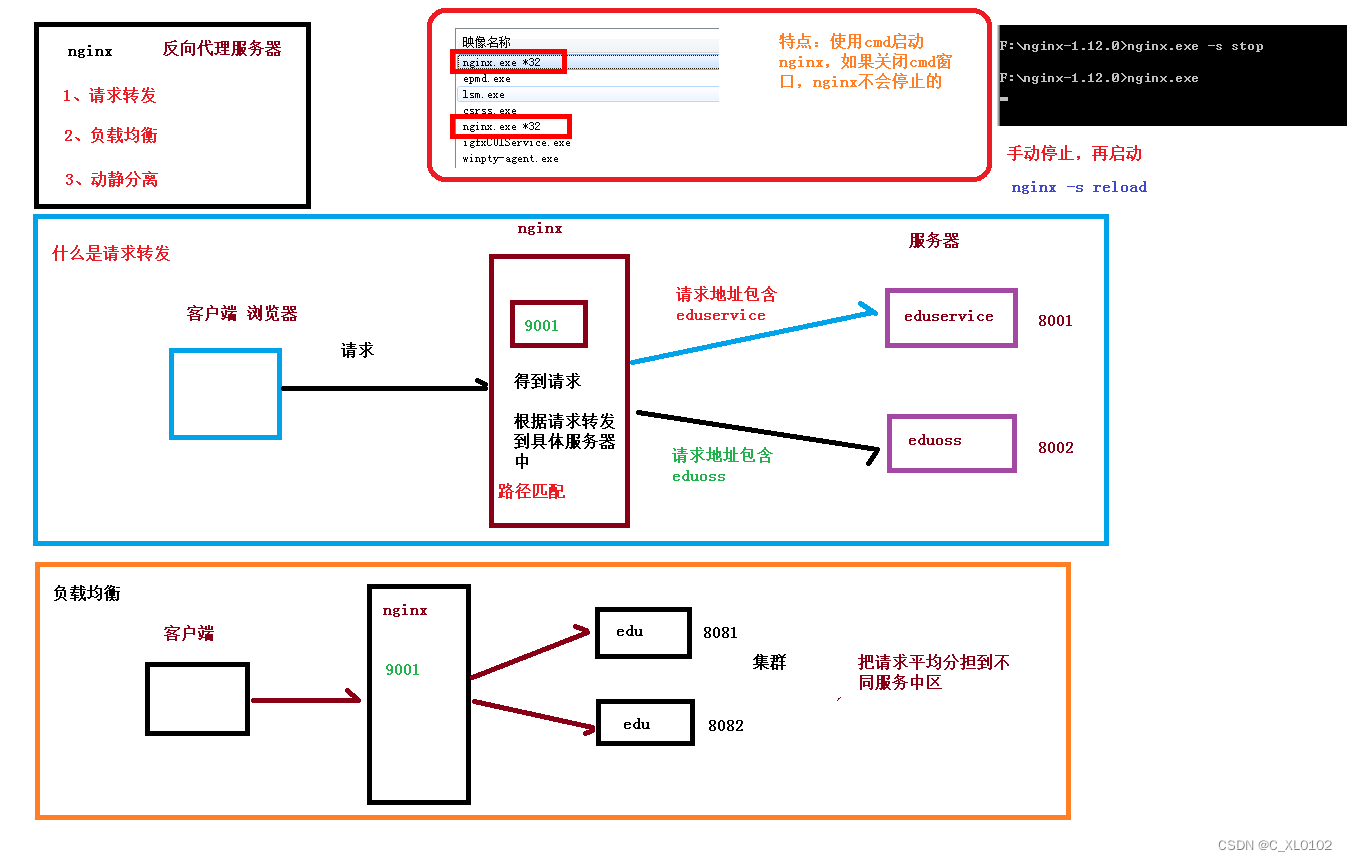
配置Nginx的请求转发过程
- 配置目录:nginx-1.12.0/conf/nginx.conf
- 修改nginx的配置文件 把nginx的启动服务端口改为81 避免端口冲突
- 配置nginx的请求转发规则(注意需要在http{}括号里面添加或者修改才有用 不是https)最好复制下面的模板来修改!!!
- 修改前端的api地址统一为nginx的地址
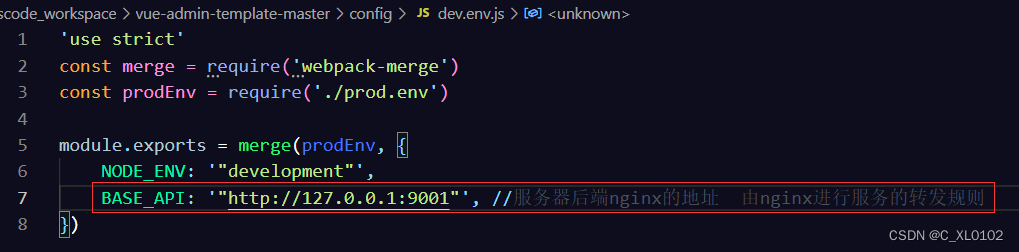
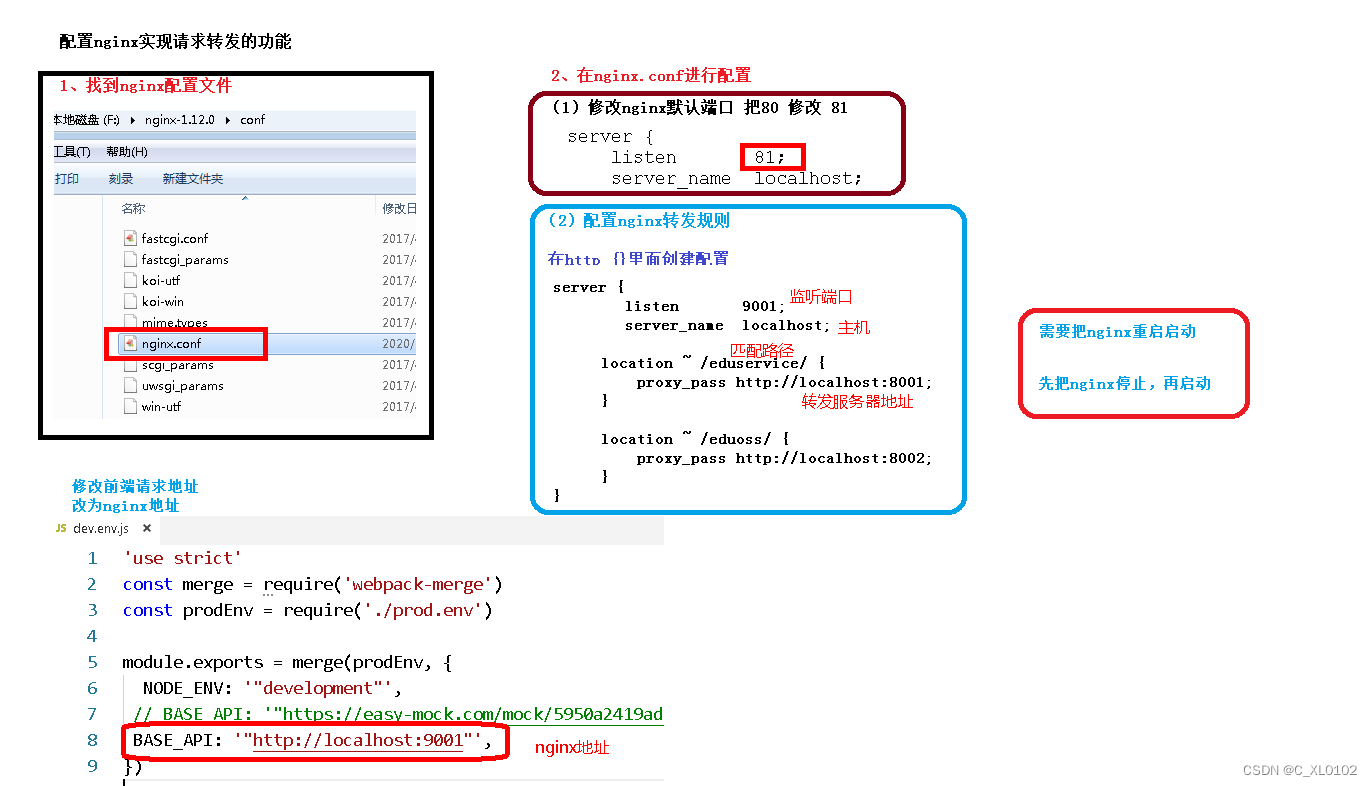
Nginx.conf 配置模板
如果需要做文件上传的功能 :
- 需要配置nginx的最大上传文件的大小设置
- 配置nginx上传文件大小,否则上传时会有 413 (Request Entity Too Large) 异常
- 打开nginx主配置文件nginx.conf,找到http{},添加 client_max_body_size 1024m;
|
1 2 3 4 5 6 7 8 9 10 11 12 13 14 15 16 17 18 19 20 21 22 23 24 25 26 27 28 29 30 31 32 33 34 35 36 37 38 39 40 41 42 43 44 45 46 47 48 49 50 51 52 53 54 55 56 57 58 59 60 61 62 63 64 65 66 67 68 69 70 71 72 73 74 75 76 77 78 79 80 81 82 83 84 85 86 87 88 89 90 91 92 93 94 95 96 97 98 99 100 101 102 103 104 105 106 107 108 109 110 111 112 113 114 115 116 117 118 119 120 121 122 123 124 125 126 127 128 129 130 131 132 133 134 135 136 137 138 139 140 141 142 143 144 145 146 147 148 149 150 151 152 153 154 155 156 |
#user nobody; worker_processes 1;
#error_log logs/error.log; #error_log logs/error.log notice; #error_log logs/error.log info;
#pid logs/nginx.pid;
events { worker_connections 1024; }
http { include mime.types; default_type application/octet-stream;
#log_format main '$remote_addr - $remote_user [$time_local] "$request" ' # '$status $body_bytes_sent "$http_referer" ' # '"$http_user_agent" "$http_x_forwarded_for"';
#access_log logs/access.log main;
sendfile on; #tcp_nopush on;
#keepalive_timeout 0; keepalive_timeout 65;
#gzip on;
server { listen 81; server_name localhost;
#charset koi8-r;
#access_log logs/host.access.log main;
location / { root html; index index.html index.htm; }
#error_page 404 /404.html;
# redirect server error pages to the static page /50x.html # error_page 500 502 503 504 /50x.html; location = /50x.html { root html; }
# proxy the PHP scripts to Apache listening on 127.0.0.1:80 # #location ~ \.php$ { # proxy_pass http://127.0.0.1; #}
# pass the PHP scripts to FastCGI server listening on 127.0.0.1:9000 # #location ~ \.php$ { # root html; # fastcgi_pass 127.0.0.1:9000; # fastcgi_index index.php; # fastcgi_param SCRIPT_FILENAME /scripts$fastcgi_script_name; # include fastcgi_params; #}
# deny access to .htaccess files, if Apache's document root # concurs with nginx's one # #location ~ /\.ht { # deny all; #} } #配置nginx的请求转发规则 server { listen 9001;#监听端口 server_name localhost;#主机 #请求地址url的匹配路径(匹配规则) 只要请求地址里面包含edu_service的就会转发到http://location:8001 location ~ /edu_service/ { proxy_pass http://localhost:8001; } #请求地址url的匹配路径(匹配规则) 只要请求地址里面包含eduoss的就会转发到http://location:8002 location ~ /eduoss/ { proxy_pass http://localhost:8002; } }
# another virtual host using mix of IP-, name-, and port-based configuration # #server { # listen 8000; # listen somename:8080; # server_name somename alias another.alias;
# location / { # root html; # index index.html index.htm; # } #}
# HTTPS server # #server { # listen 443 ssl; # server_name localhost;
# ssl_certificate cert.pem; # ssl_certificate_key cert.key;
# ssl_session_cache shared:SSL:1m; # ssl_session_timeout 5m;
# ssl_ciphers HIGH:!aNULL:!MD5; # ssl_prefer_server_ciphers on;
# location / { # root html; # index index.html index.htm; # } #}
} |