无需下载、安装任何软件,浏览器实现无限续杯
我认为最强的武功就是用自己打败自己,就在刚刚根据从一个佬那里得来的思想,我决定用cursor打败cursor。让它帮我写一个关于自己的无限续杯浏览器插件。
不想听废话的直接获取插件,想听的可以看完,感谢!
插件下载地址cursor:https://minio.acowbo.fun/file/cursor-face.js
augment地址:https://minio.acowbo.fun/file/augment.js
继前面无限续杯的逻辑,这里再实现一个浏览器插件的无限续杯实现。
前言
在使用Cursor这款基于AI的编程工具时,注册流程需要通过邮箱验证码来完成。这个过程虽然简单,但经常会遇到验证码获取不及时、填写不便等问题。为了解决这些痛点,我开发了一个简易的Tampermonkey脚本,可以帮助用户自动填写邮箱、获取验证码并填入,大大提高注册效率。
功能概述
这个脚本主要提供以下功能:
- 自动填写邮箱:一键填写随机生成的邮箱并提交
- 智能获取验证码:自动或手动获取邮箱中的最新验证码
- 自动填入验证码:将获取到的验证码自动填入输入框
- 邮箱管理:提供清空邮箱功能,确保获取最新验证码
- 实时日志:显示详细的操作日志,便于了解执行状态
使用方法
安装脚本
- 首先安装Tampermonkey浏览器扩展
- 点击Tampermonkey图标,选择"创建新脚本"
- 将脚本代码复制粘贴到编辑器中
- 保存脚本(Ctrl+S)
使用流程
脚本会根据当前页面自动显示相应的功能按钮:
邮箱输入页面
在邮箱输入页面,你会看到右上角有一个"填写邮箱并提交"按钮:
- 点击此按钮,脚本会:
- 先清空临时邮箱(确保能获取最新验证码)
- 自动填写一个随机生成的邮箱
- 点击提交按钮
验证码页面
在验证码页面(URL包含magic-code),你会看到三个功能按钮:
- 获取验证码:获取当前邮箱中的最新验证码
- 强制获取新验证码:先清空邮箱,然后等待并获取新验证码
- 清空邮箱:手动清空临时邮箱
获取到验证码后,脚本会:
- 在页面上显示验证码
- 自动填入验证码输入框
- 尝试提交表单
如果自动提交失败,脚本会添加一个"提交验证码"辅助按钮。
实战演示
最麻烦的其实就是随机邮箱,以及接受邮件验证码,所以我也只在这两步上做了文章
点击填写并提交,直接会填写邮箱并继续
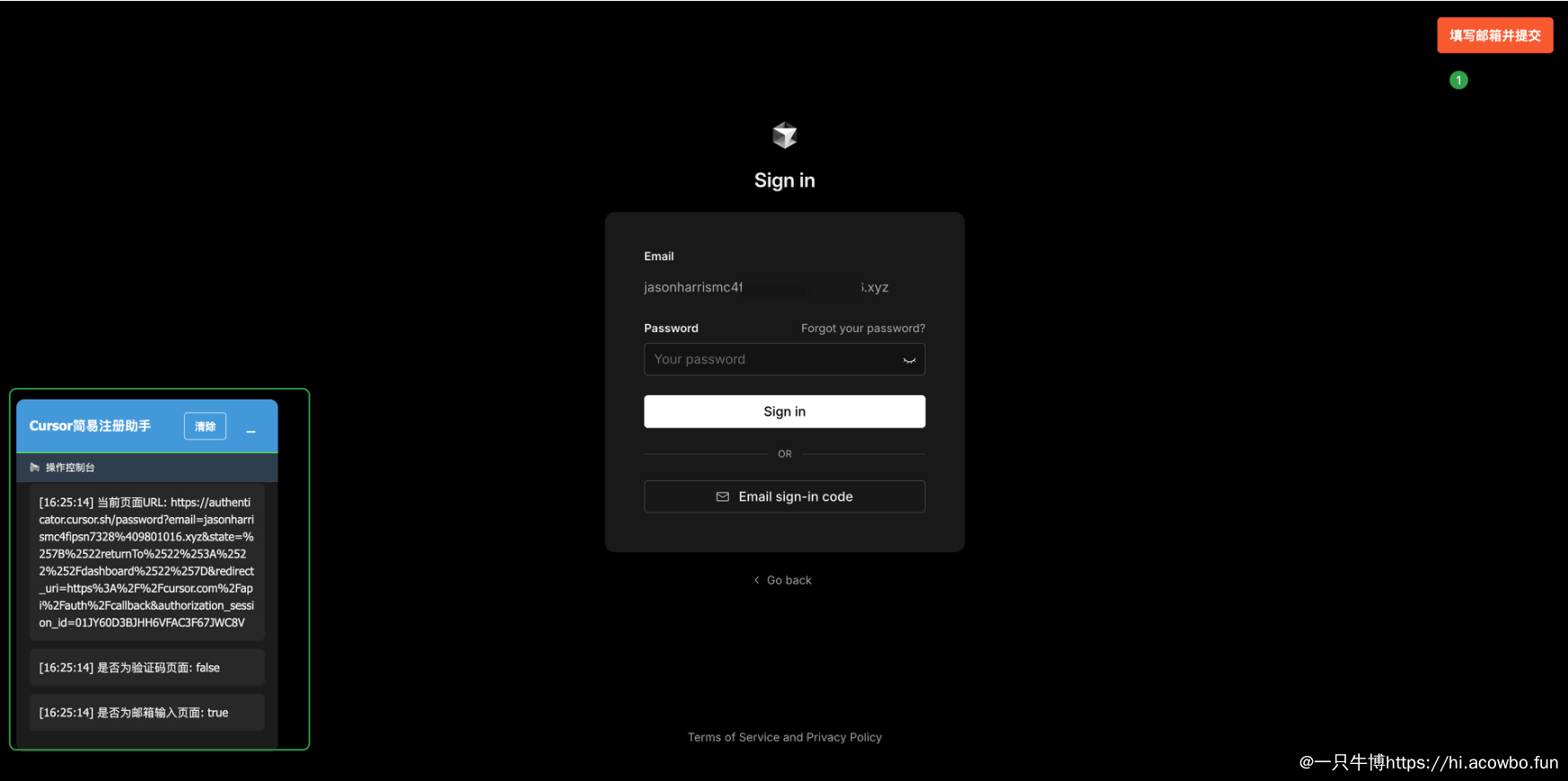
虽然就是自己点击Email sign-in code,然后过一个人机校验到下一个页面
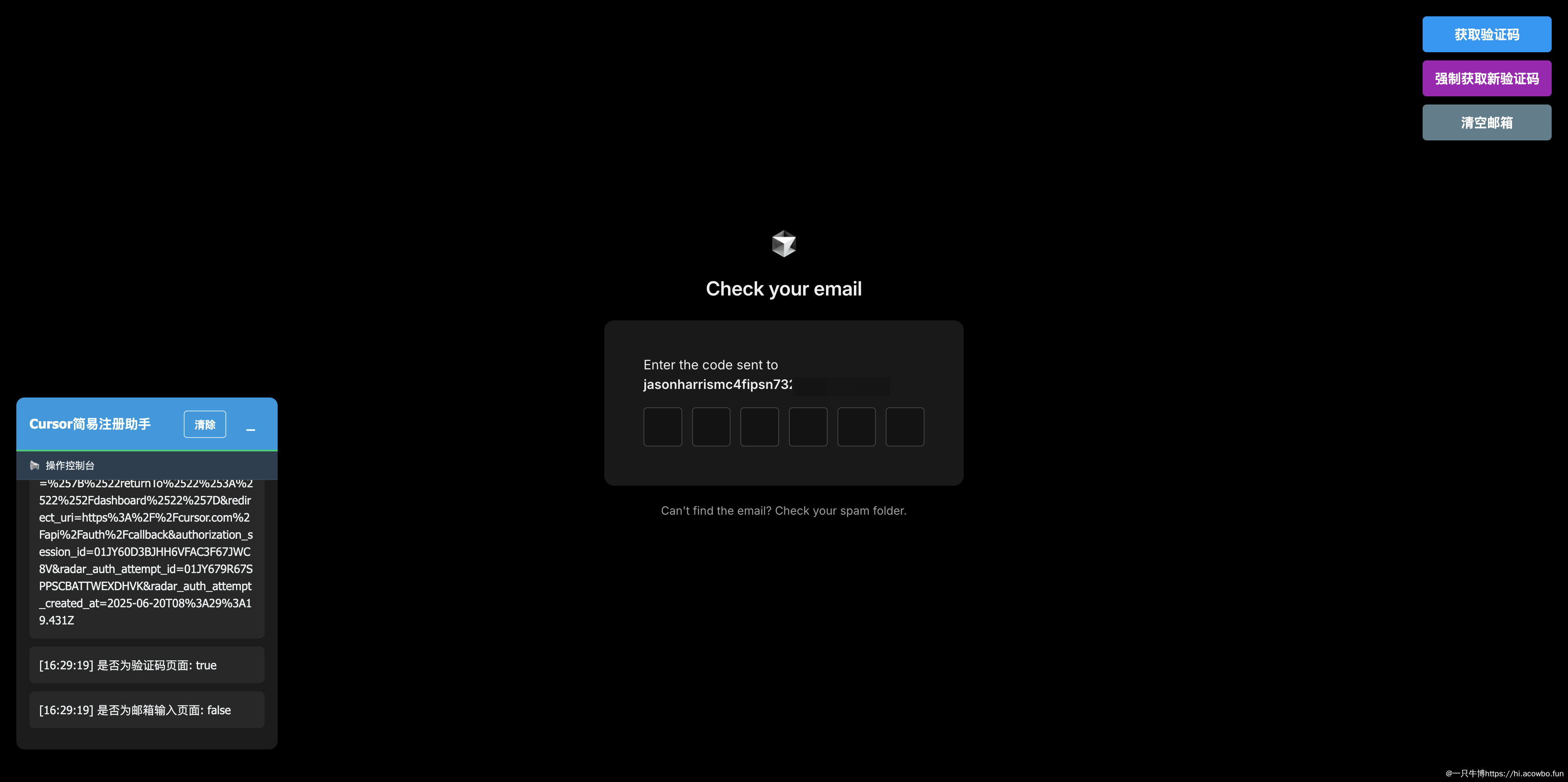
这里别点强制获取新验证码和清空邮箱,这两个功能主要是防止邮箱多人在用。获取的验证码不是最新的。直接点击获取验证码就出现下面的图。
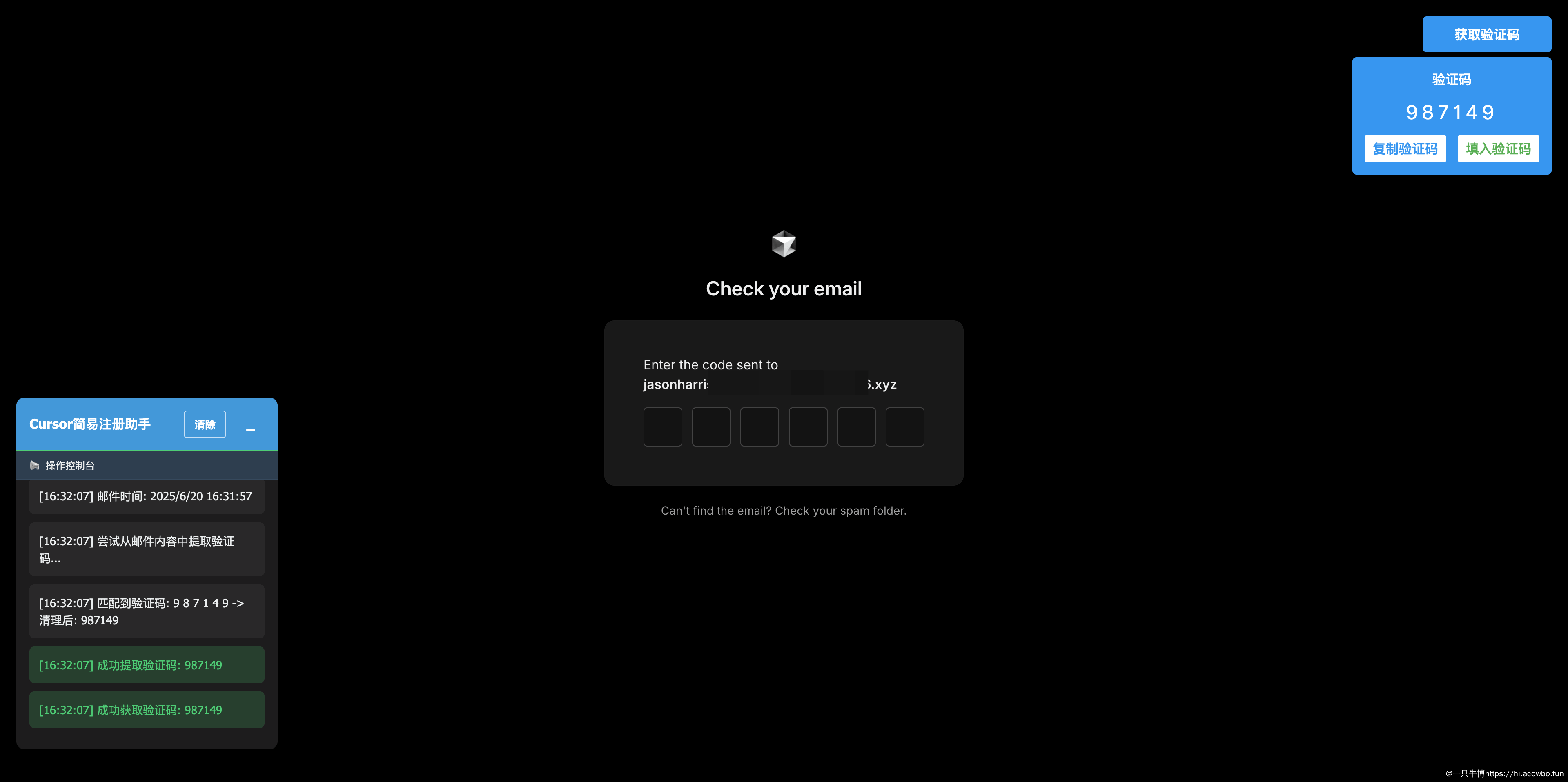
然后点击填入验证码就自动填入注册成功了。
注意:如果感觉邮箱前缀比较长,可以找到generateEmail方法进行修改。
|
1 2 3 4 5 6 7 8 9 |
// 生成随机邮箱 function generateEmail() { const firstName = FIRST_NAMES[Math.floor(Math.random() * FIRST_NAMES.length)]; const lastName = LAST_NAMES[Math.floor(Math.random() * LAST_NAMES.length)]; const timestamp = Date.now().toString(36); // 转换为36进制以缩短长度 const randomNum = Math.floor(Math.random() * 10000).toString().padStart(4, '0'); // 生成4位随机数 const username = `${firstName}${lastName}${timestamp}${randomNum}`; return `${username}${EMAIL_DOMAIN}`; } |
将 const username = ${firstName}${lastName}${timestamp}${randomNum};去掉后面的即可。
技术实现
核心功能实现
1. 随机邮箱生成
脚本使用预定义的名字和姓氏列表,结合时间戳和随机数生成唯一的邮箱地址:
|
1 2 3 4 5 6 7 8 |
function generateEmail() { const firstName = FIRST_NAMES[Math.floor(Math.random() * FIRST_NAMES.length)]; const lastName = LAST_NAMES[Math.floor(Math.random() * LAST_NAMES.length)]; const timestamp = Date.now().toString(36); const randomNum = Math.floor(Math.random() * 10000).toString().padStart(4, '0'); const username = `${firstName}${lastName}${timestamp}${randomNum}`; return `${username}${EMAIL_DOMAIN}`; } |
2. 验证码提取
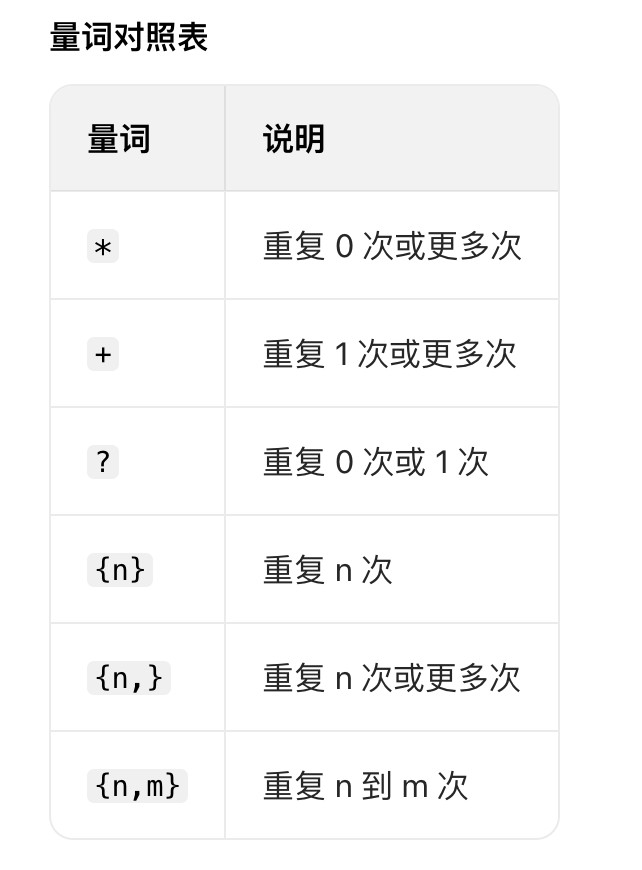
脚本使用多种正则表达式模式来匹配邮件中的验证码,包括处理带空格的验证码:
|
1 2 3 4 5 6 7 8 9 10 11 12 13 14 15 16 17 18 19 20 |
function extractVerificationCode(mailText) { const patterns = [ /code is:?\s*(\d[\s\d]{0,11}\d)/i, /one-time code is:?\s*(\d[\s\d]{0,11}\d)/i, /verification code[^\d]*(\d[\s\d]{0,11}\d)/i, /code[^\d]*(\d[\s\d]{0,11}\d)/i, /\b(\d[\s\d]{0,11}\d)\b/ ]; for (const pattern of patterns) { const match = mailText.match(pattern); if (match) { const rawCode = match[1] || match[0]; const cleanCode = rawCode.replace(/\s+/g, ''); if (/^\d{6}$/.test(cleanCode)) { return cleanCode; } } } return null; } |
3. 邮箱清空机制
脚本通过递归方式逐个删除邮件,确保邮箱完全清空:
|
1 2 3 4 5 6 7 8 9 10 |
async function clearMailbox() { // 先获取邮件列表 const mailListUrl = `https://tempmail.plus/api/mails?email=${username}${extension}&limit=50`; // 获取第一封邮件ID const firstId = mailListData.first_id; // 删除该邮件 const clearUrl = `https://tempmail.plus/api/mails/${firstId}?email=${username}${extension}`; // 递归调用,直到邮箱清空 clearMailbox().then(resolve).catch(reject); } |
4. 验证码填写
脚本支持多种验证码输入框格式,包括分离式输入框:
|
1 2 3 4 5 6 7 8 9 10 11 12 13 14 15 16 17 18 19 20 21 22 |
function fillSeparateCodeInputs(code) { // 查找所有可能的验证码输入框 const codeInputSelectors = [ 'input[maxlength="1"][pattern="\\d{1}"]', 'input[data-test="otp-input"]', 'input[data-index]', '.rt-TextFieldInput[maxlength="1"]' ]; // 逐个填入验证码 for (let i = 0; i < codeInputs.length; i++) { const digit = code.charAt(i); const input = codeInputs[i]; input.value = digit; input.dispatchEvent(new Event('input', { bubbles: true })); input.dispatchEvent(new Event('change', { bubbles: true })); } // 更新隐藏的code输入框 const hiddenCodeInput = document.querySelector('input[name="code"][type="hidden"]'); if (hiddenCodeInput) { hiddenCodeInput.value = code; } } |
用户界面
脚本提供了友好的用户界面,包括:
- 日志面板:显示操作日志,支持最小化和清除
- 功能按钮:根据页面类型动态显示相关按钮
- 验证码显示框:直观显示获取到的验证码,支持复制和填入
技术亮点
- 动态UI适配:根据页面URL动态显示不同功能按钮
- 增强的验证码提取:支持多种验证码格式,包括带空格的验证码
- 递归邮箱清空:确保彻底清空邮箱,获取最新验证码
- 多种输入框适配:支持各种验证码输入框格式
- 实时日志系统:提供详细的操作日志,方便调试和了解执行状态
常见问题
1. 为什么需要清空邮箱?
清空邮箱是为了确保每次获取的都是最新的验证码,避免获取到旧的验证码。特别是在多次尝试注册时,邮箱中可能存在多个验证码邮件。
2. 验证码无法自动填入怎么办?
如果验证码无法自动填入,可以:
- 点击验证码显示框中的"填入验证码"按钮手动触发填入
- 点击"复制验证码"按钮,然后手动粘贴到输入框
3. 如何确保获取最新的验证码?
如果担心获取的不是最新验证码,可以:
- 先点击"清空邮箱"按钮
- 然后点击"强制获取新验证码"按钮
总结
这个Cursor简易注册助手脚本通过自动化邮箱填写和验证码获取流程,大大简化了Cursor的注册过程。它不仅提高了注册效率,还通过友好的用户界面和详细的日志系统,为用户提供了良好的使用体验。
无论你是首次注册Cursor,还是需要创建多个账号,这个脚本都能帮你节省大量时间和精力。
后续优化方向
- 支持更多临时邮箱服务
- 添加账号信息保存功能
- 优化验证码识别准确率
- 增加自动完成注册后的配置功能
希望这个脚本能帮助你更便捷地使用Cursor这个强大的AI编程工具!