
返回顶部
分享到

Agent Skills工作流从入门到实战

Ai 来源:互联网 作者:佚名 发布时间:2026-05-11 22:27:53 人浏览
摘要

在人工智能快速发展的今天,Agent智能体技术正在改变我们构建应用的方式。Agent Skills工作流作为连接智能体与具体能力的桥梁,为开发者提供了一种灵活、可扩展的架构模式。本文将从基础概

在人工智能快速发展的今天,Agent智能体技术正在改变我们构建应用的方式。Agent Skills工作流作为连接智能体与具体能力的桥梁,为开发者提供了一种灵活、可扩展的架构模式。本文将从基础概念出发,结合实际案例,带你深入了解Agent Skills的设计与实现。

一、什么是Agent Skills

1.1 核心概念

Agent(智能体):具有自主决策能力的实体,能够理解任务、规划行动并执行操作。

Skill(技能):Agent可以调用的具体能力单元,如文件读取、数据查询、文本分析等。

Agent Skills工作流:Agent通过识别任务需求,动态选择并调用合适的Skill,最终完成用户目标的过程。

1.2 架构设计

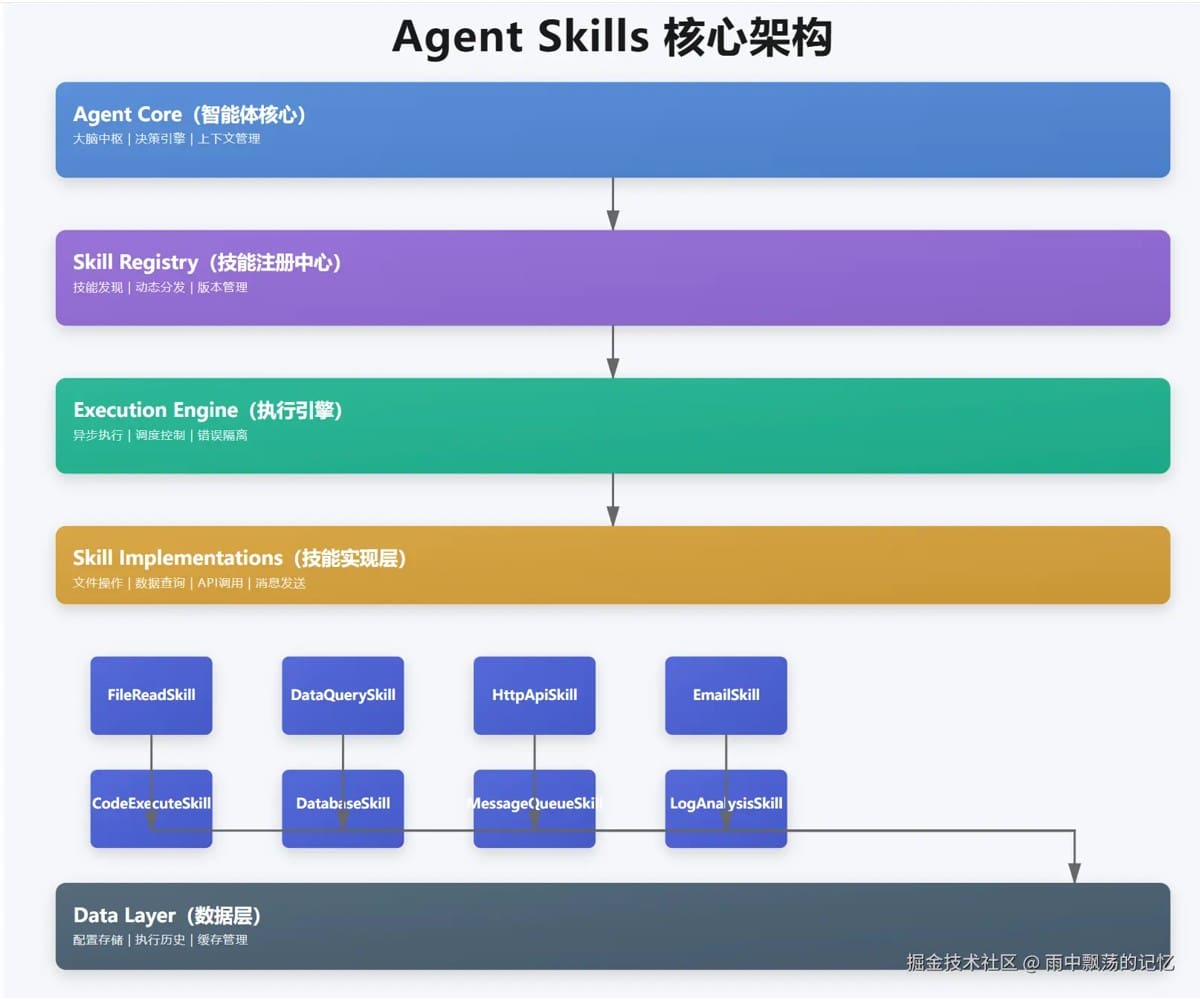
Agent Skills架构包含四个核心层次:

  • Agent Core:智能体核心,负责决策和协调
  • Skill Registry:技能注册中心,管理所有可用技能
  • Execution Engine:执行引擎,处理技能调用和错误重试
  • Skill Implementations:具体技能实现层

这种分层设计确保了系统的可扩展性和可维护性。

二、核心组件实现

2.1 Agent接口设计

1

2

3

4

5

6

7

8

9

10

11

12

13

14

15

16

17

18

19

20

21

22

23

24

25

26

27

28

29

30

31

32

33

34

35

36

37

38

39

40

41

42

43

44

45

46

47

48

49

50

51

52

53

54

55

56

57

58

59

60

61

62

63

64

65

66

67

68

69

70

71

72

73

74

75

76

77

78

79

80

81

82

package com.example.agent;

import com.example.skills.Skill;

import com.example.skills.SkillResult;

import java.util.Map;

/**

 * Agent智能体接口

 * 定义Agent的基本行为和能力

 * @version 1.0.0

 */

public interface Agent {

    /**

     * 获取Agent名称

     */

    String getName();

    /**

     * 获取Agent描述

     */

    String getDescription();

    /**

     * 执行任务

     *

     * @param task 任务内容

     * @param context 执行上下文

     * @return 执行结果

     */

    AgentResult execute(String task, AgentContext context);

    /**

     * 注册技能

     *

     * @param skill 技能实例

     */

    void registerSkill(Skill skill);

    /**

     * 获取已注册的所有技能

     */

    java.util.Collection<Skill> getSkills();

    /**

     * Agent执行结果

     */

    class AgentResult {

        private final boolean success;

        private final String message;

        private final Object data;

        private final long executionTime;

        public AgentResult(boolean success, String message, Object data, long executionTime) {

            this.success = success;

            this.message = message;

            this.data = data;

            this.executionTime = executionTime;

        }

        public static AgentResult success(String message, Object data) {

            return new AgentResult(true, message, data, 0);

        }

        public static AgentResult success(String message, Object data, long executionTime) {

            return new AgentResult(true, message, data, executionTime);

        }

        public static AgentResult failure(String message) {

            return new AgentResult(false, message, null, 0);

        }

        public boolean isSuccess() {

            return success;

        }

        public String getMessage() {

            return message;

        }

        public Object getData() {

            return data;

        }

        public long getExecutionTime() {

            return executionTime;

        }

        @Override

        public String toString() {

            return "AgentResult{" +

                    "success=" + success +

                    ", message='" + message + '\'' +

                    ", data=" + data +

                    ", executionTime=" + executionTime + "ms" +

                    '}';

        }

    }

}

Agent接口定义了智能体的基本行为,其中最关键的是execute方法,它接收任务和上下文,返回执行结果。

2.2 Skill接口设计

1

2

3

4

5

6

7

8

9

10

11

12

13

14

15

16

17

18

19

20

21

22

23

24

25

26

27

28

29

30

31

32

33

34

35

36

37

38

39

40

41

42

43

44

45

46

47

48

49

50

51

52

53

54

55

56

57

58

59

60

61

62

63

64

65

66

67

68

69

70

71

package com.example.skills;


import java.util.Map;


/**

 * Skill技能接口

 * 定义Agent可以执行的具体技能

 * @version 1.0.0

 */

public interface Skill {


    /**

     * 获取技能名称

     */

    String getName();


    /**

     * 获取技能描述

     */

    String getDescription();


    /**

     * 获取技能版本

     */

    default String getVersion() {

        return "1.0.0";

    }


    /**

     * 判断技能是否可以执行该任务

     *

     * @param task 任务内容

     * @return 是否可以执行

     */

    boolean canExecute(String task);


    /**

     * 执行技能

     *

     * @param task 任务内容

     * @param parameters 参数

     * @return 执行结果

     */

    SkillResult execute(String task, Map<String, Object> parameters);


    /**

     * 获取技能的超时时间(毫秒)

     * 默认30秒

     */

    default long getTimeout() {

        return 30000;

    }


    /**

     * 技能执行前的验证

     *

     * @param task 任务内容

     * @param parameters 参数

     * @return 验证是否通过

     */

    default boolean validate(String task, Map<String, Object> parameters) {

        return task != null && !task.trim().isEmpty();

    }


    /**

     * 技能执行后的清理

     */

    default void cleanup() {

        // 默认不需要清理

    }

}

Skill接口采用策略模式,每个技能实现独立的功能,并通过canExecute方法声明自己能处理哪些任务。

2.3 技能调用流程

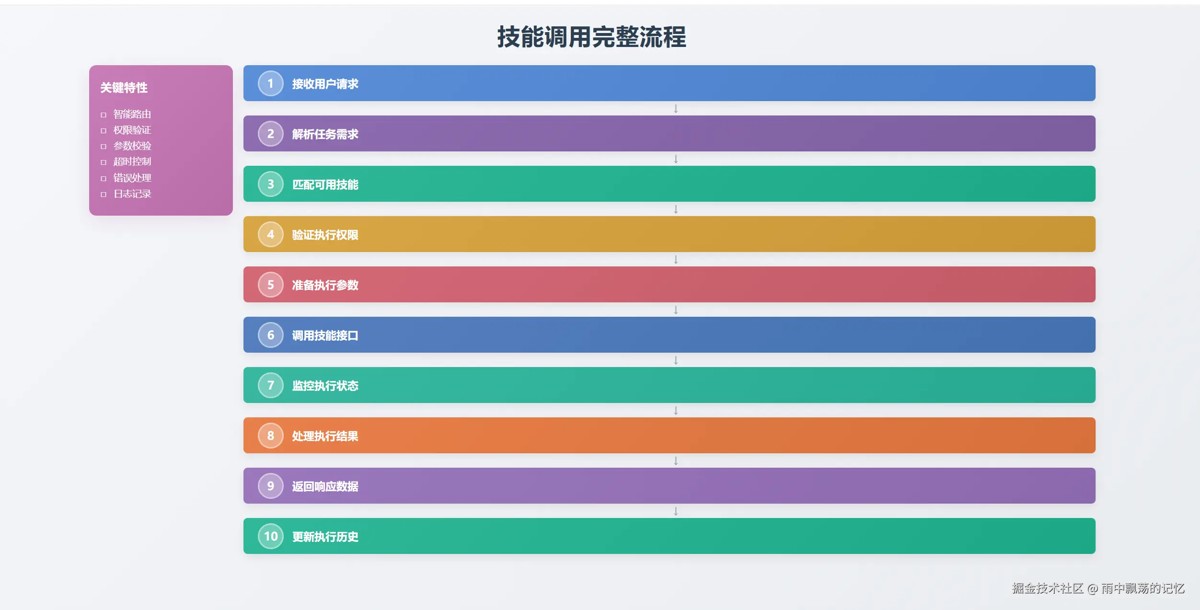
完整的技能调用流程包括10个步骤:

  1. 接收用户请求
  2. 解析任务意图
  3. 匹配可用技能
  4. 验证执行权限
  5. 准备执行参数
  6. 调用技能接口
  7. 监控执行状态
  8. 处理执行结果
  9. 返回响应数据
  10. 更新执行历史

每个步骤都有其特定的职责,确保任务能够安全、高效地执行。

三、基础技能实现

3.1 文件读取技能

1

2

3

4

5

6

7

8

9

10

11

12

13

14

15

16

17

18

19

20

21

22

23

24

25

26

27

28

29

30

31

32

33

34

35

36

37

38

39

40

41

42

43

44

45

46

47

48

49

50

51

52

53

54

55

56

57

58

59

60

61

62

63

64

65

66

67

68

69

70

71

72

73

74

75

76

77

78

79

80

81

82

83

84

85

86

87

88

89

90

91

92

93

94

95

96

97

98

99

100

101

102

103

104

105

106

107

108

109

110

111

112

113

114

115

116

117

118

119

120

121

122

123

124

125

126

127

128

129

130

131

132

133

134

135

136

137

138

139

140

141

package com.example.skills.impl;


import com.example.skills.Skill;

import com.example.skills.SkillResult;

import org.slf4j.Logger;

import org.slf4j.LoggerFactory;


import java.io.IOException;

import java.nio.charset.StandardCharsets;

import java.nio.file.Files;

import java.nio.file.Path;

import java.nio.file.Paths;

import java.util.ArrayList;

import java.util.List;

import java.util.Map;


/**

 * 文件读取技能

 * 用于读取本地文件内容

 * @version 1.0.0

 */

public class FileReadSkill implements Skill {


    private static final Logger logger = LoggerFactory.getLogger(FileReadSkill.class);


    @Override

    public String getName() {

        return "FileReadSkill";

    }


    @Override

    public String getDescription() {

        return "读取本地文件内容,支持文本文件、配置文件等";

    }


    @Override

    public boolean canExecute(String task) {

        if (task == null) {

            return false;

        }

        String lowerTask = task.toLowerCase();

        return lowerTask.contains("文件") &&

               (lowerTask.contains("读取") || lowerTask.contains("打开") || lowerTask.contains("查看"));

    }


    @Override

    public boolean validate(String task, Map<String, Object> parameters) {

        if (!Skill.super.validate(task, parameters)) {

            return false;

        }


        // 检查文件路径参数

        Object filePath = parameters.get("filePath");

        if (filePath == null) {

            logger.warn("filePath parameter is missing");

            return false;

        }


        Path path = Paths.get(filePath.toString());

        if (!Files.exists(path)) {

            logger.warn("File does not exist: {}", filePath);

            return false;

        }


        if (!Files.isReadable(path)) {

            logger.warn("File is not readable: {}", filePath);

            return false;

        }


        return true;

    }


    @Override

    public SkillResult execute(String task, Map<String, Object> parameters) {

        long startTime = System.currentTimeMillis();


        try {

            String filePath = parameters.get("filePath").toString();


            logger.info("Reading file: {}", filePath);


            Path path = Paths.get(filePath);


            // 读取文件内容

            String content = new String(Files.readAllBytes(path), StandardCharsets.UTF_8);


            // 获取文件信息

            long fileSize = Files.size(path);

            String fileName = path.getFileName().toString();


            // 构建元数据

            Map<String, Object> metadata = new java.util.HashMap<>();

            metadata.put("filePath", filePath);

            metadata.put("fileName", fileName);

            metadata.put("fileSize", fileSize);

            metadata.put("lines", content.split("\n").length);


            long executionTime = System.currentTimeMillis() - startTime;


            logger.info("File read successfully: {} ({} bytes)", fileName, fileSize);


            return SkillResult.success(

                    "文件读取成功: " + fileName,

                    content,

                    executionTime,

                    metadata

            );


        } catch (IOException e) {

            logger.error("Error reading file", e);

            return SkillResult.failure("文件读取失败: " + e.getMessage(), e.getMessage());

        }

    }


    @Override

    public long getTimeout() {

        return 10000; // 10秒超时

    }


    /**

     * 读取文件行

     */

    public List<String> readLines(String filePath) throws IOException {

        Path path = Paths.get(filePath);

        return Files.readAllLines(path, StandardCharsets.UTF_8);

    }


    /**

     * 检查文件是否存在

     */

    public boolean exists(String filePath) {

        return Files.exists(Paths.get(filePath));

    }


    /**

     * 获取文件大小

     */

    public long getFileSize(String filePath) throws IOException {

        return Files.size(Paths.get(filePath));

    }

}

3.2 数据查询技能

1

2

3

4

5

6

7

8

9

10

11

12

13

14

15

16

17

18

19

20

21

22

23

24

25

26

27

28

29

30

public class DataQuerySkill implements Skill {

    private final Map<String, List<Map<String, Object>>> database;


    public DataQuerySkill() {

        this.database = new ConcurrentHashMap<>();

        initializeSampleData();

    }


    @Override

    public boolean canExecute(String task) {

        String lowerTask = task.toLowerCase();

        return lowerTask.contains("查询") ||

               lowerTask.contains("数据");

    }


    @Override

    public SkillResult execute(String task, Map<String, Object> parameters) {

        String tableName = parameters.get("tableName").toString();

        String condition = parameters.get("condition").toString();


        List<Map<String, Object>> results = performQuery(

            tableName, condition, 100

        );


        return SkillResult.success(

            "查询成功,找到" + results.size() + "条记录",

            results

        );

    }

}

3.3 文本分析技能

1

2

3

4

5

6

7

8

9

10

11

12

13

14

15

16

17

18

public class TextAnalysisSkill implements Skill {

    @Override

    public SkillResult execute(String task, Map<String, Object> parameters) {

        String text = parameters.get("text").toString();

        String operation = parameters.get("operation").toString();


        switch (operation) {

            case "stats":

                return analyzeStats(text);

            case "keywords":

                return extractKeywords(text);

            case "sentiment":

                return analyzeSentiment(text);

            default:

                return fullAnalysis(text);

        }

    }

}

四、Agent交互机制

4.1 时序交互

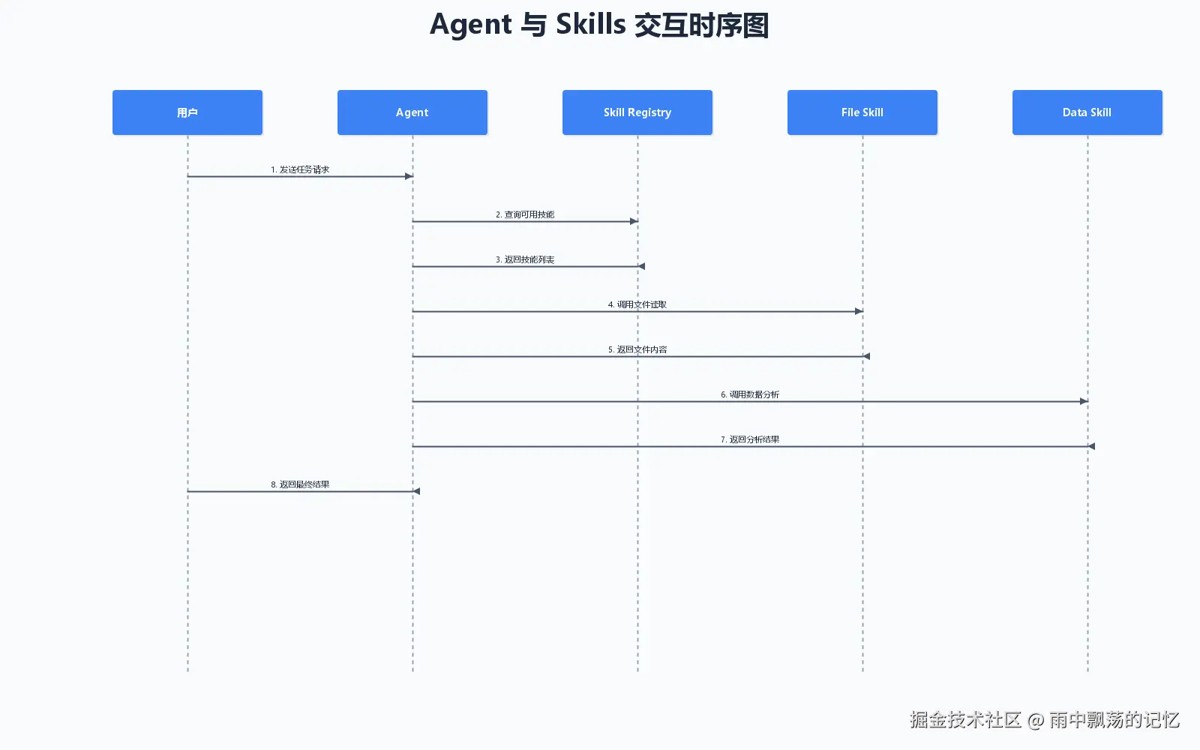
Agent与Skills之间的交互遵循明确的时序关系:

  1. 用户向Agent发送任务请求
  2. Agent查询Skill Registry获取可用技能
  3. Registry返回匹配的技能列表
  4. Agent调用具体技能执行任务
  5. 技能返回执行结果
  6. Agent整合结果并返回给用户

4.2 上下文管理

AgentContext在执行过程中传递和存储数据:

1

2

3

4

5

6

7

8

9

10

11

12

13

14

15

16

17

18

19

20

21

22

23

24

25

26

27

28

29

30

31

32

33

34

35

36

37

38

39

40

41

42

43

44

45

46

47

48

49

50

51

52

53

54

55

56

57

58

59

60

61

62

63

64

65

66

67

68

69

70

71

72

73

74

75

76

77

78

79

80

81

82

83

84

85

86

87

88

89

90

91

92

93

94

95

96

97

98

99

100

101

102

103

104

105

106

107

108

109

110

111

112

113

114

115

116

117

118

119

120

121

122

123

124

125

126

127

128

129

130

131

132

133

134

135

136

137

138

139

140

141

142

143

144

145

146

147

package com.example.agent;


import java.util.HashMap;

import java.util.Map;

import java.util.concurrent.ConcurrentHashMap;


/**

 * Agent执行上下文

 * 用于在Agent执行过程中传递和存储数据

 * @version 1.0.0

 */

public class AgentContext {


    private final String requestId;

    private final Map<String, Object> attributes;

    private final Map<String, Object> sessionData;

    private final long createdAt;


    public AgentContext(String requestId) {

        this.requestId = requestId;

        this.attributes = new ConcurrentHashMap<>();

        this.sessionData = new ConcurrentHashMap<>();

        this.createdAt = System.currentTimeMillis();

    }


    /**

     * 获取请求ID

     */

    public String getRequestId() {

        return requestId;

    }


    /**

     * 设置属性

     */

    public void setAttribute(String key, Object value) {

        attributes.put(key, value);

    }


    /**

     * 批量设置属性

     */

    public void setAttributes(Map<String, Object> attributes) {

        if (attributes != null) {

            this.attributes.putAll(attributes);

        }

    }


    /**

     * 获取属性

     */

    public Object getAttribute(String key) {

        return attributes.get(key);

    }


    /**

     * 获取属性(带类型转换)

     */

    @SuppressWarnings("unchecked")

    public <T> T getAttribute(String key, Class<T> type) {

        Object value = attributes.get(key);

        if (value != null && type.isInstance(value)) {

            return (T) value;

        }

        return null;

    }


    /**

     * 移除属性

     */

    public Object removeAttribute(String key) {

        return attributes.remove(key);

    }


    /**

     * 设置会话数据

     */

    public void setSessionData(String key, Object value) {

        sessionData.put(key, value);

    }


    /**

     * 获取会话数据

     */

    public Object getSessionData(String key) {

        return sessionData.get(key);

    }


    /**

     * 获取所有属性

     */

    public Map<String, Object> getAllAttributes() {

        return new HashMap<>(attributes);

    }


    /**

     * 清空属性

     */

    public void clear() {

        attributes.clear();

    }


    /**

     * 获取上下文创建时间

     */

    public long getCreatedAt() {

        return createdAt;

    }


    /**

     * 获取上下文存活时间(毫秒)

     */

    public long getAge() {

        return System.currentTimeMillis() - createdAt;

    }


    /**

     * 创建新的上下文

     */

    public static AgentContext create() {

        return create(generateRequestId());

    }


    /**

     * 创建带请求ID的上下文

     */

    public static AgentContext create(String requestId) {

        return new AgentContext(requestId);

    }


    /**

     * 生成请求ID

     */

    private static String generateRequestId() {

        return "req-" + System.currentTimeMillis() + "-" + Thread.currentThread().getId();

    }


    @Override

    public String toString() {

        return "AgentContext{" +

                "requestId='" + requestId + '\'' +

                ", attributes=" + attributes.size() +

                ", sessionData=" + sessionData.size() +

                ", age=" + getAge() + "ms" +

                '}';

    }

}

上下文分为临时属性和会话数据,临时属性在单次请求中有效,会话数据可以跨请求共享。

五、多Agent协作

5.1 协作架构

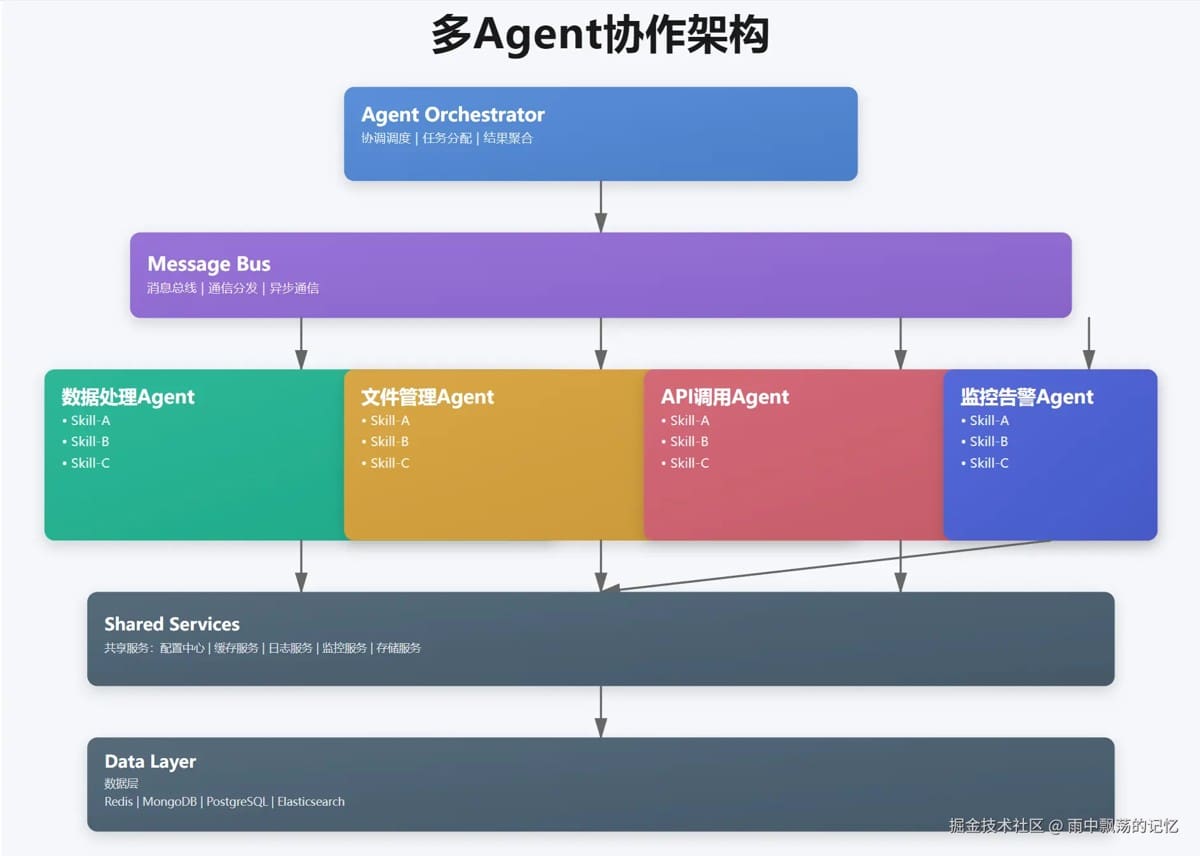
在复杂系统中,多个Agent协同工作可以完成更复杂的任务:

  • Agent Orchestrator:协调整个系统的运行
  • Message Bus:实现Agent间的异步通信
  • Specialized Agents:专门处理特定领域的Agent

5.2 消息传递

1

2

3

4

5

6

7

8

9

10

11

12

public class MessageBus {

    private final Map<String, List<Agent>> subscribers;


    public void publish(String topic, Message message) {

        List<Agent> agents = subscribers.get(topic);

        for (Agent agent : agents) {

            executor.submit(() ->

                agent.execute(message.getContent(), message.getContext())

            );

        }

    }

}

六、实战案例:智能数据分析系统

6.1 系统设计

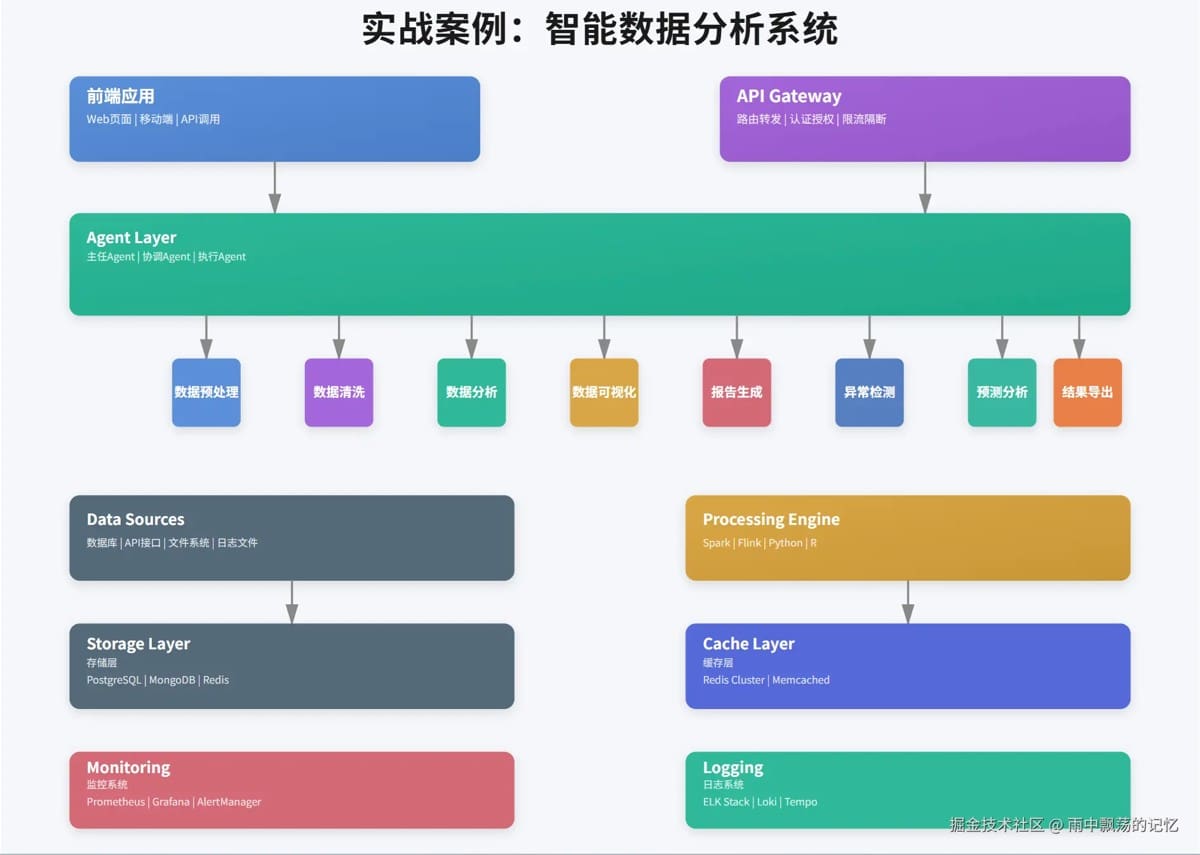
我们以一个智能数据分析系统为例,展示Agent Skills的实际应用:

系统包含以下关键组件:

  • 前端应用:Web界面和移动端
  • API Gateway:统一入口,处理认证和限流
  • Agent Layer:多个专门的数据处理Agent
  • Skills Layer:8种核心技能
  • Data Sources:多种数据源支持

6.2 数据分析Agent实现

1

2

3

4

5

6

7

8

9

10

11

12

13

14

15

16

17

18

19

20

21

22

23

24

25

26

27

28

29

30

31

32

33

34

35

36

37

38

39

40

41

42

43

44

45

46

47

48

49

50

51

52

53

54

55

56

57

58

59

60

61

62

63

64

65

66

67

68

69

70

71

72

73

74

75

76

77

78

79

80

81

82

83

84

85

86

87

88

89

90

91

92

93

94

95

96

97

package com.example.demo;


import com.example.agent.Agent;

import com.example.agent.AgentContext;

import com.example.agent.BaseAgent;

import com.example.skills.SkillResult;

import com.example.skills.impl.DataQuerySkill;

import com.example.skills.impl.FileReadSkill;

import com.example.skills.impl.TextAnalysisSkill;

import org.slf4j.Logger;

import org.slf4j.LoggerFactory;


import java.util.HashMap;

import java.util.Map;


/**

 * 数据分析Agent

 * 专门处理数据分析相关任务

 * @version 1.0.0

 */

public class DataAnalysisAgent extends BaseAgent {


    private static final Logger logger = LoggerFactory.getLogger(DataAnalysisAgent.class);


    public DataAnalysisAgent() {

        super("DataAnalysisAgent", "数据分析智能体,提供数据查询、分析和可视化能力");


        // 注册技能

        registerSkill(new DataQuerySkill());

        registerSkill(new TextAnalysisSkill());

        registerSkill(new FileReadSkill());

    }


    /**

     * 执行数据分析任务

     */

    public Agent.AgentResult analyzeData(String query, AgentContext context) {

        logger.info("[DataAnalysisAgent] Starting data analysis: {}", query);


        // 设置分析参数

        Map<String, Object> parameters = new HashMap<>();

        parameters.put("tableName", "users");

        parameters.put("condition", query);

        parameters.put("limit", 100);


        context.setAttributes(parameters);


        return execute("查询用户数据: " + query, context);

    }


    /**

     * 生成数据分析报告

     */

    public Agent.AgentResult generateReport(String filePath, AgentContext context) {

        logger.info("[DataAnalysisAgent] Generating report from file: {}", filePath);


        Map<String, Object> parameters = new HashMap<>();

        parameters.put("filePath", filePath);


        context.setAttributes(parameters);


        AgentResult fileResult = execute("读取数据文件", context);


        if (fileResult.isSuccess()) {

            String content = fileResult.getData().toString();


            // 分析文本内容

            Map<String, Object> analysisParams = new HashMap<>();

            analysisParams.put("text", content);

            analysisParams.put("operation", "analyze");


            context.setAttributes(analysisParams);


            return execute("分析文本内容", context);

        }


        return fileResult;

    }


    @Override

    protected void preprocess(String task, AgentContext context) {

        super.preprocess(task, context);

        context.setAttribute("agentType", "data-analysis");

        context.setAttribute("timestamp", System.currentTimeMillis());

    }


    @Override

    protected void postprocess(String task, SkillResult result, AgentContext context) {

        super.postprocess(task, result, context);


        // 记录分析结果

        if (result.isSuccess()) {

            context.setSessionData("lastAnalysis", result.getData());

            context.setSessionData("lastAnalysisTime", System.currentTimeMillis());

        }

    }

}

6.3 使用示例

1

2

3

4

5

6

7

8

9

10

11

12

13

14

public class Demo {

    public static void main(String[] args) {

        // 创建Agent

        DataAnalysisAgent agent = new DataAnalysisAgent();


        // 执行查询

        AgentContext context = AgentContext.create();

        AgentResult result = agent.analyzeData("技术部", context);


        if (result.isSuccess()) {

            System.out.println("查询结果: " + result.getData());

        }

    }

}

七、生产环境部署

7.1 部署架构

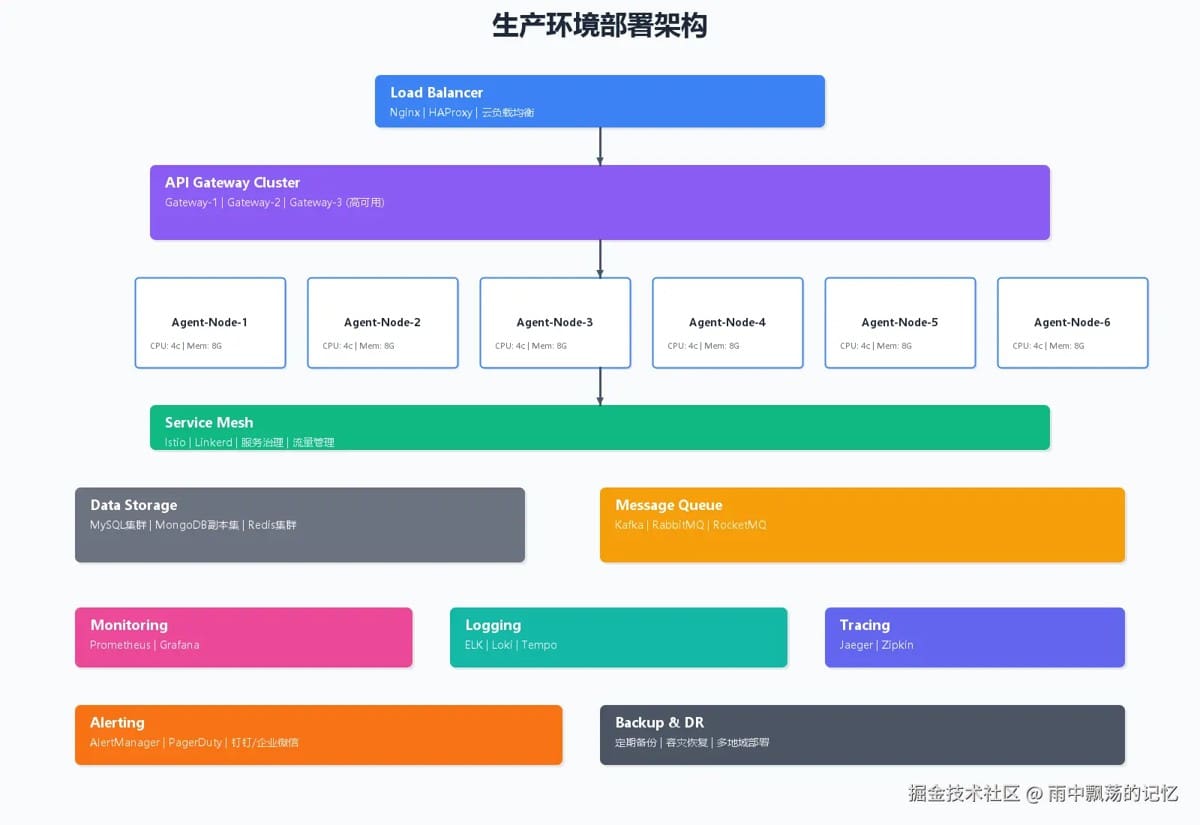
生产环境需要考虑高可用、可扩展和监控:

关键设计要点:

  • 负载均衡:使用Nginx或云负载均衡
  • 多副本部署:每个Agent部署多个实例
  • 监控体系:Prometheus + Grafana
  • 日志收集:ELK Stack统一管理日志

7.2 性能优化

  1. 连接池管理:复用数据库和HTTP连接
  2. 异步执行:使用线程池并行处理任务
  3. 缓存策略:缓存常用查询结果
  4. 超时控制:防止技能执行时间过长

1

2

3

4

5

6

7

8

9

10

11

public class BaseAgent {

    protected ExecutorService executorService;


    protected SkillResult executeSkill(Skill skill, String task,

                                       Map<String, Object> parameters) {

        Future<SkillResult> future = executorService.submit(

            () -> skill.execute(task, parameters)

        );

        return future.get(skill.getTimeout(), TimeUnit.MILLISECONDS);

    }

}

7.3 错误处理

完善的错误处理机制:

1

2

3

4

5

6

7

8

9

10

11

12

13

14

15

try {

    SkillResult result = executeSkill(skill, task, parameters);

    if (result.isSuccess()) {

        return AgentResult.success(result.getMessage(), result.getData());

    } else {

        // 记录错误日志

        logger.error("Skill execution failed: {}", result.getError());

        // 尝试备用技能

        return executeFallbackSkill(task, context);

    }

} catch (TimeoutException e) {

    return AgentResult.failure("执行超时");

} catch (Exception e) {

    return AgentResult.failure("执行异常: " + e.getMessage());

}

八、测试策略

8.1 单元测试

1

2

3

4

5

6

7

8

9

10

11

12

13

14

15

16

17

@DisplayName("TextAnalysisSkill测试")

class TextAnalysisSkillTest {

    @Test

    @DisplayName("测试情感分析")

    void testSentimentAnalysis() {

        TextAnalysisSkill skill = new TextAnalysisSkill();


        Map<String, Object> parameters = new HashMap<>();

        parameters.put("text", "今天心情非常好!");

        parameters.put("operation", "sentiment");


        SkillResult result = skill.execute("情感分析", parameters);


        assertTrue(result.isSuccess());

        assertNotNull(result.getData());

    }

}

8.2 集成测试

测试Agent与Skills的协作:

1

2

3

4

5

6

7

8

9

10

11

@Test

@DisplayName("测试Agent完整流程")

void testAgentWorkflow() {

    DataAnalysisAgent agent = new DataAnalysisAgent();

    AgentContext context = AgentContext.create();


    AgentResult result = agent.analyzeData("技术部", context);


    assertTrue(result.isSuccess());

    assertNotNull(result.getData());

}

九、最佳实践

9.1 技能设计原则

  1. 单一职责:每个技能只做一件事
  2. 幂等性:相同输入产生相同输出
  3. 超时控制:设置合理的执行超时
  4. 资源清理:执行完成后释放资源

9.2 Agent设计原则

  1. 专注领域:每个Agent专注特定领域
  2. 可观测性:记录完整的执行日志
  3. 容错性:优雅处理各种异常情况
  4. 可测试性:便于编写单元测试

十、总结

Agent Skills工作流为我们提供了一种优雅的架构模式,将AI智能体与传统软件开发有机结合。

未来,随着AI技术的发展,Agent Skills将在更多领域发挥重要作用。


版权声明 : 本文内容来源于互联网或用户自行发布贡献,该文观点仅代表原作者本人。本站仅提供信息存储空间服务和不拥有所有权,不承担相关法律责任。如发现本站有涉嫌抄袭侵权, 违法违规的内容, 请发送邮件至2530232025#qq.cn(#换@)举报,一经查实,本站将立刻删除。
原文链接 :
    Tag :
相关文章
  • 本站所有内容来源于互联网或用户自行发布,本站仅提供信息存储空间服务,不拥有版权,不承担法律责任。如有侵犯您的权益,请您联系站长处理!
  • Copyright © 2017-2022 F11.CN All Rights Reserved. F11站长开发者网 版权所有 | 苏ICP备2022031554号-1 | 51LA统计