1、准备工作
|
1 |
pip install qcloudsms_py |
1.注册腾讯云账号
2.在产品列表内找到短信,在短信内添加应用

3.获取对应的SDK AppID 和 App Key

4.配置短信内容
注:需先申请“短信签名”和“短信正文”,按照要求填写申请即可,腾讯云的审核效率还是很快的,一般在1-2个小时内就会有结果
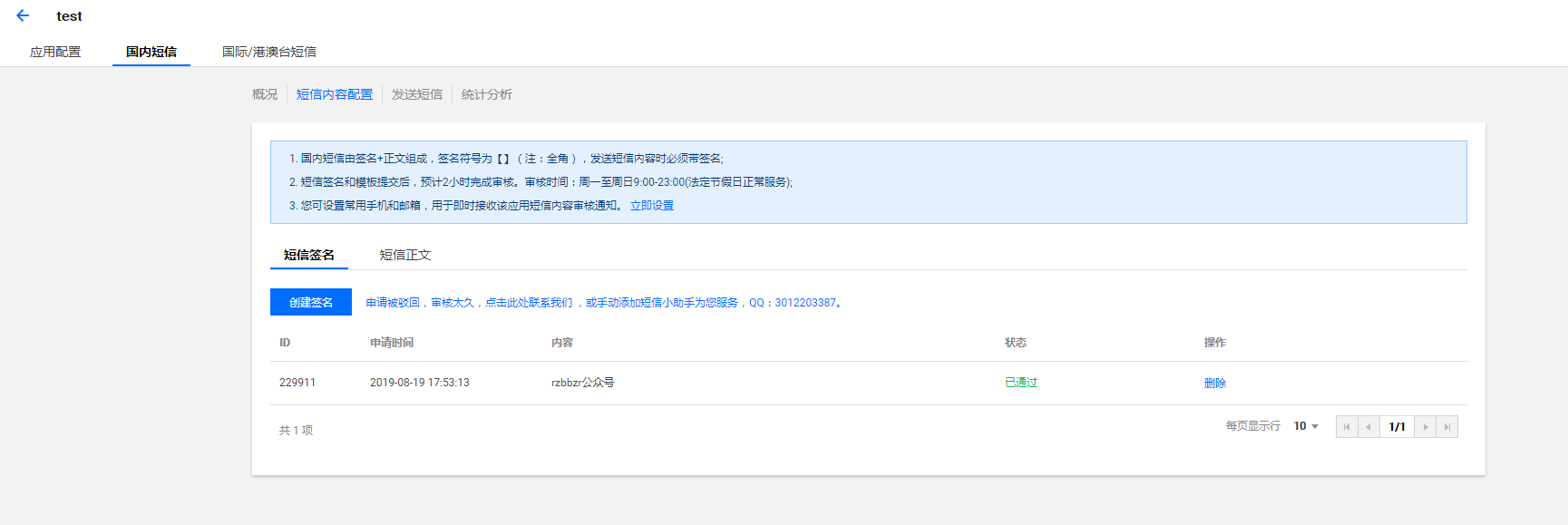
注:腾讯云的短信服务现在好像也不免费了,之前每个月还会赠送100条免费短信额度。总结:准备工作准备内容:SDK AppID、App Key、应用签名、短信正文模板ID

2、代码实现
|
1 2 3 4 5 6 7 8 9 10 11 12 13 14 15 16 17 18 19 20 21 22 23 24 25 26 27 28 29 30 31 32 33 34 35 36 37 38 39 40 |
# -*- coding: utf-8 -*- """ @author: rzb @software: PyCharm @file: sms_qcloud.py @time: 2019/8/21 11:54 """ from qcloudsms_py import SmsSingleSender from qcloudsms_py.httpclient import HTTPError import random # 使用腾讯云发送手机6位随机验证码 class TestQCloudSMS(object): def __init__(self, phone_num): self.appid = **** # 准备工作中的SDK AppID,类型:int self.appkey = **** # 准备工作中的App Key,类型:str self.phone_num = phone_num self.sign = 'rzbbzr公众号' # 准备工作中的应用签名,类型:str def make_code(self): """ :return: code 6位随机数 """ code = '' for item in range(6): code += str(random.randint(0, 9)) return code def send_msg(self): ssender = SmsSingleSender(self.appid, self.appkey) try: # parms参数类型为list rzb = ssender.send_with_param(86, self.phone_num, 短信正文模板ID, [self.make_code()], sign=self.sign, extend='', ext='') print(rzb) except HTTPError as http: print("HTTPError", http) except Exception as e: print(e) if __name__ == '__main__': phone_num = ['188********', '185********', '176********'] sendmsg = TestQCloudSMS(random.choices(phone_num)[0]) # 需传入发送短信的手机号,单发 sendmsg.send_msg() |
3、拓展
官方文档中心里面给出了多种API的详细使用,有兴趣的同学可以去看看
腾讯云文档中心:https://cloud.tencent.com/document/product/382/5976

4、闲聊
可用于但不限于以下用途
- 脚本触发/告警
- 事务提醒
- 追番更新、电视剧更新等
- ……