我们的目标是秒杀淘宝或京东等的订单,这里面有几个关键点,首先需要登录淘宝或京东,其次你需要准备好订单,最后要在指定时间快速提交订单。
这里就要用到一个爬虫利器Selenium,Selenium是一个用于Web应用程序测试的工具,Selenium可以直接运行在浏览器中,通过后台控制操作浏览器,完成购买操作,利用它我们可以驱动浏览器执行特定的动作,抢购脚本就是通过Selenium来完成自动登录和自动购买的操作的。
一、环境
操作系统:Win10
Python版本:3.7.4
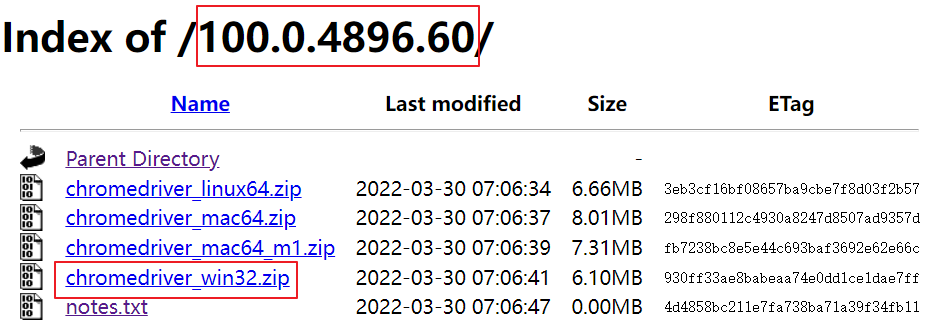
Chrome浏览器版本:100.0.4896.60
ChromeDriver版本:100.0.4896.60
注意:Chrome浏览器版本和ChromeDriver版本要保持一致
二、安装
1.ChromeDriver安装
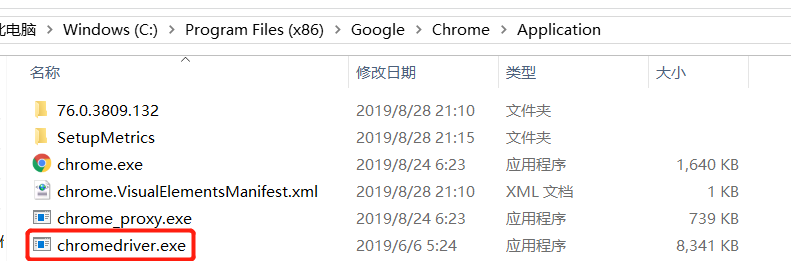
步骤一:将下载好的chromedriver.exe文件放置到chrome浏览器所在目录
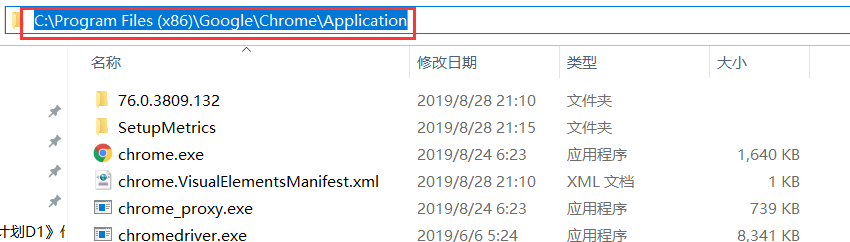
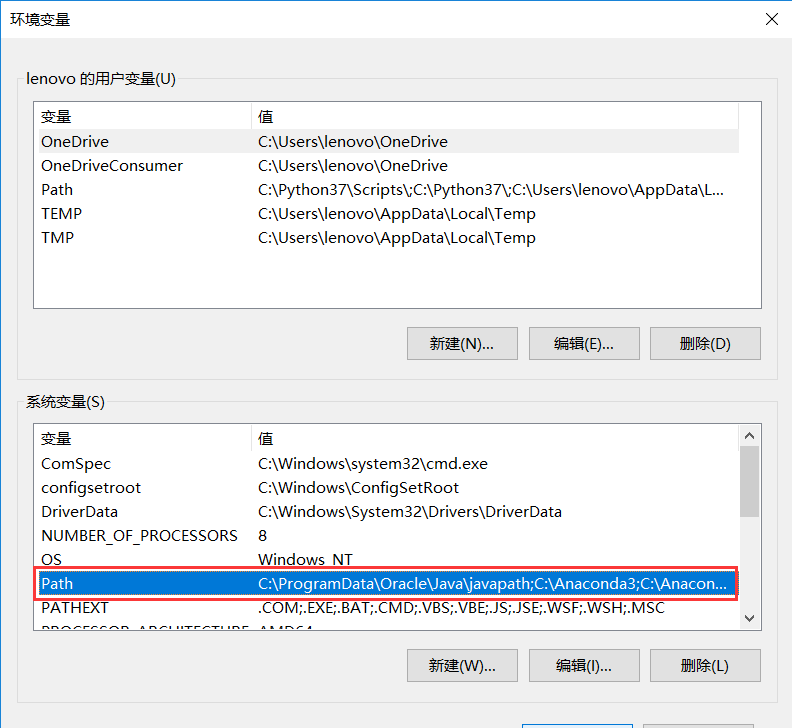
步骤二:复制该目录配置到Windows系统环境变量中
步骤三:我的电脑→属性→高级系统设置→环境变量→系统变量→Path→编辑→新建,将复制的目录粘贴确定即可,注意:要一路确定返回。
2.Seleuinm安装
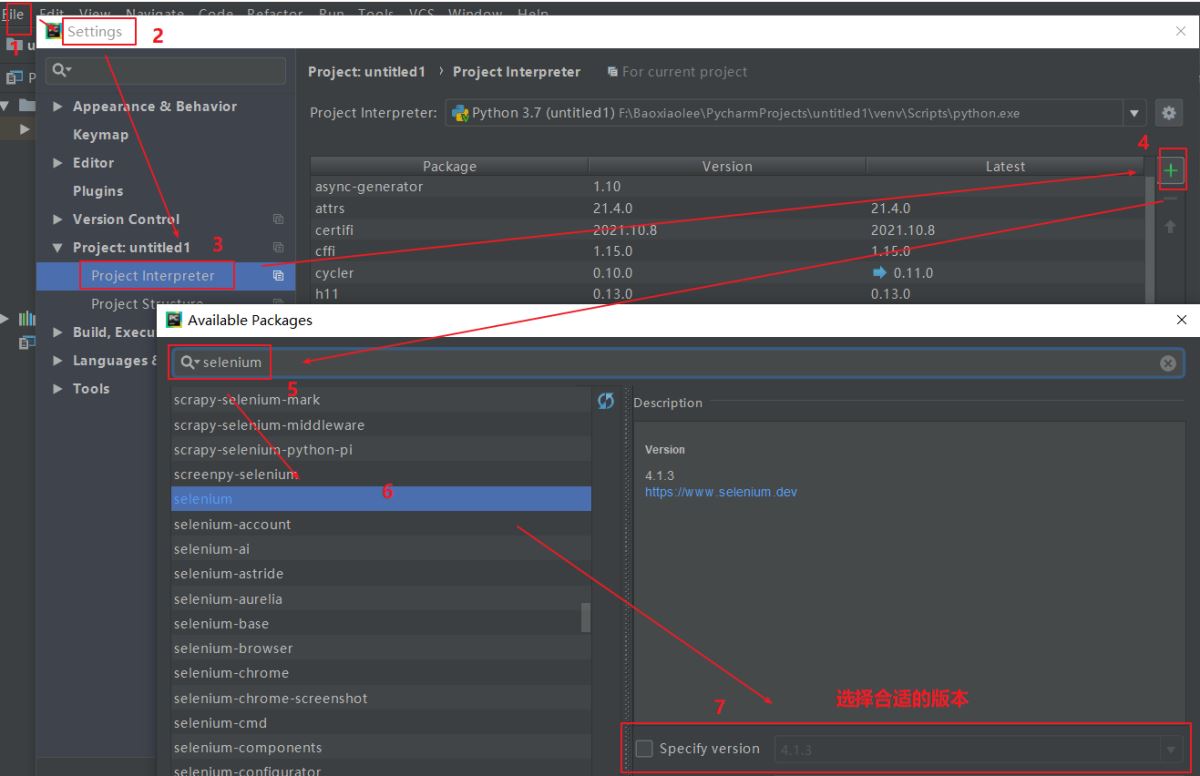
Selenium模块是Python的第三方库,可以通过pip进行安装
|
1 |
pip install selenium |
或python中导入
3.淘宝秒杀脚本
|
1 2 3 4 5 6 7 8 9 10 11 12 13 14 15 16 17 18 19 20 21 22 23 24 25 26 27 28 29 30 31 32 33 34 35 36 37 38 39 40 41 42 43 44 45 46 47 48 49 50 |
from selenium import webdriver import datetime import time # 连接Chrome浏览器 driver = webdriver.Chrome() def login(url): # 打开淘宝登录页,并进行登录 driver.get("https://www.taobao.com") time.sleep(3) if driver.find_element_by_link_text("亲,请登录"): # F12 点击事件name定位(注意空格) driver.find_element_by_link_text("亲,请登录").click() print("请在20秒内完成登录") time.sleep(20) driver.get(url) time.sleep(3) now = datetime.datetime.now() print('login success:', now.strftime('%Y-%m-%d %H:%M:%S')) def buy(buytime): while True: now = datetime.datetime.now().strftime('%Y-%m-%d %H:%M:%S.%f') # 对比时间,时间到的话就点击结算 if now >= buytime: try: # 立即抢购 if driver.find_element_by_id("J_LinkBuy"): # F12 点击事件id定位 print("速度点击!!!") driver.find_element_by_id("J_LinkBuy").click() time.sleep(0.09) while now >= buytime: try: print("赶紧买!!!") # 提交订单 if driver.find_element_by_class_name('go-btn'): # F12 点击事件class定位 driver.find_element_by_class_name('go-btn').click() except: time.sleep(0.02) except: time.sleep(0.08) print(now) time.sleep(0.05) # 定位元素方式三种任何一个都可以使用过,实际使用自由组合。 # (1)id定位 driver.find_element_by_id("id") # (2)name定位 driver.find_element_by_name("name") # (3)class定位 driver.find_element_by_class_name("class_name") # 抢购主函数 if __name__ == "__main__": times = input("请输入抢购时间:时间格式:2021-12-29 19:45:00.000000") url = input("请输入抢购地址") login(url) buy(times) |
4.京东秒杀脚本
|
1 2 3 4 5 6 7 8 9 10 11 12 13 14 15 16 17 18 19 20 21 22 23 24 25 26 27 28 29 30 31 32 33 34 35 36 37 38 39 40 41 42 43 44 45 46 47 48 49 50 51 52 53 54 55 56 57 58 59 60 61 62 63 64 65 |
from selenium import webdriver import datetime import time def login(): # 打开淘宝登录页,并进行扫码登录 browser.get("https://www.jd.com") time.sleep(3) if browser.find_element_by_link_text("你好,请登录"): browser.find_element_by_link_text("你好,请登录").click() print("======请在30秒内完成登录") time.sleep(30) browser.get("https://cart.jd.com") time.sleep(3) now = datetime.datetime.now() print('======login success:', now.strftime('%Y-%m-%d %H:%M:%S')) time.sleep(5)
def buy(times, choose): # 点击购物车里全选按钮 if choose == 2: print("======请手动勾选需要购买的商品") while True: now = datetime.datetime.now().strftime('%Y-%m-%d %H:%M:%S.%f') # 对比时间,时间到的话就点击结算 if now > times: if choose == 1: while True: try: if browser.find_element_by_id("J_SelectAll2"): browser.find_element_by_id("J_SelectAll2").click() break except: print("======找不到购买按钮") # 点击结算按钮 while True: try: if browser.find_element_by_link_text("去结算"): browser.find_element_by_link_text("去结算").click() print("======结算成功") break except: pass
while True: try: if browser.find_element_by_id('order-submit'): browser.find_element_by_id('order-submit').click() now1 = datetime.datetime.now().strftime('%Y-%m-%d %H:%M:%S.%f') print("======抢购成功时间:%s" % now1) except: print("======再次尝试提交订单") time.sleep(0.01)
# 定位元素方式三种任何一个都可以使用过,实际使用自由组合。 # (1)id定位 driver.find_element_by_id("id") # (2)name定位 driver.find_element_by_name("name") # (3)class定位 driver.find_element_by_class_name("class_name") # 抢购主函数 if __name__ == "__main__": times = input("请输入抢购时间,格式如(2018-09-06 11:20:00.000000):") browser = webdriver.Chrome() browser.maximize_window() login() choose = int(input("到时间自动勾选购物车请输入“1”,否则输入“2”:")) buy(times, choose) |
总结
本篇文章主要介绍了Python 通过selenium实现毫秒级自动抢购的示例代码,通过扫码登录即可自动完成一系列操作,抢购时间精确至毫秒,可抢加购物车等待时间结算的,也可以抢聚划算、火车票等的商品。