root与alias
|
1 2 3 4 |
location / { alias /app/html/; index index.html index.htm; } |
两者区别:
- alias是目录别名,root是最上层目录的定义
- alias后必须用"/"结束,不然找不到文件,root可有可无
反向代理解决跨域
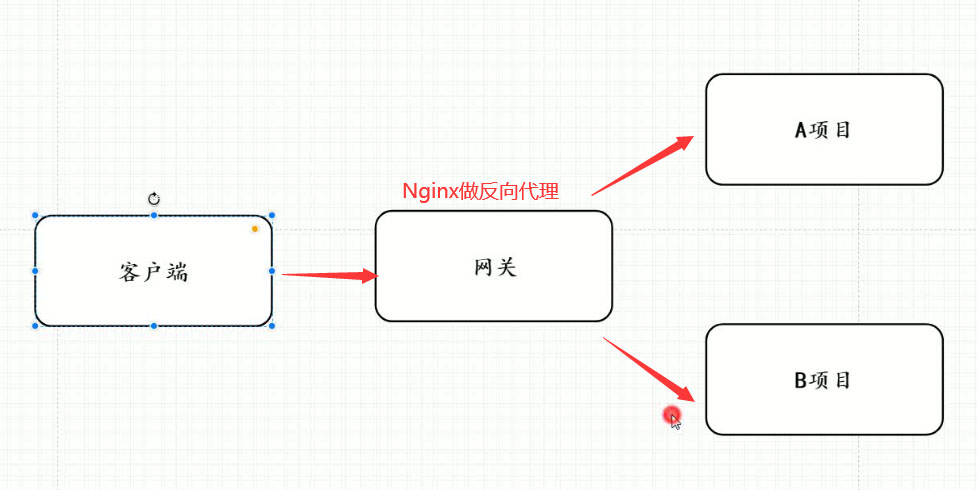
- LVS:四层负载均衡,基于tcp ip和端口号 实现负载均衡
- Nginx:七层负载均衡,对http协议 实现负载均衡
nginx的优化
基本配置优化
- 查看CPU核数
|
1 |
cat /proc/cpuinfo| grep "cpu cores"| uniq |

|
1 2 3 4 5 6 7 8 9 10 11 12 13 14 15 16 17 18 19 20 21 22 23 24 25 26 27 28 29 30 31 32 33 34 35 36 37 38 39 40 41 42 |
worker_processes 4 ; # 设为cpu核数 启动的worker进程数
events{ #设置Nginx网络连接序列化 accept_mutex on; #设置Nginx的worker进程是否可以同时接收多个请求 multi_accept on; #设置Nginx的worker进程最大的连接数 worker_connections 1024; #设置Nginx使用的事件驱动模型 use epoll; }
http { include mime.types; #include是引入关键字,这里引入了mime.types这个配置文件(同在conf目录下,mime.types是用来定义,求返回的content-type) default_type application/octet-stream; #mime.types未定义的,使用默认格式application/octet-stream
sendfile on; # 开启 高效文件传输模式。 tcp_nopush on; #需要在 sendfile开启模式才有效,防止网路阻塞,积极的减少网络报文段的数量。将响应头和正文的开始部分一起发送,而不一个接一个的发送 tcp_nodelay on; #有数据随时发送
keepalive_timeout 65; #长链接超时时间
#一个nginx可以启用多个server(虚拟服务器) server { listen 80;#监听端口80 server_name localhost; #接收的域名
location / { root html; #根目录指向html目录,看下图 index index.html index.htm; #域名/index 指向 index.html index.htm文件,看下图 }
error_page 500 502 503 504 /50x.html; # 服务器错误码为500 502 503 504,转到"域名/50x.html" location = /50x.html { # 指定到html文件夹下找/50x.htm root html;#根目录指向html目录,看下图 }
} } |
反向代理设置keepalive
- 转发请求 提高效率
|
1 2 3 4 5 6 7 8 9 10 11 12 13 14 |
upstream backend{ server 192.168.111.101:9001; server 192.168.111.101:9002; server 192.168.111.101:9003; keepalive 300; # 300个长连接,转发请求效率大大提高! } server { listen 80; server_name localhost; location /{ proxy_pass http://backend;
} } |
压缩
|
1 2 3 4 5 6 7 8 9 10 11 12 13 14 15 16 17 18 19 |
server { listen 80; server_name localhost;
gzip on; gzip_buffers 32 4K; gzip_comp_level 6; gzip_min_length 100; gzip_types application/javascript text/css text/xml application/json; gzip_disable "MSIE [1-6]\."; #配置禁用gzip条件,支持正则。此处表示ie6及以下不启用gzip(因为ie低版本不支持) gzip_vary on; #accept-encoding gzip_static on; #如果有压缩好的,直接使用 location / { proxy_pass http://127.0.0.1:8080; }
} |
配置文件内容详细介绍:
gzip配置的常用参数
- gzip on|off; #是否开启gzip
- gzip_buffers 32 4K| 16 8K #缓冲(压缩在内存中缓冲几块? 每块多大?)
- gzip_comp_level [1-9] #推荐6 压缩级别(级别越高,压的越小,越浪费CPU计算资源)
- gzip_disable #正则匹配UA 什么样的Uri不进行gzip
- gzip_min_length 200 # 开始压缩的最小长度(再小就不要压缩了,意义不在)
- gzip_http_version 1.0|1.1 # 开始压缩的http协议版本(可以不设置,目前几乎全是1.1协议)
- gzip_proxied # 设置请求者代理服务器,该如何缓存内容
- gzip_types text/plain application/xml # 对哪些类型的文件用压缩 如txt,xml,html ,css
- gzip_vary on|off # 是否传输gzip压缩标志
缓存
|
1 2 3 4 5 6 7 8 9 10 11 12 13 14 15 16 17 18 19 20 21 |
# 代理缓存配置 # meitecache:256m,大小256m,失效时间1天 inactive=1d proxy_cache_path "./meite_cachedata" levels=1:2 keys_zone=meitecache:256m inactive=1d max_size=1000g;
server { listen 80; server_name localhost;
location /details { #使用缓存名称 proxy_cache meitecache; #对以下状态码实现缓存~~~~ proxy_cache_valid 200 206 304 301 302 1d; # 缓存的key--》请求路径 proxy_cache_key $request_uri; add_header X-Cache-Status $upstream_cache_status; proxy_pass http://127.0.0.1:8080; index index.html index.htm; }
} |
操作系统优化
|
1 |
vi /etc/sysctl.conf |
- 配置内容
|
1 2 3 4 5 6 7 8 9 10 |
# 防止一个套接字过多连接到达时引起负载 net.ipv4.tcp_syncookies=1 #默认128,socket的监听队列,微调大 net.core.somaxconn=1024 # timeout的超时时间,调小,tcp握手时间 net.ipv4.tcp_fin_timeout=10 #os直接使用timewait的连接 net.ipv4.tcp_tw_reuse=1 #回收禁用,若开启---》快速回收处于 TIME_WAIT状态的socket net.ipv4.tcp_tw_recycle=0 |
- 加载配置!
|
1 |
sysctl -p |