一、图片存储方案
1.1 常见图片存储方案
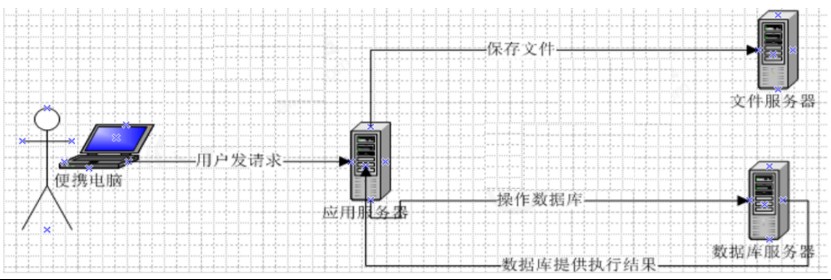
实际项目中会拆分不同功能服务器,提升系统运行效率,图片存储常用三种方案:
- Nginx 搭建图片服务器
- 分布式文件存储系统(FastDFS、HDFS)
- 云存储(阿里云 OSS、七牛云)
本文选用七牛云对象存储,接入简单、CDN 加速快、适合中小项目快速落地。
1.2 七牛云使用流程
1.2.1 注册与实名认证
- 访问七牛云官网:https://www.qiniu.com/
- 注册账号并完成个人实名认证(创建存储空间必须认证)
1.2.2 新建存储空间
控制台进入对象存储 KODO
- 创建存储空间(Bucket):
- 名称:3~63 位小写字母 / 数字 / 短横线
- 存储区域:华东 / 华北 / 华南等
- 访问控制:公开 / 私有(图片通常设为公开)
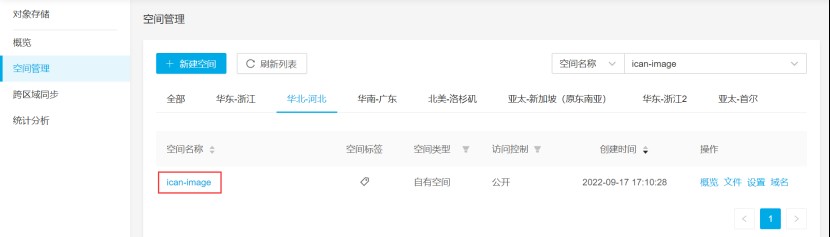
- 创建成功后可在文件管理查看上传资源。
1.2.3 获取 AK/SK 密钥
- 进入个人中心 → 密钥管理
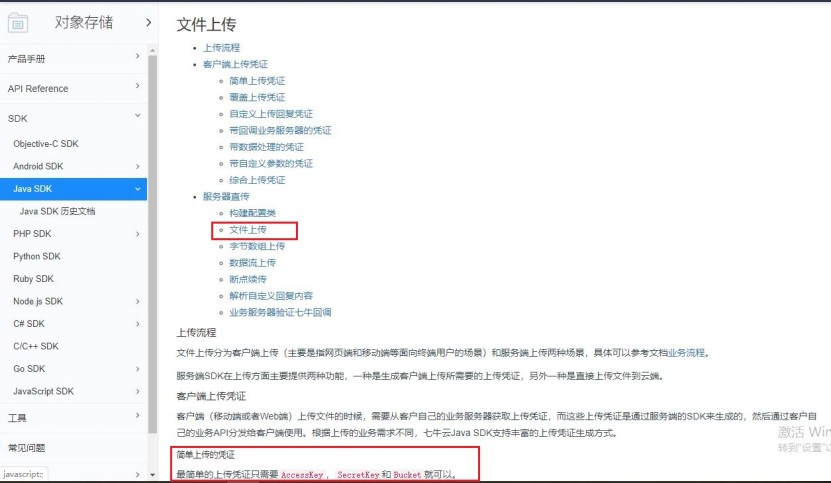
- 复制 AccessKey 和 SecretKey(Java SDK 鉴权使用)
1.3 Java SDK 接入七牛云
1.3.1 引入 Maven 依赖
|
1 2 3 4 5 6 |
<!-- 七牛云SDK --> <dependency> <groupId>com.qiniu</groupId> <artifactId>qiniu-java-sdk</artifactId> <version>7.7.0</version> </dependency> |
1.3.2 封装七牛云工具类
将上传、删除封装为工具类,放入公共模块(ICan-common):
|
1 2 3 4 5 6 7 8 9 10 11 12 13 14 15 16 17 18 19 20 21 22 23 24 25 26 27 28 29 30 31 32 33 34 35 36 37 38 39 40 41 42 43 |
public class QiniuUtils { public static String accessKey = "你的AK"; public static String secretKey = "你的SK"; public static String bucket = "你的存储空间名"; // 文件路径上传 public static void upload2Qiniu(String filePath,String fileName){ Configuration cfg = new Configuration(Zone.zone2()); //你自己存储空间的存储区域 UploadManager uploadManager = new UploadManager(cfg); Auth auth = Auth.create(accessKey, secretKey); String upToken = auth.uploadToken(bucket); try { Response response = uploadManager.put(filePath, fileName, upToken); DefaultPutRet putRet = new Gson().fromJson(response.bodyString(), DefaultPutRet.class); } catch (QiniuException ex) { ex.printStackTrace(); } } // 字节数组上传 public static void upload2Qiniu(byte[] bytes, String fileName){ Configuration cfg = new Configuration(Zone.zone2()); UploadManager uploadManager = new UploadManager(cfg); Auth auth = Auth.create(accessKey, secretKey); String upToken = auth.uploadToken(bucket); try { Response response = uploadManager.put(bytes, fileName, upToken); DefaultPutRet putRet = new Gson().fromJson(response.bodyString(), DefaultPutRet.class); } catch (QiniuException ex) { ex.printStackTrace(); } } // 删除文件 public static void deleteFileFromQiniu(String fileName){ Configuration cfg = new Configuration(Zone.zone2()); Auth auth = Auth.create(accessKey, secretKey); BucketManager bucketManager = new BucketManager(auth, cfg); try { bucketManager.delete(bucket, fileName); } catch (QiniuException ex) { System.err.println(ex.code()); } } } ? |
二、新增套餐功能(图片上传 + 多对多关联)
2.1 需求说明
套餐是检查组的集合,套餐与检查组为多对多关系,需中间表t_setmeal_checkgroup关联。新增套餐需录入:
- 基本信息(编码、名称、价格、图片等)
- 关联检查组
2.2 前端实现(Vue+ElementUI)
2.2.1 弹出新增窗口
点击新建按钮,清空表单并展示弹窗,同时加载所有检查组:
|
1 2 3 4 5 6 7 8 9 10 11 12 |
handleCreate(){ this.resetForm(); this.dialogFormVisible = true; // 查询所有检查组 axios.get("/checkgroup/findAll.do").then((res)=>{ if(res.data.flag){ this.tableData = res.data.data; }else{ this.$message.error(res.data.message); } }); } |
2.2.2 图片上传与预览
使用el-upload组件,限制 JPG 格式、大小≤2MB:
|
1 2 3 4 5 6 7 8 9 10 11 |
<el-upload class="avatar-uploader" action="/setmeal/upload.do" :auto-upload="autoUpload" name="imgFile" :show-file-list="false" :on-success="handleAvatarSuccess" :before-upload="beforeAvatarUpload"> <img v-if="imageUrl" :src="imageUrl" class="avatar"> <i v-else class="el-icon-plus avatar-uploader-icon"></i> </el-upload> |
上传前校验:
|
1 2 3 4 5 6 7 |
beforeAvatarUpload(file){ const isJPG = file.type === 'image/jpeg'; const isLt2M = file.size / 1024 / 1024 < 2; if(!isJPG) this.$message.error("只能上传JPG格式!"); if(!isLt2M) this.$message.error("图片大小不能超过2MB!"); return isJPG && isLt2M; } |
2.3 后端实现
2.3.1 图片上传接口
|
1 2 3 4 5 6 7 8 9 10 11 12 13 14 15 16 17 18 19 20 21 22 23 24 25 |
@Controller @RequestMapping("/setmeal") public class SetmealController { @Autowired private JedisPool jedisPool;
// 图片上传 @RequestMapping("/upload") @ResponseBody public Result upload(@RequestParam("imgFile") MultipartFile imgFile){ try { String originalFilename = imgFile.getOriginalFilename(); String extention = originalFilename.substring(originalFilename.lastIndexOf(".")); String fileName = UUID.randomUUID().toString() + extention; // 上传七牛云 QiniuUtils.upload2Qiniu(imgFile.getBytes(),fileName); // 存入Redis(所有上传图片) jedisPool.getResource().sadd(RedisConstant.SETMEAL_PIC_RESOURCES,fileName); return new Result(true, MessageConstant.PIC_UPLOAD_SUCCESS,fileName); } catch (Exception e) { e.printStackTrace(); return new Result(false, MessageConstant.PIC_UPLOAD_FAIL); } } } |
2.3.2 新增套餐(事务 + 多对多关联)
|
1 2 3 4 5 6 7 8 9 10 11 12 13 14 15 16 17 18 19 20 21 22 23 24 25 26 27 |
@Service @Transactional public class SetmealServiceImpl implements SetmealService { @Autowired private SetmealDao setmealDao;
@Override public void add(Setmeal setmeal, Integer[] checkgroupIds) { // 新增套餐基本信息 setmealDao.add(setmeal); Integer setmealId = setmeal.getId(); // 设置套餐与检查组关联 this.setSetmealAndCheckgroup(setmealId,checkgroupIds); }
// 维护多对多关系 private void setSetmealAndCheckgroup(Integer setmealId, Integer[] checkgroupIds) { if(checkgroupIds != null && checkgroupIds.length > 0){ for (Integer checkgroupId : checkgroupIds) { Map<String,Integer> map = new HashMap<>(); map.put("setmealId",setmealId); map.put("checkgroupId",checkgroupId); setmealDao.setSetmealAndCheckGroup(map); } } } } |
2.3.3 保存套餐后同步 Redis
|
1 2 3 4 5 6 7 8 9 10 11 12 13 |
@RequestMapping("/add") @ResponseBody public Result add(@RequestBody Setmeal setmeal, Integer[] checkgroupIds){ try { setmealService.add(setmeal,checkgroupIds); // 存入Redis(已保存到数据库的图片) jedisPool.getResource().sadd(RedisConstant.SETMEAL_PIC_DB_RESOURCES,setmeal.getImg()); return new Result(true, MessageConstant.ADD_SETMEAL_SUCCESS); }catch (Exception e){ e.printStackTrace(); return new Result(false, MessageConstant.ADD_SETMEAL_FAIL); } } |
三、定时任务组件 Quartz(重点)
3.1 Quartz 核心概念
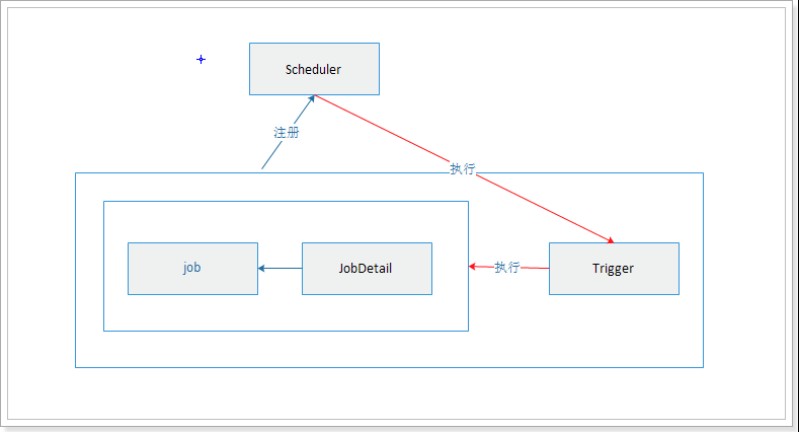
- Job:要执行的任务(清理图片)
- Trigger:触发器(定义执行时间)
- Scheduler:调度器(绑定任务与触发器)
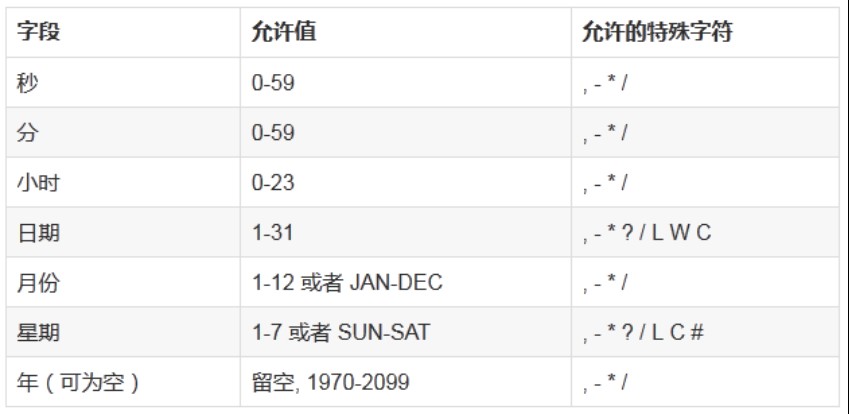
3.2 Cron 表达式
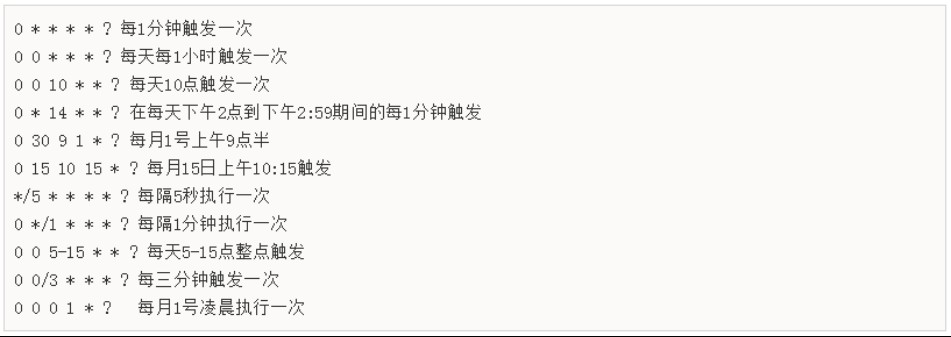
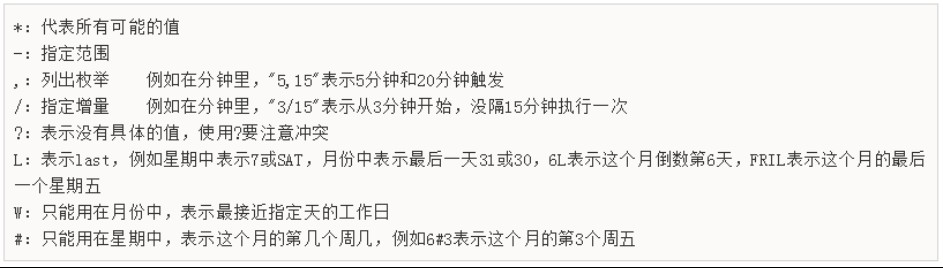
格式:秒 分 时 日 月 周 年(年可省略)常用示例:
- 0/1 * * * * ?:每秒执行
- 0 0 2 * * ?:每天凌晨 2 点执行
- 0 0 0/1 * * ?:每小时执行
示例:
前面介绍了cron表达式,但是自己编写表达式还是有一些困难的,我们可以借助一些 cron表达式在线生成器来根据我们的需求生成表达式即可。
http://cron.qqe2.com/
3.3 SpringBoot 整合 Quartz
3.3.1 引入依赖
|
1 2 3 4 |
<dependency> <groupId>org.springframework.boot</groupId> <artifactId>spring-boot-starter-quartz</artifactId> </dependency> |
3.3.2 配置类
|
1 2 3 4 5 6 7 8 9 10 11 12 13 14 15 16 17 18 19 20 21 22 23 24 25 26 27 |
@Configuration public class QuartzConfig { @Bean //job:干什么事 public MethodInvokingJobDetailFactoryBean jobDetail(ClearImgJob clearImgJob){ MethodInvokingJobDetailFactoryBean bean = new MethodInvokingJobDetailFactoryBean(); bean.setTargetObject(clearImgJob); bean.setTargetMethod("clearImg"); return bean; }
@Bean //trigger:什么时候 public CronTriggerFactoryBean trigger(MethodInvokingJobDetailFactoryBean jobDetail){ CronTriggerFactoryBean bean = new CronTriggerFactoryBean(); bean.setCronExpression("0 0 2 * * ?"); // 每天凌晨2点 bean.setJobDetail(jobDetail.getObject()); return bean; }
@Bean //scheduler:什么时候干什么事 public SchedulerFactoryBean scheduler(CronTriggerFactoryBean trigger){ SchedulerFactoryBean bean = new SchedulerFactoryBean(); bean.setTriggers(trigger.getObject()); return bean; } }
? |
四、定时清理垃圾图片(核心)
4.1 垃圾图片产生原因
用户上传图片后未提交套餐,图片存于七牛云但无数据库记录,成为垃圾文件。
4.2 清理思路
- Redis 集合 A:setmealPicResources(所有上传图片)
- Redis 集合 B:setmealPicDbResources(已保存数据库图片)
- 求差集:A - B = 垃圾图片
- 定时删除七牛云 + Redis 中的垃圾文件
4.3 清理任务实现
|
1 2 3 4 5 6 7 8 9 10 11 12 13 14 15 16 17 18 19 20 21 22 23 24 |
@Component public class ClearImgJob { @Autowired private JedisPool jedisPool;
public void clearImg(){ // 计算差集 Set<String> garbageImg = jedisPool.getResource().sdiff( RedisConstant.SETMEAL_PIC_RESOURCES, RedisConstant.SETMEAL_PIC_DB_RESOURCES);
if(garbageImg != null){ for (String imgName : garbageImg) { // 删除七牛云文件 QiniuUtils.deleteFileFromQiniu(imgName); // 删除Redis记录 jedisPool.getResource().srem(RedisConstant.SETMEAL_PIC_RESOURCES,imgName); System.out.println("清理垃圾图片:" + imgName); } } } }
? |
五、总结
- 图片存储:选用七牛云对象存储,接入简单、CDN 加速、支持 Java SDK。
- 套餐管理:多对多关联检查组,支持图片上传预览、分页查询。
- 垃圾清理:基于 Redis 集合差集定位垃圾图片,Quartz 定时自动清理,节省存储资源。
本文完整实现预约系统套餐管理的图片存储与定时清理,可直接复用至同类项目。