本文中的示例均在python3.11中运行成功。
如果运行出现re.error报错,可以更换python版本或者用regex模块替换re模块后再运行。
高级特性详解
贪婪与非贪婪匹配
贪婪匹配 (Greedy):默认匹配模式,尽可能匹配更多的字符
非贪婪匹配 (Lazy/Reluctant):匹配尽可能少的字符
| 量词 | 贪婪模式 | 非贪婪模式 |
|---|---|---|
| * | .* | .*? |
| + | .+ | .+? |
| ? | .? | .?? |
| {n,m} | .{n,m} | .{n,m}? |
| {n,} | .{n,} | .{n,}? |
示例
匹配div标签
|
1 2 3 4 5 6 7 8 9 10 11 |
import re
html_text = '<div>content1</div><div>content2</div>'
# 贪婪匹配 greedy_pattern = r'<div>.*<\/div>' print(re.findall(greedy_pattern, html_text)) # ['<div>content1</div><div>content2</div>']
# 非贪婪匹配 lazy_pattern = r'<div>.*?<\/div>' print(re.findall(lazy_pattern, html_text)) # ['<div>content1</div>', '<div>content2</div>'] |
分组和反向引用
捕获分组:用括号 () 定义,从左到右编号
非捕获分组:语法为(?:pattern) ,表示只分组不捕获
反向引用:在同一个正则表达式中引用前面的捕获组,用 \1, \2 等
示例
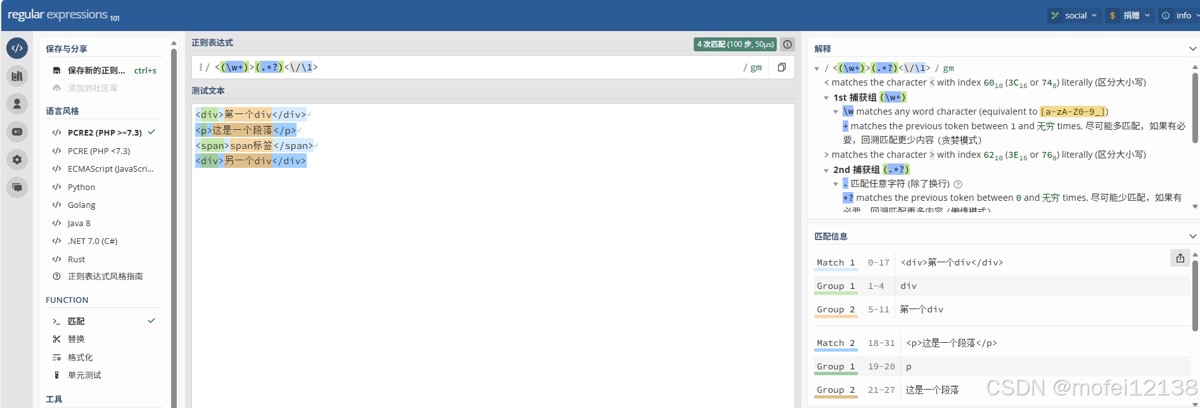
匹配对称的HTML标签
|
1 2 3 4 5 6 7 8 9 10 11 12 13 14 15 16 17 |
import re
html_text = """ <div>第一个div</div> <p>这是一个段落</p> <span>span标签</span> <div>另一个div</div> """ pattern = r'<(\w+)>(.*?)</\1>' matches = re.finditer(pattern, html_text) for match in matches: print(f"标签: <{match.group(1)}>, 内容: '{match.group(2)}'") # 输出: # 标签: <div>, 内容: '第一个div' # 标签: <p>, 内容: '这是一个段落' # 标签: <span>, 内容: 'span标签' # 标签: <div>, 内容: '另一个div' |
格式化日期
|
1 2 3 4 5 |
import re
# 使用反向引用进行替换 date_text = "2024-05-15" print(re.sub(r'(\d{4})-(\d{2})-(\d{2})', r'\3/\2/\1', date_text)) # 15/05/2024 |
命名捕获组
语法:(?Ppattern)
说明:name是捕获组的名称,可以使用 (?P=name) 来反向引用
示例
处理配置文件
|
1 2 3 4 5 6 7 8 9 10 11 12 13 14 15 16 17 18 19 20 21 22 23 24 25 26 27 28 29 |
import re
config_text = """ # 数据库配置 db_host = localhost db_port = 5432 db_name = mydb """ config_pattern = r''' ^ \s* # 忽略前导空格 (?P<key>[a-zA-Z_][a-zA-Z0-9_]*) # 键名(命名捕获组) \s*=\s* # 等号 (?P<value>[^#\n]+) # 值(到注释或换行为止) \s* (?:\#.*)? # 忽略注释 $ '''
matches = re.finditer(config_pattern, config_text, re.MULTILINE | re.VERBOSE) for match in matches: groups = match.groupdict() # 获取所有命名组作为字典 key = groups['key'] value = groups['value'].strip() print(f"{key} = {value}") # 输出: # db_host = localhost # db_port = 5432 # db_name = mydb |
模式修饰符
| 修饰符 | re 模块常量 | 说明 |
|---|---|---|
| i | re.IGNORECASE 或 re.I | 忽略大小写 |
| m | re.MULTILINE 或 re.M | 多行模式,使^和$匹配每行的开头结尾 |
| s | re.DOTALL 或 re.S | 单行模式,使.匹配包括换行符在内的所有字符 |
| x | re.VERBOSE 或 re.X | 忽略空白和注释 |
| u | re.UNICODE 或 re.U | Unicode模式(Python 3 默认) |
| a | re.ASCII 或 re.A | ASCII 模式 |
| g | 没有对应的常量,可以用re.findall()函数实现 | 全局匹配 |
示例
|
1 2 3 4 5 6 7 8 9 10 11 12 13 14 15 16 17 18 19 20 21 22 23 24 25 26 27 28 29 30 31 32 33 34 35 |
import re
text = "Hello World\nhello Python\nHELLO Regex"
# 1. 忽略大小写 pattern1 = re.compile(r'hello', re.IGNORECASE) print(pattern1.findall(text)) # ['Hello', 'hello', 'HELLO']
# 2. 多行模式 pattern2 = re.compile(r'^hello', re.IGNORECASE | re.MULTILINE) print(pattern2.findall(text)) # ['Hello', 'hello', 'HELLO']
# 3. 使 . 匹配所有字符 text2 = "start\nmiddle\nend" pattern3 = re.compile(r'start.*end', re.DOTALL) print(pattern3.search(text2).group()) # start\nmiddle\nend
# 4. 详细模式(允许注释和空白) email_pattern = re.compile(r''' ^ # 开始 [\w\.-]+ # 用户名 @ # @符号 [\w\.-]+ # 域名 \. # 点 [a-zA-Z]{2,} # 顶级域名 $ # 结束 ''', re.VERBOSE) email = "test@example.com" print(email_pattern.match(email).group()) # test@example.com
# 5. Python 3 中,默认启用 Unicode 匹配 print(re.findall(r'\w+', 'café')) # ['café']
# 6. ASCII 模式 print(re.findall(r'\w+', 'café', re.ASCII)) # ['caf'] |
嵌入修饰符
语法
|
1 2 3 |
(?修饰符字母) # 开启修饰符 (?-修饰符字母) # 关闭修饰符 (?修饰符字母:子模式) # 对子模式应用修饰符 |
示例
|
1 2 3 4 5 6 7 8 9 10 |
import re
# 1. 全局开启修饰符 pattern1 = re.compile(r'(?i)hello') print(pattern1.findall("Hello WORLD")) # ['Hello']
# 2. 局部修饰符 pattern2 = re.compile(r'Hello (?i:world)!') print(pattern2.findall("Hello WORLD!")) # ['Hello WORLD!'] print(pattern2.findall("hello WORLD!")) # [] - Hello 区分大小写 |
先行断言和后行断言
正则表达式的先行断言和后行断言一共有 4 种形式:
- (?=pattern) 零宽正向先行断言(zero-width positive lookahead assertion)
- (?!pattern) 零宽负向先行断言(zero-width negative lookahead assertion)
- (?<=pattern) 零宽正向后行断言(zero-width positive lookbehind assertion)
- (?<!pattern) 零宽负向后行断言(zero-width negative lookbehind assertion)
如同 ^ 代表开头,$ 代表结尾,\b 代表单词边界一样,先行断言和后行断言也有类似的作用,它们只匹配某些位置,在匹配过程中,不占用字符,所以被称为"零宽"。
正向先行断言
语法:(?=pattern)
说明:代表字符串中的一个位置,紧接该位置之后的字符序列能够匹配 pattern。
示例
匹配后面跟着"元"的数字
|
1 2 3 4 5 |
import re
text = "苹果价格100元, 香蕉价格50元, 橙子价格20元" pattern = r'\d+(?=元)' print(re.findall(pattern, text)) # ['100', '50', '20'] |
提取扩展名前的主文件名
|
1 2 3 4 5 6 7 8 9 10 11 12 13 14 15 16 |
import re
filenames = ["file.txt", "image.jpg", "document.pdf", "noextension", "archive.tar.gz"] pattern = r'.+?(?=\.\w)' for filename in filenames: match = re.match(pattern, filename) if match: print(f"{filename} → {match.group()}") else: print(f"{filename} → 文件名格式错误") # 输出: # file.txt → file # image.jpg → image # document.pdf → document # noextension → 文件名格式错误 # archive.tar.gz → archive |
复杂密码验证(至少8位,包含大写字母、数字、特殊字符)
|
1 2 3 4 5 6 7 8 9 10 11 12 13 14 15 |
import re
passwords = ["Pass123#", "password", "PASSWORD123", "Pass123", "Pass@1234"] pattern = r'^(?=.*[A-Z])(?=.*\d)(?=.*[@#$%^&+=]).{8,}$' for pwd in passwords: if re.match(pattern, pwd): print(f"{pwd}: ? 通过") else: print(f"{pwd}: ? 失败") # 输出: # Pass123#: ? 通过 # password: ? 失败(缺大写、数字、特殊字符) # PASSWORD123: ? 失败(缺特殊字符) # Pass123: ? 失败(缺特殊字符,长度不够) # Pass@1234: ? 通过 |
负向先行断言
语法:(?!pattern)
说明:代表字符串中的一个位置,紧接该位置之后的字符序列不能匹配 pattern。
示例
提取非注释的Python配置项
|
1 2 3 4 5 6 7 8 9 10 11 12 13 14 15 16 |
import re
config_text = """# 数据库配置 DATABASE_HOST = "localhost" # DATABASE_PORT = 5432 DATABASE_PORT = 3306 DATABASE_NAME = "myapp_db" """ pattern = r'^(?!\s*#).+$' matches = re.findall(pattern, config_text, re.MULTILINE) for i, line in enumerate(matches, 1): print(f"{i:2}. {line.strip()}") # 输出: # 1. DATABASE_HOST = "localhost" # 2. DATABASE_PORT = 3306 # 3. DATABASE_NAME = "myapp_db" |
正向后行断言
语法:(?<=pattern)
说明:代表字符串中的一个位置,紧接该位置之前的字符序列能够匹配 pattern。
注意:在python中,后行断言要求模式必须是固定宽度的
示例
从配置文件中提取指定键后面的值
|
1 2 3 4 5 6 7 8 9 10 11 12 |
import re
config_text = """ # Redis配置 redis_host = 127.0.0.1 redis_port = 6379 redis_password = "redis_pass" """ pattern = r'(?<=\bredis_host\s=\s)([^\s#]+)' match = re.search(pattern, config_text) if match: print(match.group(1)) # 127.0.0.1 |
负向后行断言
语法:(?<!pattern)
说明:代表字符串中的一个位置,紧接该位置之前的字符序列不能匹配 pattern。
注意:在python中,后行断言要求模式必须是固定宽度的
示例
匹配前面不是 "not " 的 “happy”
|
1 2 3 4 5 6 7 8 9 10 11 12 |
import re
text = "I am happy, you are not happy, we are happy" pattern = r'(?<!not\s)happy'
matches = re.finditer(pattern, text) for match in matches: start, end = match.span() print(f"位置 {start}-{end}: '{match.group()}'") # 输出: # 位置 5-10: 'happy' # 位置 38-43: 'happy' |
原子分组与占有量词
原子分组:使用语法 (?>pattern)。一旦这个分组内的子表达式匹配成功,匹配点就会固定,引擎会关闭该分组内的所有回溯可能性。
占有量词:原子分组应用于量词的快捷语法。它在普通量词后加上一个 +。比如 .+ 等同于 (?>.)
示例
|
1 2 3 4 5 6 7 8 9 10 11 12 13 14 15 16 17 18 |
import re
text = "ID: 12345678901234567890, Name: LongID"
# 普通量词 - 会回溯尝试5-10位的各种组合 pattern_normal = r"ID: (\d{5,10}), Name: (\w+)" match = re.search(pattern_normal, text) print(f"ID={match.group(1)}" if match else '不匹配') # 不匹配
# 使用原子分组 - 直接匹配10位然后失败 pattern_atomic = r"ID: ((?>\d{5,10})), Name: (\w+)" match = re.search(pattern_atomic, text) print(f"ID={match.group(1)}" if match else '不匹配') # 不匹配
# 使用占有量词 - 同原子分组 pattern_possess = r"ID: (\d{5,10}+), Name: (\w+)" match = re.search(pattern_possess, text) print(f"ID={match.group(1)}" if match else '不匹配') # 不匹配 |
性能测试
|
1 2 3 4 5 6 7 8 9 10 11 12 13 14 15 16 17 18 19 20 21 22 23 24 25 |
import re
# 创建一个会导致大量回溯的长文本,进行性能测试 long_text = "ID: " + "1" * 10001 + "abc" pattern_normal = r"ID: (\d{5,10000}), Name: (\w+)" pattern_atomic = r"ID: (\d{5,10000}+), Name: (\w+)"
# 测试普通分组 import time start = time.time() for _ in range(1000): # 重复多次 re.search(pattern_normal, long_text)
end = time.time() print(f"普通分组 1000次匹配耗时: {(end-start)*1000:.2f}毫秒") # 64.38毫秒
# 测试占有量词 start2 = time.time() for _ in range(1000): re.search(pattern_atomic, long_text)
end2 = time.time() print(f"占有量词 1000次匹配耗时: {(end2-start2)*1000:.2f}毫秒") # 24.43毫秒
print(f"效率提升: {((end-start)/(end2-start2)-1)*100:.1f}%") # 效率提升: 163.6% |
条件表达式
语法:(?(condition)yes-pattern|no-pattern)
说明:如果condition匹配了,则尝试yes-pattern,否则尝试no-pattern
条件可以是:
- 捕获组的编号:(?(1)…)
- 命名捕获组的名称:(?(name)…)
示例
匹配带或不带引号的字符串
|
1 2 3 4 5 6 7 8 9 10 11 12 13 14 15 16 17 18 19 20 21 22 23 24 25 26 27 28 29 30 31 |
import re
texts = [ '"quoted string"', # 双引号 'unquoted string', # 不带引号 "'single quotes'", # 单引号 'another string', # 不带引号 ] pattern = r''' ^ (["'])? # 第1组: 可选的引号 (?(1) # 条件: 如果第1组匹配了(有引号) ([^"']+) # yes模式: 引号内的内容 | # 否则 (.+) # no模式: 不带引号的内容 ) (?(1)\1) # 条件: 如果有引号,匹配对应的结束引号 $ ''' for text in texts: match = re.search(pattern, text, re.VERBOSE) if match: if match.group(1): print(f"带引号字符串: 引号={match.group(1)}, 内容={match.group(2)}") else: print(f"无引号字符串: 内容={match.group(3)}") # 输出: # 带引号字符串: 引号=", 内容=quoted string # 无引号字符串: 内容=unquoted string # 带引号字符串: 引号=', 内容=single quotes # 无引号字符串: 内容=another string |
递归匹配
递归匹配:允许模式引用自身,用于匹配嵌套结构
语法:
- (?R):递归整个模式
- (?0):同 (?R)
- (?1), (?2), … :递归指定捕获组
- (?&name):递归命名捕获组 “name”
示例
匹配嵌套的圆括号
|
1 2 3 4 5 6 |
import regex # 需要安装: pip install regex
text = "a(b(c)d(e)f)g(h)i" # 使用递归模式 ?R 或 ?0 pattern = r'\((?:[^()]*|(?0))+\)' print(regex.findall(pattern, text)) # ['(b(c)d(e)f)', '(h)'] |
分支重置
分支重置让多个分支共享相同的捕获组编号。
语法:(?|pattern1|pattern2|pattern3)
示例
匹配日期
|
1 2 3 4 5 6 7 8 9 10 11 12 13 14 |
import regex
text1 = "2024-01-15" text2 = "15/01/2024"
# 传统方式(分组编号混乱) pattern_bad = r'(\d{4})-(\d{2})-(\d{2})|(\d{2})/(\d{2})/(\d{4})' print(regex.search(pattern_bad, text1).groups()) # ('2024', '01', '15', None, None, None) print(regex.search(pattern_bad, text2).groups()) # (None, None, None, '15', '01', '2024')
# 使用分支重置 pattern_good = r'(?|(\d{4})-(\d{2})-(\d{2})|(\d{2})/(\d{2})/(\d{4}))' print(regex.search(pattern_good, text1).groups()) # ('2024', '01', '15') print(regex.search(pattern_good, text2).groups()) # ('15', '01', '2024') |
子程序调用
语法:
|
1 2 3 4 5 6 |
(?(DEFINE) (?P<name1>pattern1) # 定义命名子模式1 (?P<name2>pattern2) # 定义命名子模式2 ... ) (?&name1) # 调用子模式name1 |
示例
匹配div标签
|
1 2 3 4 5 6 7 8 9 10 11 12 13 14 15 16 17 18 19 20 21 22 23 24 25 26 27 28 29 30 31 32 33 34 35 36 37 38 39 40 41 42 43 44 45 46 |
import regex
html = """<div class="container"> <h1>Title</h1> <p class="content">Paragraph with <strong>bold</strong> text.</p> <a href="/link" rel="external nofollow" rel="external nofollow" >Click here</a> </div> """ pattern = r'''(?six) # s: DOTALL, i: IGNORECASE, x: VERBOSE (?(DEFINE) # 定义标签名 (?P<tagname>[a-z][a-z0-9]*) # 定义属性部分 (?P<attrs>\s+[^>]*?) # 定义开始标签 (?P<start_tag><(?&tagname)(?&attrs)?>) # 定义结束标签 (?P<end_tag></(?&tagname)>) # 定义自闭合标签 (?P<self_closing><(?&tagname)(?&attrs)?\s*/>) # 定义文本内容(不包含<符号) (?P<text>[^<]+) # 定义元素(支持递归) (?P<element> (?&text) | (?&self_closing) | (?&start_tag) (?&element)* (?&end_tag) ) ) <div(?&attrs)?> (?&element)* </div> ''' match = regex.search(pattern, html) if match: print(match.group()) # 输出 # <div class="container"> # <h1>Title</h1> # <p class="content">Paragraph with <strong>bold</strong> text.</p> # <a href="/link" rel="external nofollow" rel="external nofollow" >Click here</a> # </div> |
工具推荐
正则表达式在线测试工具:https://regex101.com/