

Python定时后台任务实例介绍

最近碰到个事情需要在flask启动的时候定时清理一些数据, 以前都是用的apscheduler, 但是这次的任务比较简单,定时上报一些请求信息, 不太想通过第三方包的方式进行操作, 看了一下threadi
|
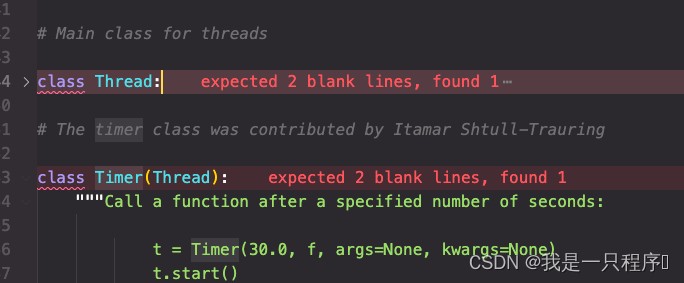
最近碰到个事情需要在flask启动的时候定时清理一些数据, 以前都是用的apscheduler, 但是这次的任务比较简单,定时上报一些请求信息, 不太想通过第三方包的方式进行操作, 看了一下threading源码,在提供Thread主函数的同时, 还提供了一个Timer的类,接下来就围绕这个Timer来说明如何启动轻量定时任务
Timer官方的说明
大概意思就是: 函数会在你设定的时间后执行, 注意这里是只执行一次,所以没有达到我们想要的定时执行,我们结合flask server来演示下如何定时执行。 代码
结果:
存在的问题: 当任务在定时时间内不能结束,那么在很短的时间内造成线程堆积,导致程序终止,所以我们进行改进。 改进
使用while True的方式保持这个Timer线程不停止, 这样就只会有一个线程在后台执行,也不会造成线程堆积最终程序退出。 |
您可能感兴趣的文章 :
- Python后台进程怎么启动?详细介绍subprocess和threading方法
- Python__pycache__被Git跟踪的排查与解决方案
- 使用Python Enum 实现类型安全的常量定义与函数签名生成
- 怎么解决Python安装TensorFlow时由于网络导致的下载超时
- 正确创建并运行 Python 脚本的桌面快捷方式的方法
- 在Python中按步长迭代调用依赖前序结果的函数
- 怎么在Python中可视化TensorFlow模型的计算图结构
- 用Python编写一个功能正确的Car类(含加速与刹车逻辑)
- Python执行系统命令的所有方法
- 使用Python一键实现MySQL数据库高可用切换

-
Python后台进程怎么启动?详细介绍subprocess和thr
后台进程是在后台运行的程序或任务,它们不会阻塞主程序的执行,并可以在后台处理一些耗时或周期性的任务。 在本文中,我们将探讨如 -
Python__pycache__被Git跟踪的排查与解决方案
一、问题现象 执行git pull时报错: 1 2 3 4 5 error: Your local changes to the following files would be overwritten by merge: backend/app/api/v1/__pycache__/__init__.cpyth -
使用Python Enum 实现类型安全的常量定义与函数签
本文介绍如何通过 `intenum` 和 `strenum` 替代 `@dataclass(frozen=true)` 定义常量,解决类型提示中动态引用常量值导致的 `variable not allowed in type ex -
怎么解决Python安装TensorFlow时由于网络导致的下载
pip install tensorflow 一直卡在 downloading 阶段怎么办 直接换源是最有效的解法,官方 PyPI 默认走国外 CDN,国内用户大概率超时或中断。清华、中 -
正确创建并运行 Python 脚本的桌面快捷方式的方法
本文详解为何 python 脚本快捷方式点击后闪退,并提供跨平台(windows/macos)的可靠解决方案:使用虚拟环境中的 python 解释器显式调用脚本, -
在Python中按步长迭代调用依赖前序结果的函数
本文介绍如何用简洁、可扩展的循环结构替代手动链式调用,实现对时间参数 t(0 到 ,步长 0.05)的自动迭代,并确保每次调用都以前一次 -
怎么在Python中可视化TensorFlow模型的计算图结构
用tf.summary.trace_export导出 GraphDef 供 TensorBoard 查看 TensorFlow 2.x 默认启用 Eager Execution,计算图不显式构建,直接调用tf.summary.trace_on和tf.summar -
用Python编写一个功能正确的Car类(含加速与刹车
本文详解如何正确实现一个 python `car` 类,重点修复刹车方法中的语法错误和逻辑问题,确保速度属性能按预期递减(每次减 5),并在达到 -
Python执行系统命令的所有方法
好的,这是对Python中执行系统命令所有方法的总结,按照从最佳实践(最好用)到逐渐淘汰(不推荐)的顺序排列,并附上详细对比和示例



-
python批量下载抖音视频
2019-06-18
-
利用Pyecharts可视化微信好友的方法
2019-07-04
-
python爬取豆瓣电影TOP250数据
2021-05-23
-
基于tensorflow权重文件的解读
2021-05-27
-
解决Python字典查找报Keyerror的问题
2021-05-27