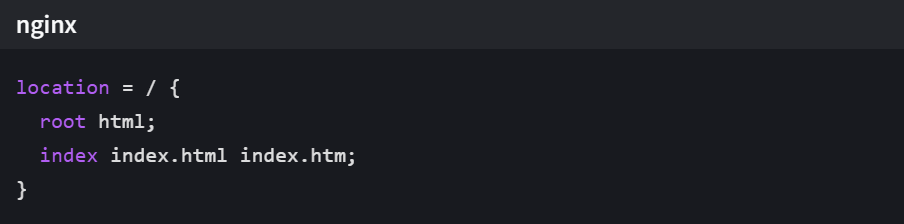
目标
通过nginx配置,实现通过https+域名访问springboot部署的tomcat接
实现步骤
1、首先申请证书
下载适用于ngxin版本的证书(.PEM格式)
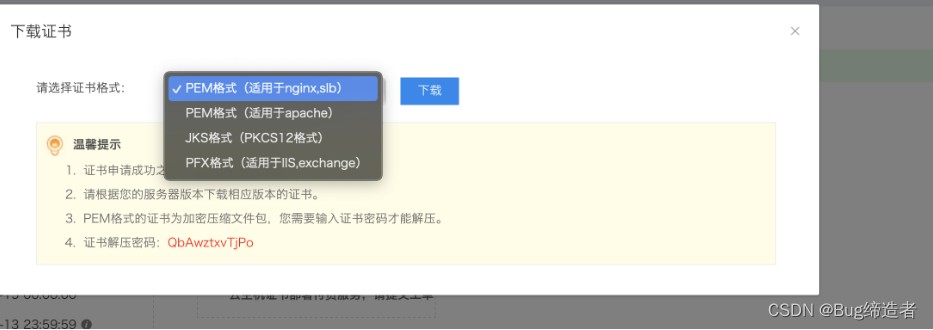
2、下载压缩包
解压后文件夹中存在以下几个文件:
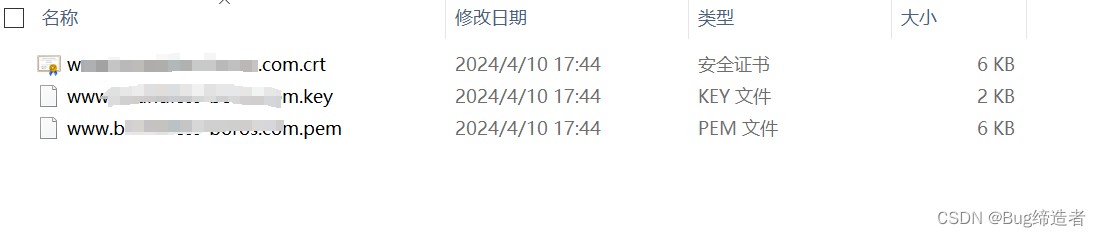
3、将解压后的文件
上传至服务器中 /etc/ssl/certs 目录下

4、修改nginx.conf文件
(1)监听自己要访问的端口(18380),并修改服务名为域名信息,每一个虚拟主机监听不同的SSL端口(默认端口为443)
|
1 2 3 4 5 6 7 8 9 10 11 12 13 14 15 16 17 18 19 20 21 22 23 24 25 26 27 28 29 30 31 32 33 34 35 36 37 38 39 40 41 42 43 44 45 46 47 48 49 |
server { listen 18380; listen 1443 ssl; server_name www.xxx.com; ssl on; ssl_certificate /etc/ssl/certs/www.xxx.com.pem; ssl_certificate_key /etc/ssl/certs/www.xxx.com.key; ssl_session_timeout 5m; ssl_protocols TLSv1 TLSv1.1 TLSv1.2; ssl_ciphers ECDHE-RSA-AES128-GCM-SHA256:ECDHE:ECDH:AES:HIGH:!NULL:!aNULL:!MD5:!ADH:!RC4; ssl_prefer_server_ciphers on;
#charset koi8-r;
#access_log logs/host.access.log main;
#前端资源地址 location / { root /usr/share/nginx/html; try_files $uri $uri/ /index.html; index index.html index.htm; } #后端接口访问地址 location /prod-api/ { proxy_pass http://ip:端口/; client_max_body_size 50m; proxy_redirect off; proxy_set_header Host $host; proxy_set_header X-Real-IP $remote_addr; proxy_set_header X-Forwarded-For $proxy_add_x_forwarded_for; proxy_next_upstream error timeout invalid_header http_500 http_502 http_503 http_504; proxy_max_temp_file_size 0; proxy_connect_timeout 90; proxy_send_timeout 90; proxy_read_timeout 90; proxy_buffer_size 4k; proxy_buffers 4 32k; proxy_busy_buffers_size 64k; proxy_temp_file_write_size 64k; proxy_cookie_path / /;
} #静态资源访问地址 location /prod-api/ryK1haERqT.txt { alias /usr/share/nginx/html/ryK1haERqT.txt; allow all; autoindex on; } |
(2)附完整.conf文件
|
1 2 3 4 5 6 7 8 9 10 11 12 13 14 15 16 17 18 19 20 21 22 23 24 25 26 27 28 29 30 31 32 33 34 35 36 37 38 39 40 41 42 43 44 45 46 47 48 49 50 51 52 53 54 55 56 57 58 59 60 61 62 63 64 65 66 67 68 69 70 71 72 73 74 75 76 77 78 79 80 81 82 83 84 85 86 87 88 89 90 91 92 93 94 95 96 97 98 99 100 101 102 103 104 105 106 107 108 109 110 111 112 113 114 115 116 117 118 119 120 121 122 123 124 125 126 127 128 129 130 131 132 133 134 135 136 137 138 139 140 141 142 143 144 145 146 147 148 149 150 151 152 |
#user nobody; worker_processes 1;
#error_log logs/error.log; #error_log logs/error.log notice; #error_log logs/error.log info;
#pid logs/nginx.pid;
events { worker_connections 1024; }
http { include mime.types; default_type application/octet-stream;
#log_format main '$remote_addr - $remote_user [$time_local] "$request" ' # '$status $body_bytes_sent "$http_referer" ' # '"$http_user_agent" "$http_x_forwarded_for"';
#access_log logs/access.log main;
sendfile on; #tcp_nopush on;
#keepalive_timeout 0; keepalive_timeout 65;
#gzip on; server { listen 18380; listen 1443 ssl; server_name www.xxx.com; ssl on; ssl_certificate /etc/ssl/certs/www.xxx.com.pem; ssl_certificate_key /etc/ssl/certs/www.xxx.com.key; ssl_session_timeout 5m; ssl_protocols TLSv1 TLSv1.1 TLSv1.2; ssl_ciphers ECDHE-RSA-AES128-GCM-SHA256:ECDHE:ECDH:AES:HIGH:!NULL:!aNULL:!MD5:!ADH:!RC4; ssl_prefer_server_ciphers on;
#charset koi8-r;
#access_log logs/host.access.log main;
#前端资源地址 location / { root /usr/share/nginx/html; try_files $uri $uri/ /index.html; index index.html index.htm; } #后端接口访问地址 location /prod-api/ { proxy_pass http://ip:端口/; client_max_body_size 50m; proxy_redirect off; proxy_set_header Host $host; proxy_set_header X-Real-IP $remote_addr; proxy_set_header X-Forwarded-For $proxy_add_x_forwarded_for; proxy_next_upstream error timeout invalid_header http_500 http_502 http_503 http_504; proxy_max_temp_file_size 0; proxy_connect_timeout 90; proxy_send_timeout 90; proxy_read_timeout 90; proxy_buffer_size 4k; proxy_buffers 4 32k; proxy_busy_buffers_size 64k; proxy_temp_file_write_size 64k; proxy_cookie_path / /;
}
location /prod-api/ryK1haERqT.txt { alias /usr/share/nginx/html/ryK1haERqT.txt; allow all; autoindex on; } #error_page 404 /404.html;
# redirect server error pages to the static page /50x.html # error_page 500 502 503 504 /50x.html; location = /50x.html { root html; }
# proxy the PHP scripts to Apache listening on 127.0.0.1:80 # #location ~ \.php$ { # proxy_pass http://127.0.0.1; #}
# pass the PHP scripts to FastCGI server listening on 127.0.0.1:9000 # #location ~ \.php$ { # root html; # fastcgi_pass 127.0.0.1:9000; # fastcgi_index index.php; # fastcgi_param SCRIPT_FILENAME /scripts$fastcgi_script_name; # include fastcgi_params; #}
# deny access to .htaccess files, if Apache's document root # concurs with nginx's one # #location ~ /\.ht { # deny all; #} }
# another virtual host using mix of IP-, name-, and port-based configuration # #server { # listen 8000; # listen somename:8080; # server_name somename alias another.alias;
# location / { # root html; # index index.html index.htm; # } #}
# HTTPS server # #server { # listen 443 ssl; # server_name localhost;
# ssl_certificate cert.pem; # ssl_certificate_key cert.key;
# ssl_session_cache shared:SSL:1m; # ssl_session_timeout 5m;
# ssl_ciphers HIGH:!aNULL:!MD5; # ssl_prefer_server_ciphers on;
# location / { # root html; # index index.html index.htm; # } #}
} |
5、然后重启nginx即可
(进入 /usr/local/nginx/sbin,运行./nginx 或./nginx -s reload进行重启)