
广告位联系
返回顶部
分享到

nginx配置https+域名访问springboot接口的教程

nginx 来源:互联网 作者:佚名 发布时间:2026-07-26 10:04:20 人浏览
摘要

目标 通过nginx配置,实现通过https+域名访问springboot部署的tomcat接 实现步骤 1、首先申请证书 下载适用于ngxin版本的证书(.PEM格式) 2、下载压缩包 解压后文件夹中存在以下几个文件: 3、将解

目标

通过nginx配置,实现通过https+域名访问springboot部署的tomcat接

实现步骤

1、首先申请证书

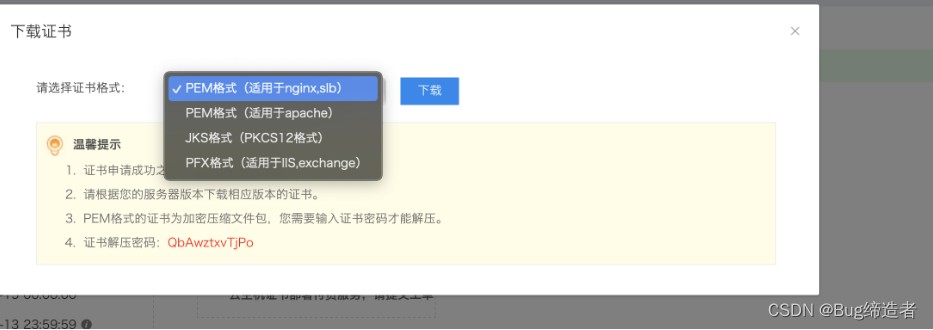
下载适用于ngxin版本的证书(.PEM格式)

2、下载压缩包

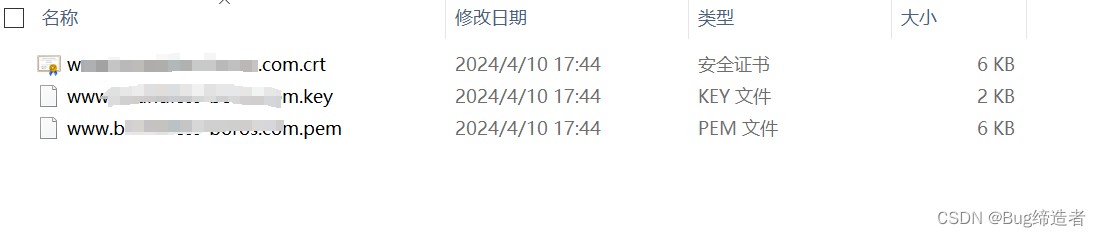
解压后文件夹中存在以下几个文件:

3、将解压后的文件

上传至服务器中 /etc/ssl/certs 目录下

4、修改nginx.conf文件

(1)监听自己要访问的端口(18380),并修改服务名为域名信息,每一个虚拟主机监听不同的SSL端口(默认端口为443)

1

2

3

4

5

6

7

8

9

10

11

12

13

14

15

16

17

18

19

20

21

22

23

24

25

26

27

28

29

30

31

32

33

34

35

36

37

38

39

40

41

42

43

44

45

46

47

48

49

server {

    listen 18380;

    listen 1443 ssl;

    server_name www.xxx.com;

    ssl on;

    ssl_certificate /etc/ssl/certs/www.xxx.com.pem;

    ssl_certificate_key /etc/ssl/certs/www.xxx.com.key;

    ssl_session_timeout 5m;

    ssl_protocols TLSv1 TLSv1.1 TLSv1.2;

    ssl_ciphers ECDHE-RSA-AES128-GCM-SHA256:ECDHE:ECDH:AES:HIGH:!NULL:!aNULL:!MD5:!ADH:!RC4;

    ssl_prefer_server_ciphers on;


        #charset koi8-r;


        #access_log  logs/host.access.log  main;


         #前端资源地址

        location / {

            root   /usr/share/nginx/html;

            try_files $uri $uri/ /index.html;

            index  index.html index.htm;

        }

     #后端接口访问地址

       location /prod-api/ {

         proxy_pass http://ip:端口/;

         client_max_body_size     50m;

         proxy_redirect     off;

         proxy_set_header   Host             $host;

         proxy_set_header   X-Real-IP        $remote_addr;

         proxy_set_header   X-Forwarded-For  $proxy_add_x_forwarded_for;

         proxy_next_upstream error timeout invalid_header http_500 http_502 http_503 http_504;

         proxy_max_temp_file_size 0;

         proxy_connect_timeout      90;

         proxy_send_timeout         90;

         proxy_read_timeout         90;

         proxy_buffer_size          4k;

         proxy_buffers              4 32k;

         proxy_busy_buffers_size    64k;

         proxy_temp_file_write_size 64k;

         proxy_cookie_path / /;


     }

#静态资源访问地址

 location /prod-api/ryK1haERqT.txt {

          alias /usr/share/nginx/html/ryK1haERqT.txt;

          allow all;

          autoindex on;

        }

(2)附完整.conf文件

1

2

3

4

5

6

7

8

9

10

11

12

13

14

15

16

17

18

19

20

21

22

23

24

25

26

27

28

29

30

31

32

33

34

35

36

37

38

39

40

41

42

43

44

45

46

47

48

49

50

51

52

53

54

55

56

57

58

59

60

61

62

63

64

65

66

67

68

69

70

71

72

73

74

75

76

77

78

79

80

81

82

83

84

85

86

87

88

89

90

91

92

93

94

95

96

97

98

99

100

101

102

103

104

105

106

107

108

109

110

111

112

113

114

115

116

117

118

119

120

121

122

123

124

125

126

127

128

129

130

131

132

133

134

135

136

137

138

139

140

141

142

143

144

145

146

147

148

149

150

151

152

#user  nobody;

worker_processes  1;


#error_log  logs/error.log;

#error_log  logs/error.log  notice;

#error_log  logs/error.log  info;


#pid        logs/nginx.pid;


events {

    worker_connections  1024;

}


http {

    include       mime.types;

    default_type  application/octet-stream;


    #log_format  main  '$remote_addr - $remote_user [$time_local] "$request" '

    #                  '$status $body_bytes_sent "$http_referer" '

    #                  '"$http_user_agent" "$http_x_forwarded_for"';


    #access_log  logs/access.log  main;


    sendfile        on;

    #tcp_nopush     on;


    #keepalive_timeout  0;

    keepalive_timeout  65;


    #gzip  on;

  server {

    listen 18380;

    listen 1443 ssl;

    server_name www.xxx.com;

    ssl on;

    ssl_certificate /etc/ssl/certs/www.xxx.com.pem;

    ssl_certificate_key /etc/ssl/certs/www.xxx.com.key;

    ssl_session_timeout 5m;

    ssl_protocols TLSv1 TLSv1.1 TLSv1.2;

    ssl_ciphers ECDHE-RSA-AES128-GCM-SHA256:ECDHE:ECDH:AES:HIGH:!NULL:!aNULL:!MD5:!ADH:!RC4;

    ssl_prefer_server_ciphers on;


        #charset koi8-r;


        #access_log  logs/host.access.log  main;


        #前端资源地址

        location / {

            root   /usr/share/nginx/html;

            try_files $uri $uri/ /index.html;

            index  index.html index.htm;

        }

        #后端接口访问地址

       location /prod-api/ {

         proxy_pass http://ip:端口/;

         client_max_body_size     50m;

         proxy_redirect     off;

         proxy_set_header   Host             $host;

         proxy_set_header   X-Real-IP        $remote_addr;

         proxy_set_header   X-Forwarded-For  $proxy_add_x_forwarded_for;

         proxy_next_upstream error timeout invalid_header http_500 http_502 http_503 http_504;

         proxy_max_temp_file_size 0;

         proxy_connect_timeout      90;

         proxy_send_timeout         90;

         proxy_read_timeout         90;

         proxy_buffer_size          4k;

         proxy_buffers              4 32k;

         proxy_busy_buffers_size    64k;

         proxy_temp_file_write_size 64k;

         proxy_cookie_path / /;


     }


     location /prod-api/ryK1haERqT.txt {

          alias /usr/share/nginx/html/ryK1haERqT.txt;

          allow all;

          autoindex on;

        }

        #error_page  404              /404.html;


        # redirect server error pages to the static page /50x.html

        #

        error_page   500 502 503 504  /50x.html;

        location = /50x.html {

            root   html;

        }


        # proxy the PHP scripts to Apache listening on 127.0.0.1:80

        #

        #location ~ \.php$ {

        #    proxy_pass   http://127.0.0.1;

        #}


        # pass the PHP scripts to FastCGI server listening on 127.0.0.1:9000

        #

        #location ~ \.php$ {

        #    root           html;

        #    fastcgi_pass   127.0.0.1:9000;

        #    fastcgi_index  index.php;

        #    fastcgi_param  SCRIPT_FILENAME  /scripts$fastcgi_script_name;

        #    include        fastcgi_params;

        #}


        # deny access to .htaccess files, if Apache's document root

        # concurs with nginx's one

        #

        #location ~ /\.ht {

        #    deny  all;

        #}

    }


    # another virtual host using mix of IP-, name-, and port-based configuration

    #

    #server {

    #    listen       8000;

    #    listen       somename:8080;

    #    server_name  somename  alias  another.alias;


    #    location / {

    #        root   html;

    #        index  index.html index.htm;

    #    }

    #}


    # HTTPS server

    #

    #server {

    #    listen       443 ssl;

    #    server_name  localhost;


    #    ssl_certificate      cert.pem;

    #    ssl_certificate_key  cert.key;


    #    ssl_session_cache    shared:SSL:1m;

    #    ssl_session_timeout  5m;


    #    ssl_ciphers  HIGH:!aNULL:!MD5;

    #    ssl_prefer_server_ciphers  on;


    #    location / {

    #        root   html;

    #        index  index.html index.htm;

    #    }

    #}


}

5、然后重启nginx即可

(进入 /usr/local/nginx/sbin,运行./nginx 或./nginx -s reload进行重启)


版权声明 : 本文内容来源于互联网或用户自行发布贡献,该文观点仅代表原作者本人。本站仅提供信息存储空间服务和不拥有所有权,不承担相关法律责任。如发现本站有涉嫌抄袭侵权, 违法违规的内容, 请发送邮件至2530232025#qq.cn(#换@)举报,一经查实,本站将立刻删除。
原文链接 :
相关文章
  • nginx配置https+域名访问springboot接口的教程

    nginx配置https+域名访问springboot接口的教程
    目标 通过nginx配置,实现通过https+域名访问springboot部署的tomcat接 实现步骤 1、首先申请证书 下载适用于ngxin版本的证书(.PEM格式) 2、下载
  • nginx多域名及https配置全过程(Tomcat服务器)

    nginx多域名及https配置全过程(Tomcat服务器)
    主域名配置 二级域名配置 详细配置 1 2 3 4 5 6 7 8 9 10 11 12 13 14 15 16 17 18 19 20 21 22 23 24 25 26 27 28 29 30 31 32 33 34 35 36 37 38 39 40 41 42 43 44 45 46 47 4
  • 如何配置内存文件系统tmpfs作为 Nginx 临时目录彻
    要让 Nginx 临时目录彻底脱离磁盘 I/O,关键不是挂个内存盘,而是把所有会触发同步写、小文件刷盘、跨设备 rename 的临时路径,全部精准替
  • 怎么在Nginx中配置集群级别的全局限流策略
    在 Nginx 中实现集群级别的全局限流,本质是突破单机限制,让多个 Nginx 实例共享同一套限流状态。但需明确:Nginx 原生的limit_req_zone和lim
  • nginx:stable镜像的使用及说明
    nginx:stable镜像的使用 以前使用的nginx:stable-alpine 但是https加载很慢,所以尝试换成nginx:stable,结果不仅https 快了,页面加载和接口调用都快了
  • Nginx使用upstream后端接口报 400
    upstream模块介绍 Nginx的负载均衡功能依赖于ngx_http_upsteam_module模块,所支持的代理方式包括proxy_pass, fastcgi_pass, uwsgi_pass, scgi_pass, memcached_pass和
  • 查看nginx是否已经启动的实现方式
    在 Ubuntu 或其他 Linux 系统上,要查看 Nginx 是否已经启动,您可以使用以下几种方法之一: 方法一:使用systemctl命令 Nginx 通常作为 systemd 服
  • 在Ubuntu上安装Nginx的实现过程
    在Ubuntu系统中从源码安装Nginx可以让您自定义Nginx的编译选项和模块,以满足特定需求。 以下是详细的步骤指南: 前提条件 更新系统包列表
  • Windows上启动停止Nginx服务器
    在 Windows 上开发 Django、Vue 或其他 Web 项目时,Nginx 往往是我们最常用的反向代理服务器。然而,不同于 Linux 系统上顺手的 systemctl 命令,
  • 使用nginx实现ssh跳板机方式
    基础环境 跳板机,IP:192.168.3.174 控制机01,IP:192.168.2.78 控制机02,IP:192.168.2.79 控制机01、控制机02只允许跳板机访问。 nginx安装 这里使用

  • 本站所有内容来源于互联网或用户自行发布,本站仅提供信息存储空间服务,不拥有版权,不承担法律责任。如有侵犯您的权益,请您联系站长处理!
  • Copyright © 2017-2022 F11.CN All Rights Reserved. F11站长开发者网 版权所有 | 苏ICP备2022031554号-1 | 51LA统计