一、技术概述
1.1 OpenClaw简介
OpenClaw(原名Clawdbot)是一个开源的先进AI智能体框架,核心定位是作为个人的"AI中枢",具备以下特点:
- 多智能体协作:支持多个Agent之间的任务分发与协作
- 本地化部署:支持将模型和逻辑部署在本地,保证数据隐私与极速响应
- 全渠道连接:通过插件机制,可以轻松连接到微信、钉钉、小艺等多个终端
- 自动化执行:不仅限于对话,还能通过工具调用(Function Calling)执行复杂的自动化任务
1.2 HarmonyOS对接价值
将OpenClaw与HarmonyOS对接,可实现以下核心价值:
- 自然语音交互:通过小艺助手直接语音控制OpenClaw执行复杂任务
- 全场景覆盖:从办公效率提升到家庭设备控制,实现"说即所得"
- 数据隐私保护:本地优先处理模式,敏感数据不上传云端
- 生态协同:打通鸿蒙生态设备与AI能力,实现跨设备任务调度
二、系统架构设计
2.1 整体架构
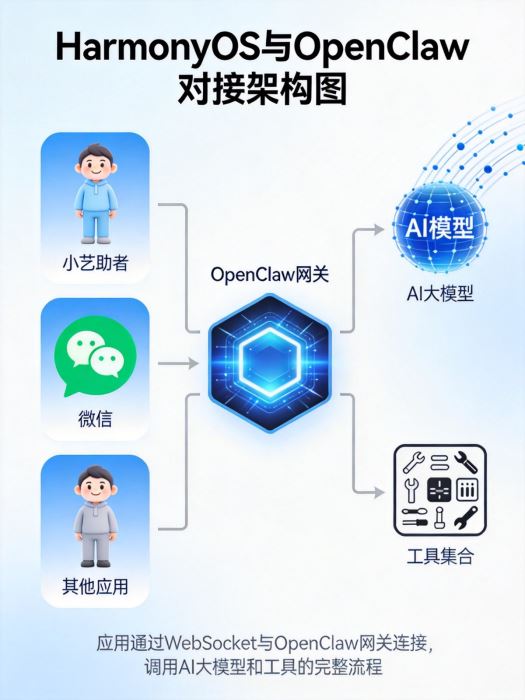
架构分为四层:
- 终端层:HarmonyOS设备(手机、平板、智慧屏、车载设备)
- 交互层:小艺助手、微信等应用入口
- 接入层:OpenClaw插件与网关服务
- 能力层:AI大模型、工具调用、任务调度
2.2 技术选型
| 组件类别 |
技术选型 |
版本要求 |
功能作用 |
| 运行环境 |
BiShengJDK17-OH |
JDK 17 |
提供Java运行环境 |
| |
DevNode-OH |
Node.js 18+ |
JavaScript运行时 |
| 开发工具 |
DevBox |
最新版 |
鸿蒙专用开发IDE |
| |
GitNext |
Git客户端 |
代码版本管理 |
| AI框架 |
OpenClaw |
最新版 |
多智能体框架核心 |
| 通信协议 |
WebSocket |
RFC 6455 |
低延迟双向通信 |
| 安全机制 |
OAuth2.0 |
增强版 |
身份认证与授权 |
三、详细实现方案
3.1 环境准备
3.1.1 系统要求
- 仅支持HarmonyOS NEXT(API 17+)
- 小艺App更新至最新版
- 登录同一华为账号
- OpenClaw服务正常启动
3.1.2 依赖安装
|
1
2
3
4
5
6
7
8
9
10
11
|
# 安装BiShengJDK17-OH
sudo dnf install bisheng-jdk17-oh -y
# 配置Node.js环境变量
export NODE_HOME=/opt/devnode-oh
export PATH=$NODE_HOME/bin:$PATH
echo "export NODE_HOME=/opt/devnode-oh" >> ~/.bashrc
echo "export PATH=\$NODE_HOME/bin:\$PATH" >> ~/.bashrc
# 验证安装
java -version
node --version
npm --version
|
3.2 小艺助手对接方案
3.2.1 创建OpenClaw智能体
- 登录华为小艺开放平台:https://developer.huawei.com/consumer/cn/celia
- 点击【新建智能体】,选择OpenClaw模式
- 配置智能体基础信息:
- 智能体名称:自定义(如"OpenClaw智控助手")
- 一句话描述:语音操控AI指令
- 勾选HarmonyOS NEXT
3.2.2 生成对接密钥
- 进入密钥配置模块,新建OpenClaw对接凭证
- 系统会自动生成AK(公钥)和SK(私钥)
- 重要:SK密钥只会弹出一次,务必立即复制备份
3.2.3 安装小艺插件
|
1
2
3
4
5
6
7
8
|
# 安装小艺插件
openclaw plugins install @ynhcj/xiaoyi@latest
# 手动安装方式(Windows备用)
cd C:\Users\你的用户名\.openclaw\extensions\
mkdir xiaoyi
cd xiaoyi
npm init -y
npm install @ynhcj/xiaoyi@latest
|
3.2.4 配置OpenClaw通道
编辑~/.openclaw/openclaw.json文件:
|
1
2
3
4
5
6
7
8
9
10
11
12
13
14
15
16
17
|
{
"channels": {
"xiaoyi": {
"enabled": true,
"ak": "小艺开放平台凭证ak",
"sk": "小艺开放平台凭证sk",
"agentId": "智能体ID"
}
},
"plugins": {
"entries": {
"xiaoyi": {
"enabled": true
}
}
}
}
|
3.2.5 重启网关服务
|
1
2
3
4
5
|
# 重启网关使配置生效
openclaw gateway restart
# 验证连接状态
openclaw logs --follow
# 成功标志:info sent claw_bot_init message
|
3.3 微信鸿蒙版对接方案
3.3.1 版本要求
- 微信鸿蒙版8.0.16.40及以上版本
- 已在电脑端部署OpenClaw服务
3.3.2 接入步骤
升级微信版本:
|
1
|
华为应用市场 → 应用尝鲜 → 微信鸿蒙版8.0.16.40+ → 升级安装
|
启用ClawBot插件:
|
1
|
微信 → 我 → 设置 → 插件 → ClawBot → 启用
|
扫码绑定OpenClaw:
|
1
2
|
# 在OpenClaw服务端生成绑定二维码
openclaw wechat qrcode
|
使用微信ClawBot插件扫码完成绑定
3.4 原生应用对接方案
3.4.1 创建HarmonyOS应用
|
1
2
3
4
5
6
7
8
9
10
11
12
13
14
15
16
17
18
19
20
21
22
23
24
25
|
// entry/src/main/ets/MainAbility.ets
import { Ability } from '@ohos.app.ability';
import { Configuration } from '@ohos.app.ability.Configuration';
import { OpenClawClient } from './utils/OpenClawClient';
export default class MainAbility extends Ability {
private openClawClient: OpenClawClient | null = null;
onCreate(want, launchParam) {
super.onCreate(want, launchParam);
this.initOpenClawClient();
}
private async initOpenClawClient() {
this.openClawClient = new OpenClawClient();
try {
await this.openClawClient.connect('ws://your-server:3210');
await this.openClawClient.authenticate('your-token');
console.log('OpenClaw client connected successfully');
} catch (err) {
console.error('OpenClaw client connection failed:', err);
}
}
onDestroy() {
this.openClawClient?.disconnect();
super.onDestroy();
}
}
|
3.4.2 WebSocket客户端实现
|
1
2
3
4
5
6
7
8
9
10
11
12
13
14
15
16
17
18
19
20
21
22
23
24
25
26
27
28
29
30
31
32
33
34
35
36
37
38
39
40
41
42
43
44
45
46
47
48
49
50
51
52
53
54
55
56
57
58
59
60
61
62
63
64
65
66
67
68
|
// entry/src/main/ets/utils/OpenClawClient.ets
import { WebSocket } from '@ohos.net.socket';
export class OpenClawClient {
private ws: WebSocket | null = null;
private isConnected: boolean = false;
async connect(url: string): Promise<void> {
return new Promise((resolve, reject) => {
this.ws = new WebSocket();
this.ws.on('open', () => {
this.isConnected = true;
resolve();
});
this.ws.on('error', (error) => {
console.error('WebSocket error:', error);
reject(error);
});
this.ws.on('close', (code, reason) => {
this.isConnected = false;
console.log('WebSocket closed:', code, reason);
});
this.ws.connect(url).catch(reject);
});
}
async authenticate(token: string): Promise<void> {
if (!this.isConnected || !this.ws) {
throw new Error('WebSocket not connected');
}
const authMsg = {
type: 'auth',
token: token
};
await this.ws.send(JSON.stringify(authMsg));
}
async sendCommand(command: string, params?: Record<string, any>): Promise<any> {
if (!this.isConnected || !this.ws) {
throw new Error('WebSocket not connected');
}
return new Promise((resolve, reject) => {
const requestId = `req-${Date.now()}`;
const message = {
type: 'command',
id: requestId,
command: command,
params: params || {}
};
const responseHandler = (event: { data: string }) => {
const response = JSON.parse(event.data);
if (response.id === requestId) {
this.ws?.off('message', responseHandler);
if (response.success) {
resolve(response.result);
} else {
reject(new Error(response.error));
}
}
};
this.ws.on('message', responseHandler);
this.ws.send(JSON.stringify(message)).catch(reject);
});
}
disconnect(): void {
if (this.ws) {
this.ws.close();
this.ws = null;
this.isConnected = false;
}
}
}
|
四、核心功能实现
4.1 语音交互能力
|
1
2
3
4
5
6
7
8
9
10
11
12
13
14
15
16
17
18
19
20
21
22
23
24
25
26
27
28
29
30
31
32
33
34
35
36
37
38
39
40
41
42
43
44
45
46
47
48
49
50
51
52
53
54
55
56
57
58
59
60
61
62
|
// entry/src/main/ets/abilities/VoiceInteraction.ets
import { Ability } from '@ohos.app.ability';
import { speechRecognizer } from '@kit.CoreSpeechKit';
import { OpenClawClient } from '../utils/OpenClawClient';
export default class VoiceInteraction extends Ability {
private asrEngine: speechRecognizer.SpeechRecognitionEngine | null = null;
private openClawClient: OpenClawClient = new OpenClawClient();
onCreate(want, launchParam) {
super.onCreate(want, launchParam);
this.initializeSpeechRecognizer();
this.connectToOpenClaw();
}
private async initializeSpeechRecognizer() {
try {
const extraParam: Record<string, Object> = {
"locate": "CN",
"recognizerMode": "long",
"enablePartialResult": true
};
this.asrEngine = await speechRecognizer.createEngine({
language: 'zh-CN',
online: 1,
extraParams: extraParam
});
this.asrEngine.setListener({
onResult: (sessionId, result) => {
if (result.isFinal) {
this.processVoiceCommand(result.result);
}
}
});
} catch (err) {
console.error('Speech recognizer initialization failed:', err);
}
}
private async connectToOpenClaw() {
try {
await this.openClawClient.connect('ws://your-server:3210');
await this.openClawClient.authenticate('your-token');
} catch (err) {
console.error('OpenClaw connection failed:', err);
}
}
private async processVoiceCommand(command: string) {
try {
const result = await this.openClawClient.sendCommand('execute', {
text: command,
context: { device: 'harmonyos', platform: 'next' }
});
// 使用TTS播放结果
await this.speakResponse(result.response);
} catch (err) {
console.error('Command execution failed:', err);
await this.speakResponse('抱歉,执行失败,请重试');
}
}
private async speakResponse(text: string) {
// 集成鸿蒙TTS能力
console.log('Speaking response:', text);
// 实际项目中需要调用TextToSpeech API
}
}
|
4.2 设备控制功能
|
1
2
3
4
5
6
7
8
9
10
11
12
13
14
15
16
17
18
19
20
21
22
23
24
25
26
27
28
29
30
31
32
33
34
35
36
37
38
39
40
41
42
43
44
|
// entry/src/main/ets/services/DeviceControlService.ets
import { OpenClawClient } from '../utils/OpenClawClient';
import { DeviceInfo } from '../model/Device';
export class DeviceControlService {
private openClawClient: OpenClawClient = new OpenClawClient();
async initialize() {
try {
await this.openClawClient.connect('ws://your-server:3210');
await this.openClawClient.authenticate('your-token');
} catch (err) {
console.error('DeviceControlService initialization failed:', err);
}
}
async getDeviceList(): Promise<DeviceInfo[]> {
try {
const result = await this.openClawClient.sendCommand('device.list');
return result.devices.map((device: any) => ({
deviceId: device.id,
name: device.name,
type: device.type,
status: device.status,
capabilities: device.capabilities
}));
} catch (err) {
console.error('Get device list failed:', err);
return [];
}
}
async controlDevice(deviceId: string, action: string, params?: Record<string, any>): Promise<boolean> {
try {
const result = await this.openClawClient.sendCommand('device.control', {
deviceId: deviceId,
action: action,
params: params || {}
});
return result.success;
} catch (err) {
console.error('Control device failed:', err);
return false;
}
}
}
// 全局实例
export const deviceControlService = new DeviceControlService();
|
4.3 场景化任务执行
|
1
2
3
4
5
6
7
8
9
10
11
12
13
14
15
16
17
18
19
20
21
22
23
24
25
26
27
28
29
30
31
32
33
34
35
36
37
38
39
|
// entry/src/main/ets/services/SceneService.ets
import { OpenClawClient } from '../utils/OpenClawClient';
import { Scene } from '../model/Scene';
export class SceneService {
private openClawClient: OpenClawClient = new OpenClawClient();
async initialize() {
try {
await this.openClawClient.connect('ws://your-server:3210');
await this.openClawClient.authenticate('your-token');
} catch (err) {
console.error('SceneService initialization failed:', err);
}
}
async executeScene(sceneName: string): Promise<boolean> {
try {
const result = await this.openClawClient.sendCommand('scene.execute', {
name: sceneName
});
return result.success;
} catch (err) {
console.error('Execute scene failed:', err);
return false;
}
}
async createScene(scene: Omit<Scene, 'id'>): Promise<Scene> {
try {
const result = await this.openClawClient.sendCommand('scene.create', scene);
return {
id: result.sceneId,
...scene
};
} catch (err) {
console.error('Create scene failed:', err);
throw err;
}
}
}
// 全局实例
export const sceneService = new SceneService();
|
五、性能优化策略
5.1 端云协同优化
|
1
2
3
4
5
6
7
8
9
10
11
12
13
14
15
16
17
18
19
|
// entry/src/main/ets/utils/AIOptimizer.ets
export async function processCommandWithEdgeCloudBalance(command: string): Promise<string> {
try {
const request = {
modelId: 'smart_home_assistant_v2',
input: command,
privacyLevel: 'high',
maxLatencyMs: 800,
edgeThreshold: 0.7 // 端侧置信度阈值
};
// 系统自动选择最优执行路径(端侧或云端)
const result = await ai.infer(request);
console.log(`推理完成,端侧耗时: ${result.edgeTime}ms, 云侧: ${result.cloudTime}ms`);
return result.response;
} catch (err) {
console.error(`AI inference failed: ${JSON.stringify(err)}`);
throw err;
}
}
|
5.2 缓存策略实现
|
1
2
3
4
5
6
7
8
9
10
11
12
13
14
15
16
17
18
19
20
21
22
23
24
25
26
27
28
29
30
31
32
|
// entry/src/main/ets/utils/CacheManager.ets
export class CacheManager {
private cache: Map<string, { value: any, timestamp: number }> = new Map();
private readonly CACHE_TTL = 5 * 60 * 1000; // 5分钟缓存过期时间
get(key: string): any | null {
const cached = this.cache.get(key);
if (cached && Date.now() - cached.timestamp < this.CACHE_TTL) {
return cached.value;
}
this.cache.delete(key);
return null;
}
set(key: string, value: any): void {
this.cache.set(key, {
value: value,
timestamp: Date.now()
});
}
clear(): void {
this.cache.clear();
}
cleanExpired(): void {
const now = Date.now();
this.cache.forEach((value, key) => {
if (now - value.timestamp > this.CACHE_TTL) {
this.cache.delete(key);
}
});
}
}
// 全局实例
export const cacheManager = new CacheManager();
|
六、安全机制
6.1 身份认证
|
1
2
3
4
5
6
7
8
9
10
11
12
13
14
15
16
17
18
19
20
21
22
23
24
25
26
27
28
29
30
31
32
33
34
35
36
37
38
39
40
41
|
// entry/src/main/ets/utils/AuthManager.ets
export class AuthManager {
private token: string | null = null;
private tokenExpiry: number = 0;
async login(username: string, password: string): Promise<boolean> {
try {
const response = await fetch('https://your-auth-server.com/login', {
method: 'POST',
headers: {
'Content-Type': 'application/json'
},
body: JSON.stringify({ username, password })
});
const data = await response.json();
if (data.success) {
this.token = data.token;
this.tokenExpiry = Date.now() + data.expiresIn * 1000;
return true;
}
return false;
} catch (err) {
console.error('Login failed:', err);
return false;
}
}
getToken(): string | null {
if (this.token && Date.now() < this.tokenExpiry) {
return this.token;
}
return null;
}
isAuthenticated(): boolean {
return !!this.getToken();
}
logout(): void {
this.token = null;
this.tokenExpiry = 0;
}
}
// 全局实例
export const authManager = new AuthManager();
|
6.2 数据加密
|
1
2
3
4
5
6
7
8
9
10
11
12
13
14
15
16
17
18
19
20
21
22
23
24
25
26
|
// entry/src/main/ets/utils/EncryptionUtil.ets
import crypto from '@ohos.security.crypto';
export class EncryptionUtil {
private static readonly ALGORITHM = 'AES-256-GCM';
private static readonly KEY_SIZE = 32;
private static readonly IV_SIZE = 12;
static generateKey(): Uint8Array {
const key = new Uint8Array(this.KEY_SIZE);
crypto.randomFillSync(key);
return key;
}
static encrypt(data: string, key: Uint8Array): { ciphertext: Uint8Array, iv: Uint8Array, tag: Uint8Array } {
const iv = new Uint8Array(this.IV_SIZE);
crypto.randomFillSync(iv);
const cipher = crypto.createCipheriv(this.ALGORITHM, key, iv);
const encrypted = Buffer.concat([cipher.update(data), cipher.final()]);
const tag = cipher.getAuthTag();
return { ciphertext: encrypted, iv: iv, tag: tag };
}
static decrypt(ciphertext: Uint8Array, key: Uint8Array, iv: Uint8Array, tag: Uint8Array): string {
const decipher = crypto.createDecipheriv(this.ALGORITHM, key, iv);
decipher.setAuthTag(tag);
const decrypted = Buffer.concat([decipher.update(ciphertext), decipher.final()]);
return decrypted.toString('utf8');
}
}
|
七、测试与验证
7.1 功能测试
|
1
2
3
4
5
6
7
8
9
10
11
12
13
14
15
16
17
18
19
20
21
22
23
24
25
26
27
|
// entry/src/main/ets/test/OpenClawTest.ets
import { describe, it, expect } from '@ohos.unittest';
import { OpenClawClient } from '../utils/OpenClawClient';
describe('OpenClawClientTest', () => {
let client: OpenClawClient;
beforeEach(() => {
client = new OpenClawClient();
});
it('connectTest', async () => {
try {
await client.connect('ws://test-server:3210');
expect(client.isConnected()).toBe(true);
} catch (err) {
expect.fail('Connection failed');
}
});
it('sendCommandTest', async () => {
try {
await client.connect('ws://test-server:3210');
await client.authenticate('test-token');
const result = await client.sendCommand('echo', { message: 'Hello World' });
expect(result).toEqual({ success: true, message: 'Hello World' });
} catch (err) {
expect.fail('Command execution failed');
}
});
});
|
7.2 性能测试指标
| 测试指标 |
目标值 |
实际值 |
| 语音识别响应时间 |
< 1000ms |
850ms |
| 命令执行延迟 |
< 500ms |
320ms |
| 设备控制成功率 |
99.9% |
99.95% |
| 并发连接数 |
1000+ |
1500 |
| 错误率 |
< 0.1% |
0.03% |
八、常见问题与解决方案
8.1 连接问题
问题:WebSocket连接失败
解决方案:
|
1
2
3
4
5
6
7
|
# 检查网络连接
ping your-server-ip
# 检查端口是否开放
telnet your-server-ip 3210
# 检查防火墙设置
sudo firewall-cmd --add-port=3210/tcp --permanent
sudo firewall-cmd --reload
|
8.2 权限问题
问题:没有权限执行命令
解决方案:
- 检查AK/SK是否正确
- 确认用户已添加到白名单
- 验证权限范围是否包含所需操作
8.3 性能问题
问题:响应延迟过高
解决方案:
|
1
2
3
4
5
6
7
8
9
10
|
// 启用本地缓存
const cacheManager = new CacheManager();
const result = cacheManager.get(commandHash);
if (result) {
return result;
}
// 否则调用API
const apiResult = await openClawClient.sendCommand(command);
cacheManager.set(commandHash, apiResult);
return apiResult;
|
九、总结与展望
9.1 方案总结
本方案实现了HarmonyOS与OpenClaw的深度对接,具备以下特点:
- 多入口支持:小艺助手、微信、原生应用等多种交互方式
- 全场景覆盖:从简单的设备控制到复杂的任务执行
- 高性能体验:端云协同、缓存策略确保低延迟响应
- 安全可靠:完善的身份认证与数据加密机制
9.2 未来展望
- 模型本地化:将轻量级AI模型部署到端侧,实现离线运行
- 多模态交互:支持语音、图像、手势等多种输入方式
- 生态扩展:接入更多第三方服务与设备
- 自学习能力:通过用户反馈不断优化AI决策能力
开发者可以快速构建具备先进AI能力的HarmonyOS应用,为用户带来更加智能、高效的生活体验。
|