kotlin - 正则表达式,识别年月日
|
1 |
<!--正则表达式日期识别,不需要处理2025.08.08的日期--> <string name="date_regex">(?:^|(?<![-\\d]))(?:(?:[2-9][0-9]{3}[-年](?:(?:0?[1-9]|1[0-2])[-月](?:0?[1-9]|[12][0-9]|3[01]))|(?:(?:0?[1-9]|1[0-2])[-月](?:0?[1-9]|[12][0-9]|3[01])))(?=(?:[日号]|$|(?![-\\d]))))[日号]?</string> |
结构分解
1. 向前边界检查 (?:^|(?<![-\\d]))
(?:^|(?<![-\\d]))
(?: ) - 非捕获分组
^ - 字符串开头
| - 或者
(?<![-\\d]) - 负向前瞻,确保前面不是 - 或数字
作用:确保匹配的日期要么在字符串开头,要么前面不是 - 或数字
2. 日期格式主体(分两部分)
第一部分:年月日格式
(?:[2-9][0-9]{3}[-年](?:(?:0?[1-9]|1[0-2])[-月](?:0?[1-9]|[12][0-9]|3[01]))
[2-9][0-9]{3} - 年份:2000-9999
[-年] - 分隔符:- 或 年
(?:0?[1-9]|1[0-2]) - 月份:1-12(可选前导零)
[-月] - 分隔符:- 或 月
(?:0?[1-9]|[12][0-9]|3[01]) - 日期:1-31(可选前导零)
第二部分:月日格式
|(?:(?:0?[1-9]|1[0-2])[-月](?:0?[1-9]|[12][0-9]|3[01]))
与第一部分相同,只是没有年份部分
3. 向后边界检查 (?=(?:[日号]|$|(?![-\\d])))
(?=(?:[日号]|$|(?![-\\d])))
(?= ) - 正向前瞻
[日号] - 后面是 日 或 号
$ - 或者字符串结尾
(?![-\\d]) - 或者后面不是 - 或数字
作用:确保日期后面是有效的边界
4. 可选后缀 [日号]?
[日号]?
可选的 日 或 号 后缀
|
1 2 3 4 5 6 7 8 9 10 11 12 13 14 15 16 17 18 19 20 21 22 23 24 25 26 27 28 29 30 31 32 33 34 35 36 37 38 39 40 41 42 43 44 45 46 47 48 49 50 51 52 53 54 55 56 57 58 59 60 61 |
package com.example.androidkotlindemo2.patternmatcher
import android.graphics.Color import android.os.Bundle import android.text.Spannable import android.text.SpannableString import android.text.style.BackgroundColorSpan import android.text.style.ForegroundColorSpan import android.widget.TextView import androidx.appcompat.app.AppCompatActivity import com.example.androidkotlindemo2.R import com.example.androidkotlindemo2.utils.LogUtils import java.util.regex.Pattern
/** * Author : wn * Email : maoning20080809@163.com * Date : 2025/10/12 10:34 * Description : 正则表达式 - 识别日期,年月日 */ class PatternMatcherMainActivity : AppCompatActivity(){
var resultTextView : TextView? = null
override fun onCreate(savedInstanceState: Bundle?) { super.onCreate(savedInstanceState)
setContentView(R.layout.pattern_matcher_main)
resultTextView = findViewById<TextView>(R.id.pattern_matcher_result)
test() }
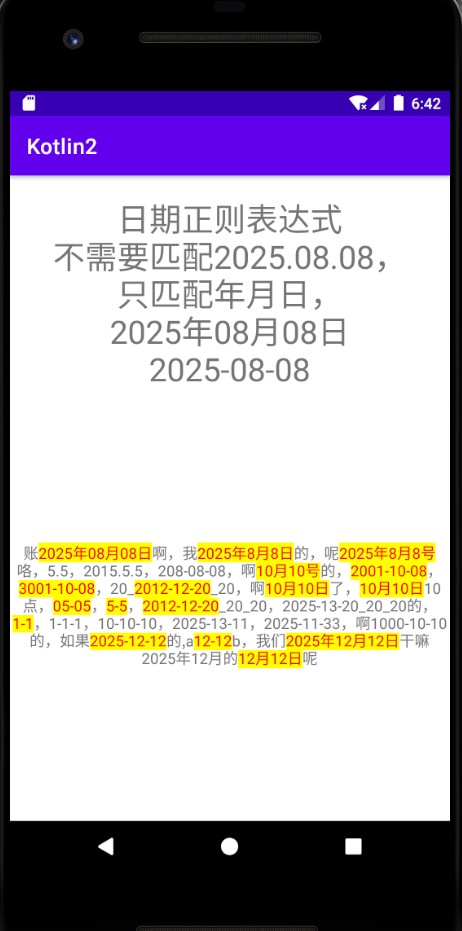
private fun test(){ val regexStr = resources.getString(R.string.date_regex) val matcherStr = "账2025年08月08日啊,我2025年8月8日的,呢2025年8月8号咯,5.5,2015.5.5,208-08-08,啊10月10号的,2001-10-08,3001-10-08,20_2012-12-20_20,啊10月10日了,10月10日10点,05-05,5-5,2012-12-20_20_20,2025-13-20_20_20的,1-1,1-1-1,10-10-10,2025-13-11,2025-11-33,啊1000-10-10的,如果2025-12-12的,a12-12b,我们2025年12月12日干嘛2025年12月的12月12日呢"
val pattern = Pattern.compile(regexStr) val matcher = pattern.matcher(matcherStr)
val spannableString = SpannableString(matcherStr) while (matcher.find()){ val start = matcher.start(); val end = matcher.end()
//设置背景颜色高亮 val backgroundColorSpan = BackgroundColorSpan(Color.YELLOW) spannableString.setSpan(backgroundColorSpan, start, end, Spannable.SPAN_EXCLUSIVE_EXCLUSIVE)
//设置文字颜色 val foregroundColorSpan = ForegroundColorSpan(Color.RED) spannableString.setSpan(foregroundColorSpan, start, end, Spannable.SPAN_EXCLUSIVE_EXCLUSIVE)
val result = matcher.group() LogUtils.i("匹配到:" + result) }
resultTextView?.setText(spannableString) } } |
pattern_matcher_main.xml布局:
|
1 2 3 4 5 6 7 8 9 10 11 12 13 14 15 16 17 18 19 20 21 22 23 24 |
<?xml version="1.0" encoding="utf-8"?> <LinearLayout xmlns:android="http://schemas.android.com/apk/res/android" android:layout_width="match_parent" android:layout_height="match_parent" android:orientation="vertical">
<TextView android:layout_width="match_parent" android:layout_height="wrap_content" android:gravity="center_horizontal" android:layout_marginTop="20dp" android:textSize="30sp" android:text="日期正则表达式\n不需要匹配2025.08.08,\n只匹配年月日,\n2025年08月08日\n2025-08-08"/>
<TextView android:id="@+id/pattern_matcher_result" android:layout_width="match_parent" android:layout_height="match_parent" android:gravity="center" android:text="结果"/>
</LinearLayout> |
|
1 |
<!--正则表达式日期识别,不需要处理2025.08.08的日期--> <string name="date_regex">(?:^|(?<![-\\d]))(?:(?:[2-9][0-9]{3}[-年](?:(?:0?[1-9]|1[0-2])[-月](?:0?[1-9]|[12][0-9]|3[01]))|(?:(?:0?[1-9]|1[0-2])[-月](?:0?[1-9]|[12][0-9]|3[01])))(?=(?:[日号]|$|(?![-\\d]))))[日号]?</string> |